


Bigger team or calmer systems?
Most brands try to scale their ecommerce content by adding channels, formats, and tools.
The output may spike for a month. But then, as the edits pile up, handoffs stall, and publishing slows to a crawl.
Without a proper structure, you’ll end up creating execution debt. And that sounds like rework, inconsistent messaging, and burned-out writers who start sounding like bots.
So forget hiring faster or posting more. You must start building workflows that’ll help you protect focus, automate the busywork, and keep quality intact as volume grows.
In this guide, we’ll break down how eCommerce brands can build scalable, sustainable content systems, the kind that boost output without burning out your team or your margins.
E-commerce content is every piece of information that shapes a shopper’s path from search to checkout. These can be titles, images, reviews, how-to videos, and quizzes, all of which remove friction and build trust before a buyer even adds to cart.
Here are some content types you should include:
Leading brands like Sephora work to create an exciting customer experience with their content.
For example, their in-person events, such as Sephoria, show that content extends beyond screens. The brand builds immersive moments that potential customers later relive online. That way, every attendee has a story to tell.
Sephora’s approach to social media gets more reach. “Sephora Haul” posts on Pinterest, for example, show how user excitement becomes social proof. There’s no need for a curated advertising brand voice; these are real user voices.
And what better way to reinforce credibility?

Then on YouTube, their tutorials educate and entertain. You’ll find celebrity makeup artists walking viewers through product use.

When you map content formats to the customer journey, your content becomes a system.
Scaling content feels like progress: more blogs, more categories, and a wider market reach, right?
But once you’re in it, you realize growth comes with its own problems.
Here’s what to watch for before you set up your system:
Scaling content strategy matters because organic search still drives durable, qualified traffic, and effective eCommerce platform management ensures that this content is coordinated across product pages, categories, and user experiences to maximize visibility and conversions.
A 2024 analysis across seven industries found that nearly 33% of overall traffic comes from organic search, according to Conductor.
Your growth depends on being discoverable without paying for every click.
But remember, traffic without conversion can only bring brand awareness, and in eCommerce, that’s not enough.
That’s when you’ll need content that converts.
For example, shoppers who interacted with user-generated content (photos/videos from actual buyers) in 2022 converted at 104% conversion lift compared to the previous years, PowerReviews reveals.
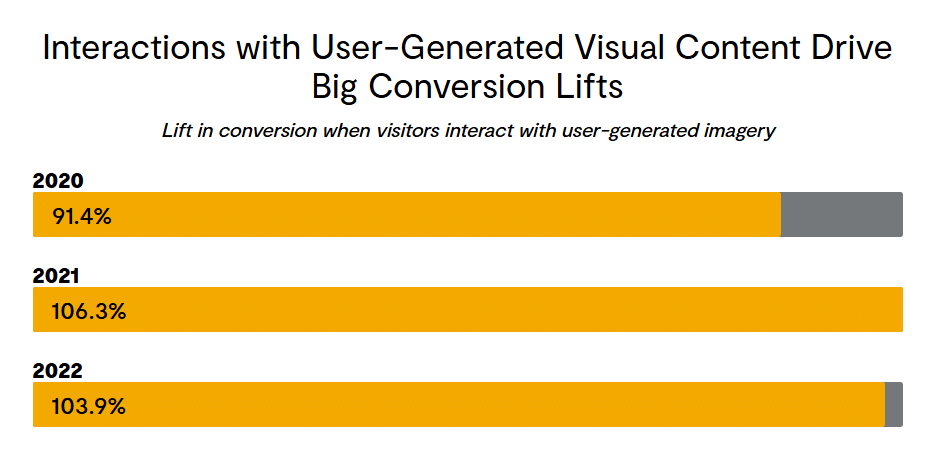
Even small lifts compound when your content brings the right visitors and answers the last-mile questions on the page.
But should you really scale eCommerce content?
Yes. And here’s why. When you scale content marketing for an eCommerce business, you’ll:
So building repeatable workflows to collect, moderate, and display content is becoming a non-negotiable today.
Now, if you think about it, building a content creation process can be intensive, and the work can stack up quickly. And Google prioritizes helpful, people-first pages so product search can surface price, availability, and ratings as rich results.
That means an ad-hoc output won’t suffice. You’ll need a system that handles repeatable briefs, consistent schema, and QA.
And let’s see how to scale that system without letting your team burn out.
In this section, we’ll walk you through a seven-step system to grow content velocity without wrecking quality or burning out your team.
Scaling content without knowing who you’re writing for is like running paid ads without targeting. You’ll burn through effort fast and still miss the mark.
E-commerce growth requires you to be clear about what motivates each buyer type, what blocks them, and what tone gets them to act. A repeat customer doesn’t need a 1,000-word explainer on materials, but a first-time visitor might.
When you create buyer personas, you can tailor content across every touchpoint. It could be the blog, the PDPs, or the post-purchase email.
Use real data. You can pull them from Google Analytics, search intent reports, and CRM insights to define segments. For instance, a buyer exploring Printify’s custom embroidery options would want to see texture shots, turnaround times, and use cases. A deal hunter, on the other hand, is comparing bundles or waiting for coupon alerts.
Using all that insight, you’ll know where to invest your next 50 articles or product updates.
When multiple writers, freelancers, and editors touch your copy, tone can drift quickly. That’s why every eCommerce content team needs a style guide that does more than police commas.
A good one defines the tone, formatting, product naming, punctuation, and how you write specs or size charts, everything. Add rules for product copy, blog posts, and PDPs so your writers/editors aren’t confused whether it’s “free shipping” or “Free Shipping.”
Pair that with a content brief template for every new piece with keywords, audience, product focus, and intent. And make sure the brief explains your content objectives, target audience, and how it fits your broader eCommerce goals.
When you document this well, your teams will save multiple rounds of editing. You can even store examples of approved copy or metadata notes for quick reference.
Add a TL;DR in the template for the elaborate sections of your style guide. Here’s how Mailchimp’s content style guide looks, for example.
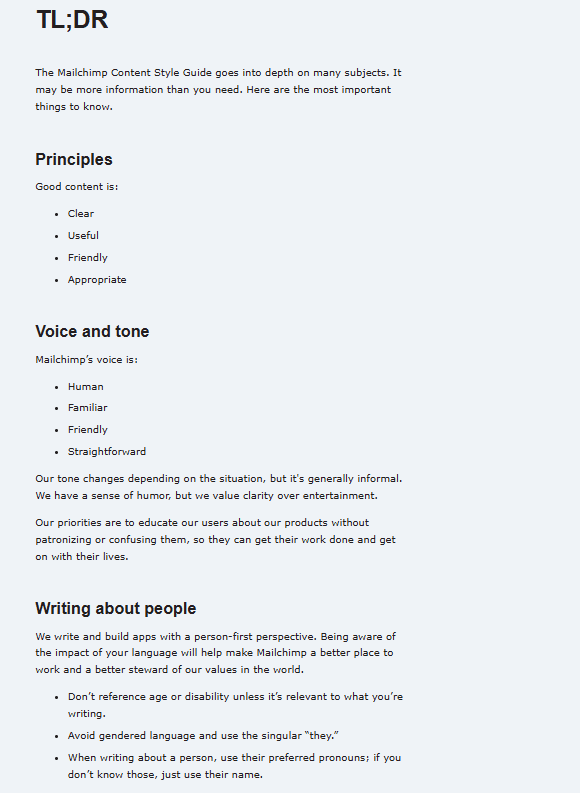
With all these in place, your writers will ship faster, editors will have less to fix, and you’ll publish content that sounds like one brand, no matter who wrote it.
A good editorial calendar keeps everything visible: what’s in progress, what’s approved, and what’s about to go live. In eCommerce, where timing around launches and seasonality can make or break revenue, you can’t argue against that visibility.
Build anticipation before key dates and ride the demand curve. For example, if you know Black Friday, Mother’s Day, or a new collection launch months ahead, your content plan should match those buying windows already.
Then, assign ownership to all the tasks. It could be the draft, image review, SEO checklists, or uploading.
Try tools like Notion, Asana, or ClickUp. They help you automate reminders and track those assignments. For example, here’s what a content calendar looks like on ClickUp.
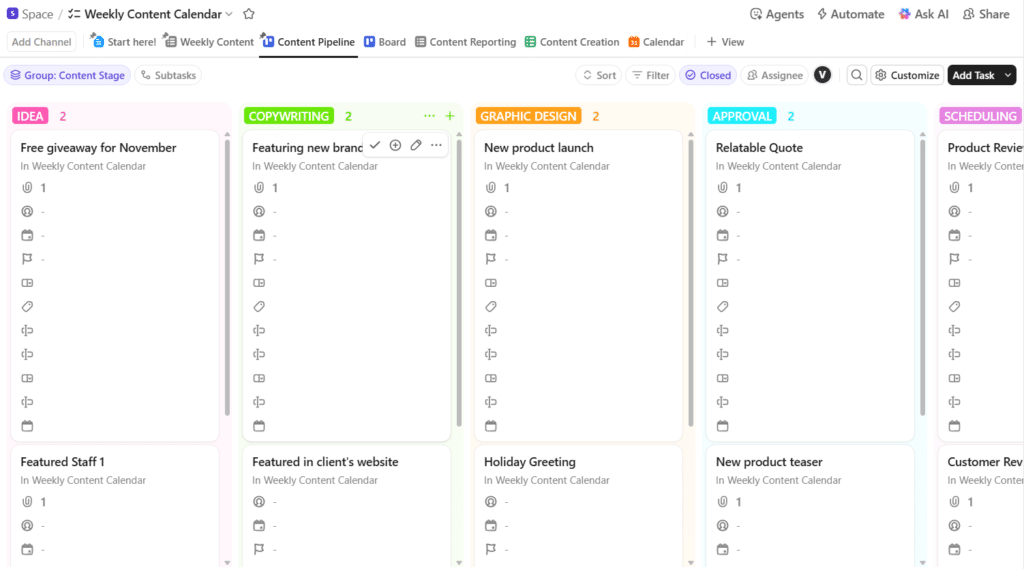
Screenshot provided by the author
If you’ve been publishing for a while, you already have a lot of material that can be reused instead of rewritten.
First, review your analytics to find high-performing posts or guides that drove traffic or conversions. Now ask: can this be updated, localized, or reshaped for another format?
For example, a “Top Trends of 2023” post could become a 2025 refresh. A long how-to can turn into short Instagram clips or a carousel.
For an eCommerce platform, this trick saves serious time. Let’s say you manage content for a branded merchandise line using platforms like Printful. One “how to price your prints” article could easily become a short TikTok series, a downloadable guide, or even a landing page for new creators learning to sell art online.
Each format reaches a different buyer, but the content’s message stays the same.
And just think about all the time you’d save.
Old content might still get clicks, but that doesn’t mean it’s still helping you sell. If a guide still says “Top Trends of 2022,” readers bounce before the first scroll, and Google notices it too. If you don’t update regularly, even your best posts start losing clicks.
Set a reminder in your content calendar for audits. Tools like Google Search Console and Ahrefs can show which pages are slipping in clicks or ranking. That’s your cue to refresh.
Add new stats, replace dead links, and update visuals to match your current branding. In eCommerce, that could also mean adding new product photos, updating SEO terms, or swapping in current reviews.
AI tools can streamline your eCommerce content workflow. But remember, they can’t understand your audience’s intent or your brand’s voice. The creative call, the emotion, the storytelling, all that still has to come from you.
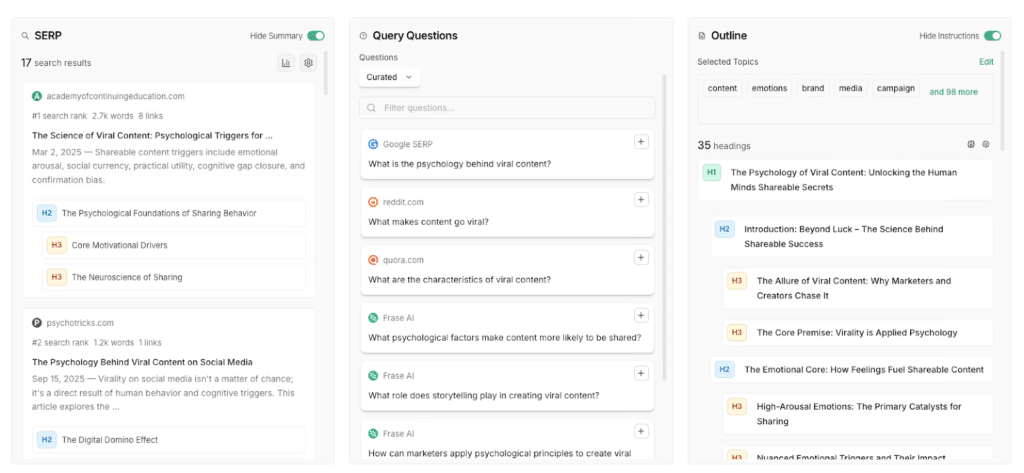
Use tools like ChatGPT, Claude, or Gemini to brainstorm ideas, outline your posts, or summarize product research. Then you’ll hand the draft to your writers to add your brand voice, examples, and first-hand experience.
For example, here’s how Frase can give you a quick start without burning hours on research or formatting.
You could be churning out hundreds of blogs, social media posts, and more for your eCommerce content marketing. But if they don’t bring your results or sales, the scaling becomes pointless.
Content marketing metrics like conversion rate, revenue per visitor, and assisted conversions (content that helped a sale later) show you business impact. On the other hand, supporting metrics like click-through rate and bounce rates tell you if people actually find your content useful.
Use Google Search Console, Analytics, and your CMS to see where traffic brings revenue.
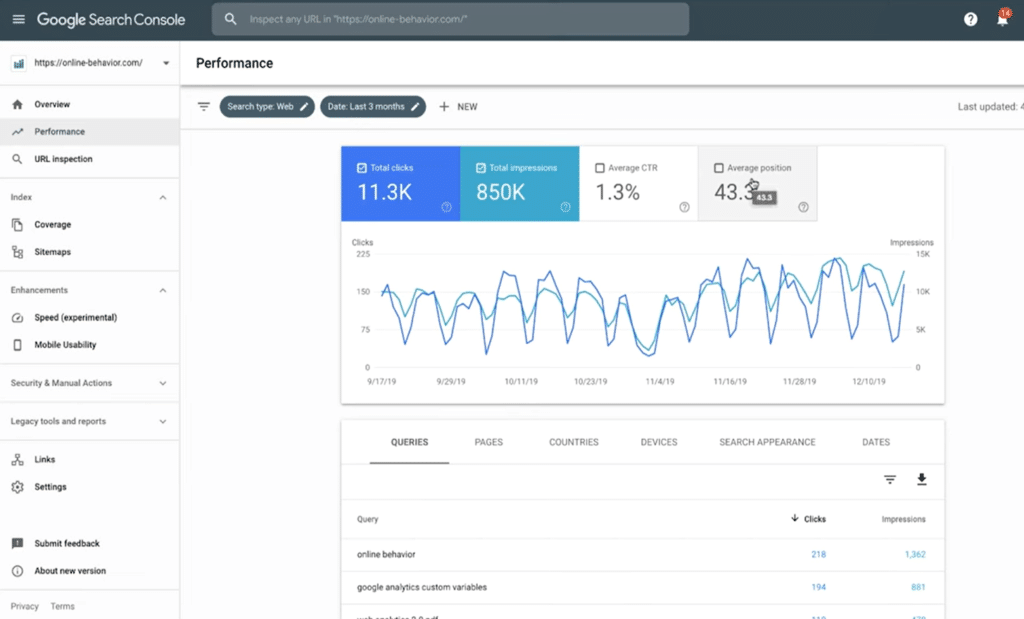
Track how long your team takes to publish, how often content gets refreshed, and which formats drive the most sales or backlinks. That tells you if your process is scaling cleanly.
Every system you set up today, whether your briefs, calendars, templates, or review loops, sets the rhythm for a structured eCommerce content system.
If you’ve made it this far, you already have the blueprint of that system.
So before you plan your next batch of product pages or blog posts, take a step back. Work on your system first. The rest, including the scale, visibility, and traffic, will follow naturally.
That’s how teams grow without burning out.