


Content marketing is a cash cow when you know how to do it right.
But producing and sharing content consistently can feel overwhelming. 😅
Teams spend hours on content creation. Social media posts, email campaigns, blog posts, and other content assets can take hours to produce, leaving little time for strategy and client nurturing.
Thankfully, content automation is officially possible with content automation tools.
The question is, how do you strike the right balance between human input and automated workflows? How do you publish authoritative content at scale without losing your brand voice or compromising your brand values?
There’s an art to this, and I’m going to break it down for you below. 👇
In this guide, I’m covering what content automation is, why it matters, and how you can use it to scale your business in five steps.
Content automation involves using AI-powered tools and cloud-based apps for content production and distribution. You can also use automation tools to plan, stage, or publish your content. Or for research or SEO planning.
It doesn’t replace content strategy or quality content writing. But it can help you manage repetitive tasks, so you can produce more content.
For instance, you don’t want to rely on AI to fully write your blog posts.
Instead, use it to automatically generate the right semantic keywords for your blog and plan your outline. You can also use it to conduct research or to fill in basic blog post sections, like definition sections. Or benefits lists.
This frees you up to focus on sections you can write alone (using your personal experience or insights as a subject-matter expert).
These capabilities are powered by continuous advancements in AI ML development services, which help automation tools understand search intent, semantic relevance, and content structure more accurately.
Some more helpful content automation examples include:
You’re likely severely underestimating how much content you need to create an authoritative online presence.
SEO dominance takes strategy and time to build up. But it also requires quality content at scale. (Heavy on the “quality” part, but also just as heavy on the quantity part.)
For Google to view you as an industry expert, you need a library of topical content.
This is how you build what us content marketers call, “topical authority.”
And it’s a biggie.
Topic clusters built with expertly written content that’s tailored to your audience show the big wigs at Google that you know your ish. (They’re more likely to rank your pages higher if they load fast, match search intent, and align with E-E-A-T principles.)
E-E-A-T stands for Experience, Expertise, Authoritativeness, and Trustworthiness. Basically, it’s Google’s way of saying, “Prove you know your stuff and that people can trust you.”
This also helps you attract more quality backlinks, which is a major authority signal. (When Google sees that, it rewards your site with a higher domain authority (DA) score. The higher your score, the more competitive your site becomes, and your rankings can skyrocket.)
PS: Check out how our CEO, Jeremy Moser, uses Writesonic’s SEO AI Agent to run a full E-E-A-T audit in seconds. 👇
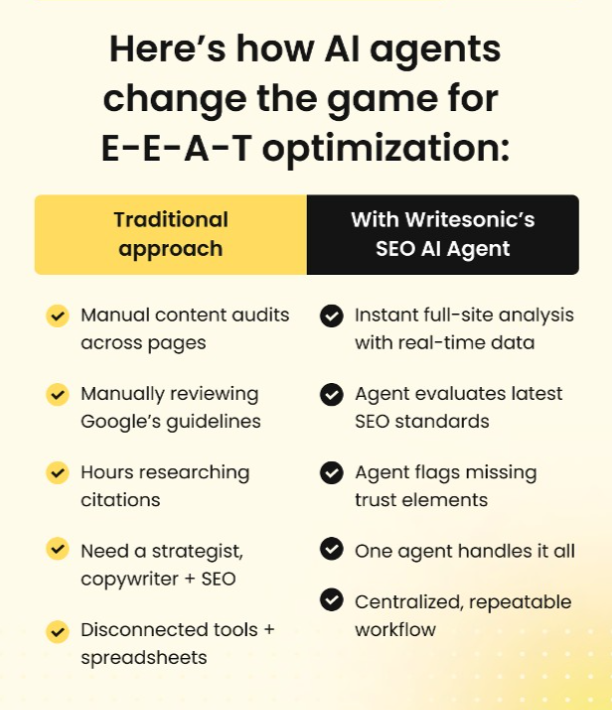
Content automation tools help you plan and distribute your E-E-A-T-friendly content, giving you a better chance to compete in the SERPs.
Imagine thousands of aligned leads and customers heading to your site every month. And picture that number increasing over time.
Are you seeing the dollar signs? I sure am.
Of course, then you have to make sure you follow through on all of your other promises — like delivering excellent products and services. But I’ll leave that part up to you. 😆
TL;DR: Teams can achieve enterprise-level content output with content automation practices in place. And this means more chances to increase your monthly recurring revenue.
For example, our sister company, uSERP, helped Nav outrank NerdWallet and claim the top spot for “business credit cards.” This drove over $140,000 per month in revenue within just a few months. 💰💰💰
See what I mean?
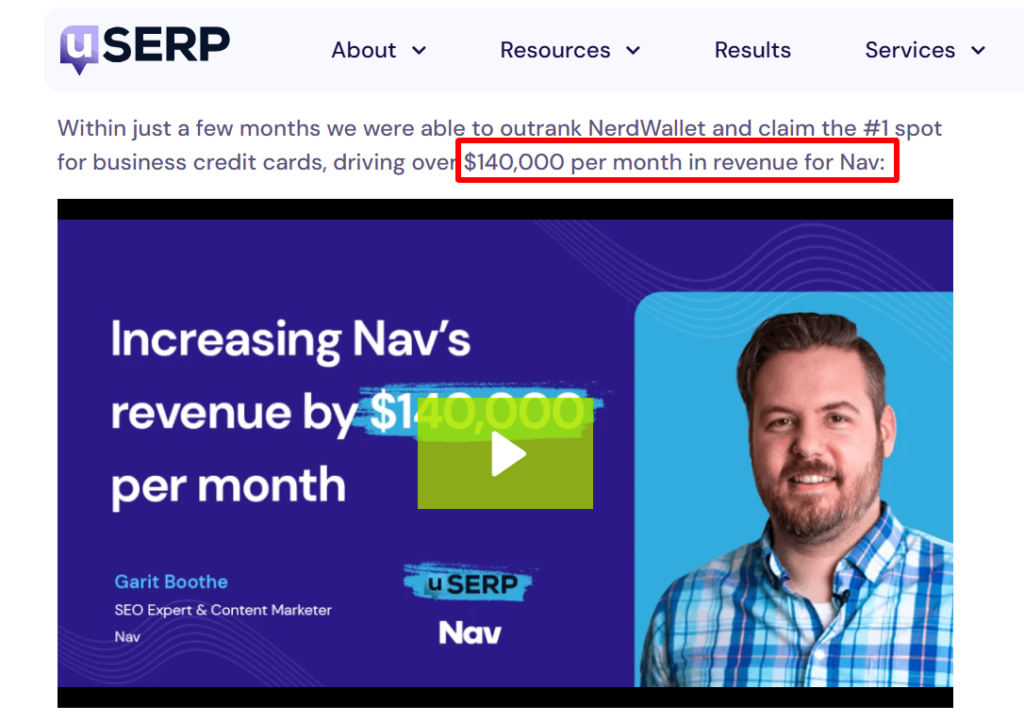
uSERP used content automation tools to spot backlink and keyword gaps, and then built a content roadmap to deliver consistent results.
Here are some of the content automation tools we used to help with this:
I think you’re on board with why content automation is a good thing at this point, but here are some more benefits just in case:
Scale without limits
Small teams can produce the same volume of content as large departments.
Keep your brand consistent
Automation enforces your brand style, voice, and posting schedules, reducing mistakes and building audience trust. And trust matters. Edelman’s 2023 report found that 71% of consumers today say trusting a brand is essential before they buy.
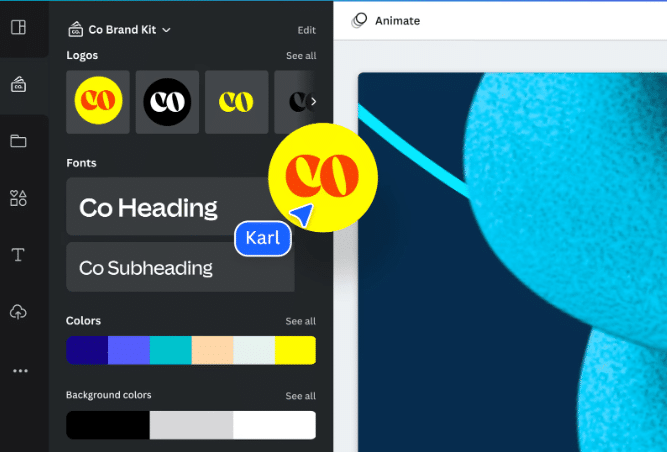
PS: Canva has an awesome brand kit you can use to automatically brand your infographics and visuals in your colors and fonts!
Move faster
Campaigns and launch announcements hit the market quickly, giving you a competitive edge.
Save time and money
Repetitive tasks get handled automatically, freeing your team for strategy and high-value work.
Optimize with data
Track performance and test ideas to improve results and ROI.
Amplify across channels
Repurpose a single piece of content automatically across multiple platforms to expand reach with minimal effort.
Stay ahead of competitors
Automatic content reports help you make sure you’re not falling behind in content frequency, engagement, and lead generation.
Here’s how you can mirror after our SEO team and successful clients to put out more quality content at scale:
Map every content-related task your team executes.
List everything from social media posts and blog drafts to email marketing sequences, product descriptions, and video scripts. Track the time each task consumes and the results it produces.
For example, a weekly newsletter might take your team two hours to draft, review, and send. Yet drive only modest engagement.
An audit like this highlights tasks that drain resources and identifies prime candidates for automation. Document the process flow, note bottlenecks, and identify manual handoffs. The clearer your audit, the easier it is to set up automation that speeds up production without losing focus.
Define exactly what you want your content to achieve. Are you aiming for lead generation, driving brand awareness, or increasing retention? Or are you aiming to create content that keeps your audience engaged?
Each goal dictates what content tasks to automate.
For instance, if lead generation is the focus, automate content that attracts and captures prospects — like gated eBooks, email drip campaigns, and LinkedIn posts linking to webinars.
Pick tools that fit smoothly into your workflow.
For instance …
AI writing tools(ChatGPT, Jasper) can help you plan outlines and generate rough drafts or social snippets. Great for pulling FAQs, too.
If you’re looking to optimize your AI writing skills, consider taking a prompt engineering course free to understand how to structure your prompts for maximum output.
Scheduling tools (Planable and Omnisend) let you post content across channels at optimal times. Planable is great for social media scheduling. And Omnisend can run automated A/B tests for emails, sending the top-performing version to the right segments. Omnisend is also a solid option for lead magnet pop-ups and email marketing strategy planning.

Workflow tools (monday.com or ClickUp) or even lightweight internal tools your team already uses to help keep deadlines, approvals, and tasks visible for the team.
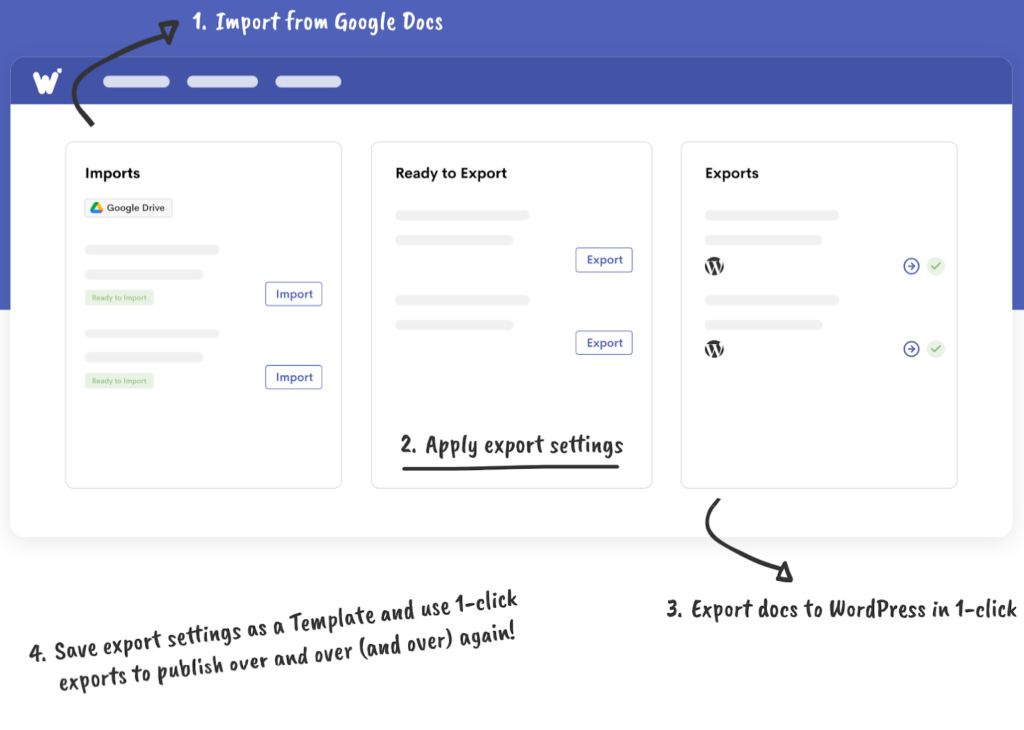
Auto-publishing blogging tools (Wordable) to stage and publish articles directly from Google Docs to WordPress.
Automated plugins for WordPress, like WSDesk, can also be helpful for support tickets. You may opt for WSChat for live chat to keep customer interactions organized and responsive. An AI chatbot may respond instantly in case of non-complex issues. (These are genius insights you can use to create content that answers real needs and drives engagement.)
If you need a tool for building a simple blog or a complex website, try Common Ninja. It automates layouts, embeds, forms, and interactive widgets so your team can focus on content instead of coding.
Scroll back up for a reminder of some of the other automated tools our teams use.
Set up ready-to-go templates and style guides for blogs, emails, social posts, and newsletters. (So your team spends less time guessing and more time creating on-brand content.)
Include your brand voice, tone, formatting rules, and approval steps — everything needed to keep content consistent.
Use AI prompts and automation to fill in repetitive sections like definitions or meta descriptions.
Set up automated content workflows to assign tasks, manage edits, and track approvals. (ClickUp, Asana, monday.com are great content planning tools to check out.)

Then, choose a distribution tool to automate posting and recycling. Evergreen blogs can be reshared on LinkedIn, X, or email with updated captions. (Try StoryChief or Planable.)
Remember to integrate with analytics and a CRM so you can track engagement, backlinks, conversions, keywords, and lead behavior.
*Pro-Tip: Conduct A/B tests to experiment with headlines, content formats, visuals, and posting times. Use behavioral intelligence tools to see which content assets are resonating most and double-down on those tactics.
Make sure to continuously refine your workflows and update your assets so they stay fresh and accurate.
Content automation helps your business produce more quality content at scale if you strike the right balance between human and bot input.
Be sure to: Audit your workflows, set clear goals, and pick the right tools to keep every piece of content aligned with your sales strategy.
Then, automate recurring posts so your team can focus on creative work that moves the business forward.
Psst … Need a blog post publishing tool? You have to try Wordable. It lets you publish your Google Doc directly to your favorite CMS while keeping the same formatting.
SIGN UP NOW.
What is content automation?
Content automation uses software and AI tools to streamline the creation, distribution, and management of content. This reduces manual effort and scales your content marketing efforts.
How can content automation help SEO?
Content automation helps produce consistent, keyword-optimized content at scale. Use it to schedule posts efficiently and repurpose high-performing content to improve search visibility.
Can content automation replace human content creators?
No. Humans are still needed for strategy, tone, quality control, and high-stakes or creative content.
Reserve automation for repetitive, scalable tasks.
How do I maintain quality with content automation?
Use templates, brand style guides, and human review for strategic or high-impact content.
(And monitor engagement metrics for feedback.)
Can automation hurt SEO if misused?
Yes. Low-quality, repetitive, or keyword-stuffed content can be penalized. Always prioritize value and relevance.
Remember E-E-A-T!