


Planning campaigns that focus on getting more leads or conversions is exhausting.
If you’re prepping an ad launch, you’ll need landing pages, ad creatives, and email nurturing sequences. That’s a ton of marketing assets that require compelling sales copy and visuals.
The same goes for email campaigns and website pages. To make those channels count, you can’t publish stale content.
Otherwise, you’re wasting your marketing budget and company time.
Thankfully, A/B testing lets you iterate with data based on real user behavior.
If you want an iterative process that delivers better results without wasting time or budget, keep reading. In this guide, I’ll tell you everything I know about A/B testing (or split testing), so you can get better results and make smarter marketing decisions.
Let’s get started.
Highlights
A/B testing, or split testing, is when you run two versions of a campaign to see which performs better in terms of click-through rates, leads, and conversions.
Usually, this involves testing a single detail at a time.
For example, you could A/B test the color of the call-to-action (CTA) button on a product page. Or the background color on a landing page. Or you could A/B test a hero image on your website’s homepage. Or a main image on an ad campaign.
Real users see and interact with these campaigns, so you get valuable insights when they end.
The main reason split testing matters is that it helps you learn which marketing campaign details perform best.
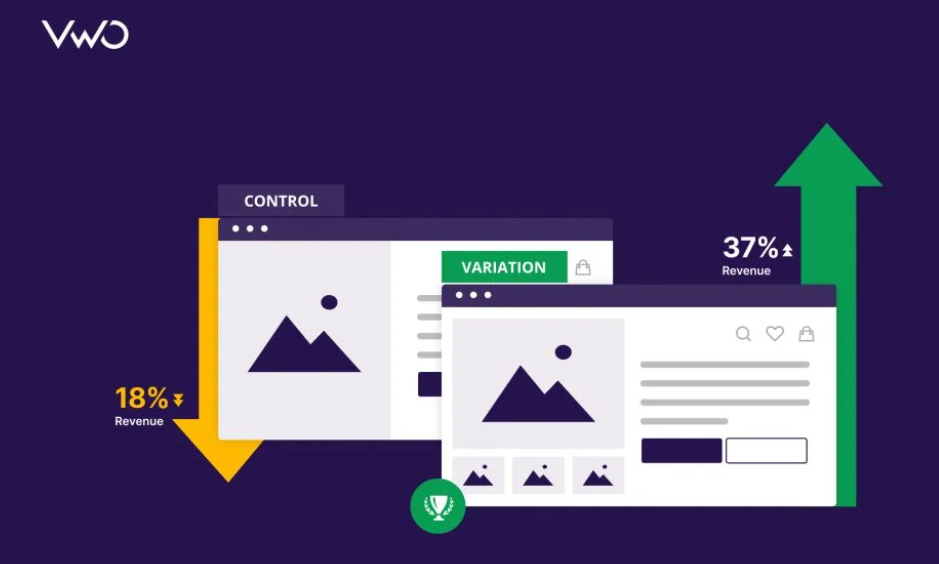
Piggybacking on my example from earlier, you might discover that your blue button CTAs get much higher conversion rates than your red ones. If you had run with the red buttons without testing, you’d have left serious money on the table.
And what an easy change to make for better conversions!
Businesses are increasingly using A/B testing tools to improve website performance and engage users. (According to the 2025 Global AB Testing Software Market Report.)
Here are some of the top benefits you can look forward to when you run consistent A/B tests:
When you A/B test something, you have a control version or “Version A.” And a variant, or “Version B,” that you test against it to see which performs better.
Take email marketing campaigns.
Let’s imagine you’re testing email subject lines. (Remember, you’ll only change one detail at a time to identify what drives differences in performance.)
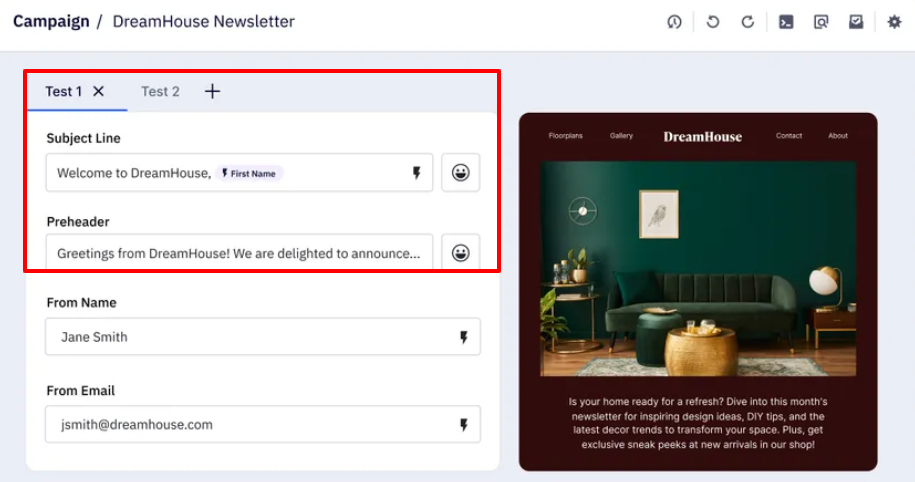
For example, you might learn that simply adding a plane emoji to your travel deal subject lines increases opens and conversions. Or that switching a word like “Save” to “Grab” in your subject line increases engagement.
This is where you can easily get lost in the weeds when planning.
There are many variations you can test. Depending on your business goals, you may need to put all your feelers out there.
Here are five subject-line split testing examples for email marketing campaigns to show you what I mean:
1. Personalization
➜ Tests adding the recipient’s name for impact.
2. Urgency
➜ Tests whether urgency drives more open rates.
3. Emoji usage
➜ Tests whether an emoji increases engagement.
4. Tone / word choice
➜ Tests whether “Learn” vs. “Discover” affects opens.
5. Curiosity / intrigue
➜ Tests whether phrasing that sparks curiosity or reorders information affects open rates.
Some A/B testing software can automate the split-testing process, streamlining your workflows.
It’ll send Version A to a pilot group and Version B to another. Then, it’ll track clicks, conversions, and other key metrics to identify the winning version. From there, it’ll automatically push the winning version to your full audience. So you don’t have to switch anything manually.
Here’s a setting in ActiveCampaign, an email newsletter tool, that allows you to do this:
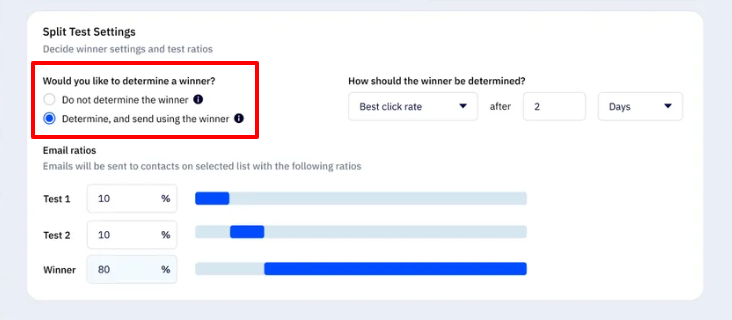
You can also set up follow-up tests to run automatically, so you can continuously optimize without extra effort.
Follow-up tests can run automatically when your A/B testing software supports sequential or iterative testing. Here’s how it usually works:
Essentially, the automation comes from linking tests and defining clear success criteria — so the software can keep iterating without human intervention.
That said, not all A/B testing software is equally automated.
Some platforms only split traffic and track metrics, so you’d need to manually implement the winning version. The same goes for follow-up tests. You may need to analyze the results and set up the next test yourself.
You can also run split URL testing (or redirect testing) when you need to compare two entirely different web pages. Instead of just elements on a single page.
Here’s how it works:
When to use split URL testing:
Unlike traditional A/B testing, which changes details like buttons, headlines, or images on the same page, split URL testing compares entire pages. (Like landing pages or websites.)
With split URL testing, you could test:
For example, say you wanted to run a split URL test on a digital retail product development website.
You could send half of your visitors to a page highlighting “Technology That Works for Retailers.” With a dark mode background and a translucent ribbon that blends purple, magenta, and neon pink. 👇

And you could send the other half to a page that says “Technology infrastructure that scales with your retail business.” With a plain white background, black text, and green buttons. 👇
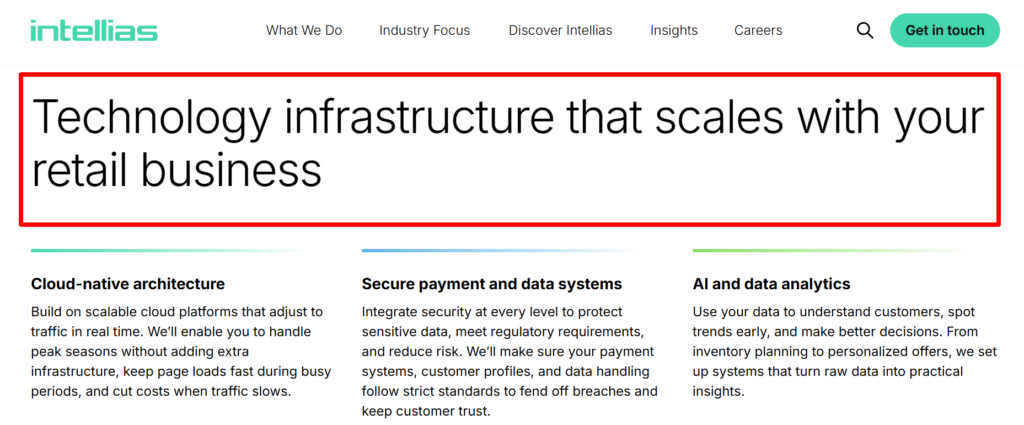
Tracking conversions, demo requests, and sign-ups would reveal which page resonates best with the target audience.
Many leading marketing automation platforms let you automate A/B tests. While others are either manual or require significant manual setup and analysis.
Here are some tools for each category:
*Keep in mind that automation features may depend on subscription tier and specific setup. Some automations (e.g., auto‑rollout of winners) may still require manual configuration.
Follow these tips when setting up your A/B tests:
Decide what metric matters most. (Clicks, conversions, sign-ups, or engagement.)
Remember, a proper A/B test only changes a single element per experiment. Whether it’s a button color, headline wording, or subject line emoji, isolate one change. So you’ll know exactly what drives the difference in performance.
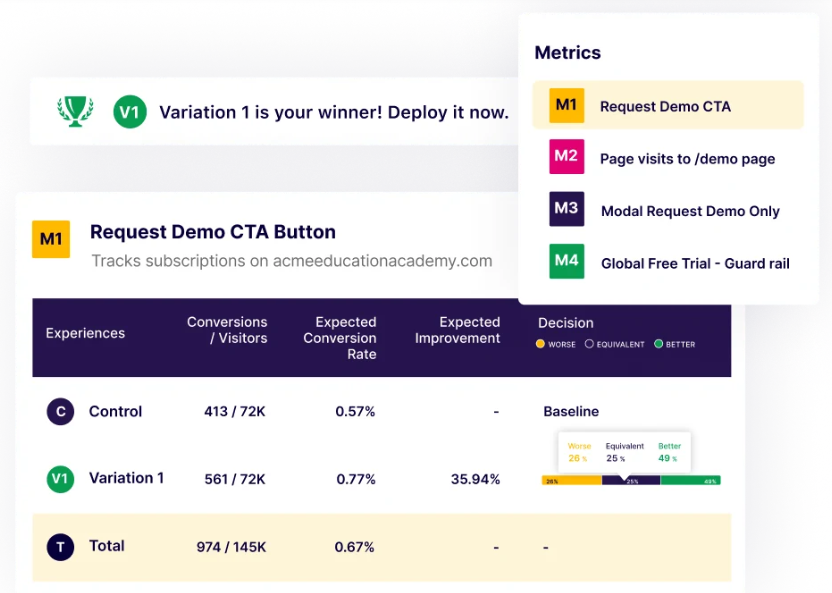
Split your audience evenly and randomly to reduce bias. You can also segment by demographics, device, or behavior to see which versions perform better for different groups. (For email campaigns, segmenting by past engagement can increase result accuracy.)
A/B tests need sufficient data to yield reliable results. Small sample sizes can mislead. Some tools calculate the minimum sample size based on expected conversion rates.
A good rule: Aim for at least 1,000–2,000 visitors or enough conversions to reach statistical significance.
Your gut may favor a blue button or a bold headline. But leave it up to real users to decide.
Use engaging visuals, like screenshots and mockups, to make tests clearer for your team. For example, show Version A and Version B side by side in your internal report. Show landing page images, email previews, or ad creatives to make findings actionable.
Keep a simple spreadsheet or tool log for each test. Note any changed details, traffic splits, results, and insights. This prevents you from repeating tests and helps you plan follow-ups more efficiently.
After one winner emerges, run a follow-up test on the next element. Over time, small gains compound into major improvements in conversions and user experience.
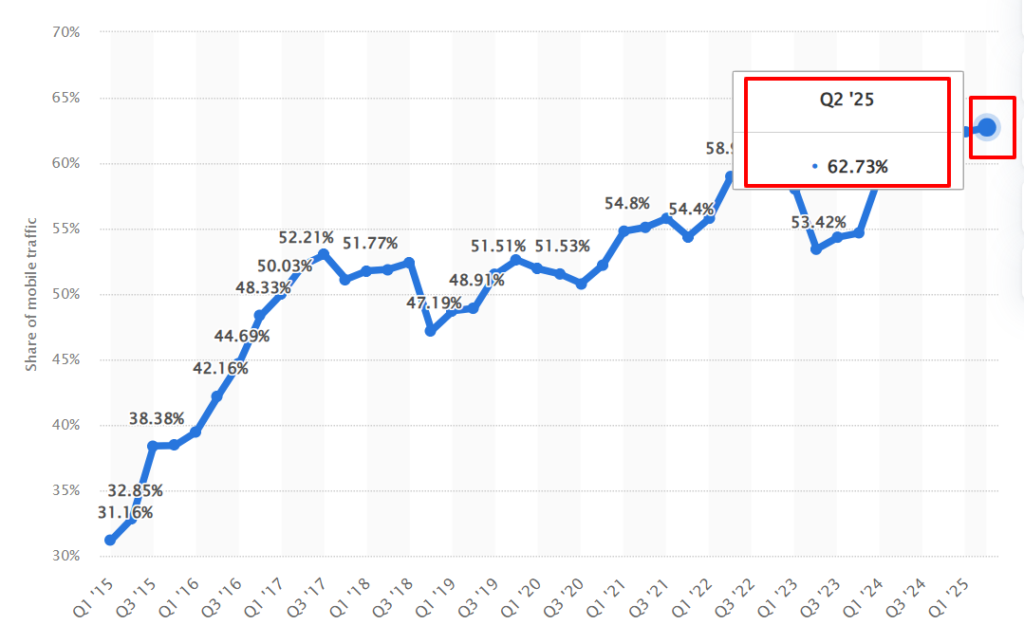
Make sure to test designs and CTAs on mobile as well to avoid skewed results. In Q2 2025, mobile devices accounted for nearly 63% of global website traffic, according to Statista.
Use platforms that let you automate winner selection and rollout. This saves you time and reduces human error. (Especially for email sequences or high-traffic landing pages.)
Winning marketing campaigns require careful planning, resources, and creativity. And that takes a team that knows how to use iterative processes and user data to make better decisions.
That’s why increasingly more businesses are turning to A/B tests.
If you’re ready to run your first A/B test, bookmark this article and share it with your marketing team. Feel free to print off the checklist from above, too, so you can check off each box as you go.
Be sure to also check out any videos or literature from the A/B testing platform you choose. They’ll explain how to use that specific tool to set up your first A/B tests. (Remember that some have features that can automatically choose the campaign winner and initiate follow-up tests, too.)
Look at the fine print when reading every tool’s plan options so you can pick the plan with the features you need.
Also, if you’re looking for a faster way to publish your blog posts to HubSpot, Medium, or WordPress, you HAVE to try Wordable. It’ll stage and publish your pieces in mere seconds!
To your immense success!