


You don’t need to know how to code to be a great marketer. But understanding the language of code, the development process, could make you a better one.
I’m not talking about becoming a junior developer or learning the nuances of Python. I’m talking about empathy. I’m talking about agility and better cross-team communication.
This article is a strategic guide to help you, the marketer or SEO, bridge the gap with your dev team. You’ll learn just enough about the mobile apps development process to set realistic timelines, translate technical features into powerful customer benefits, and—most importantly—build the collaborative empathy that turns a contentious “dev ticket” into a shared, successful win.
Highlights
Let’s get right to it. Why should you, a marketer focused on content, SEO, and campaigns, spend even a minute learning about something as technical as mobile apps development?
The answer is simple: it gives you a strategic advantage.
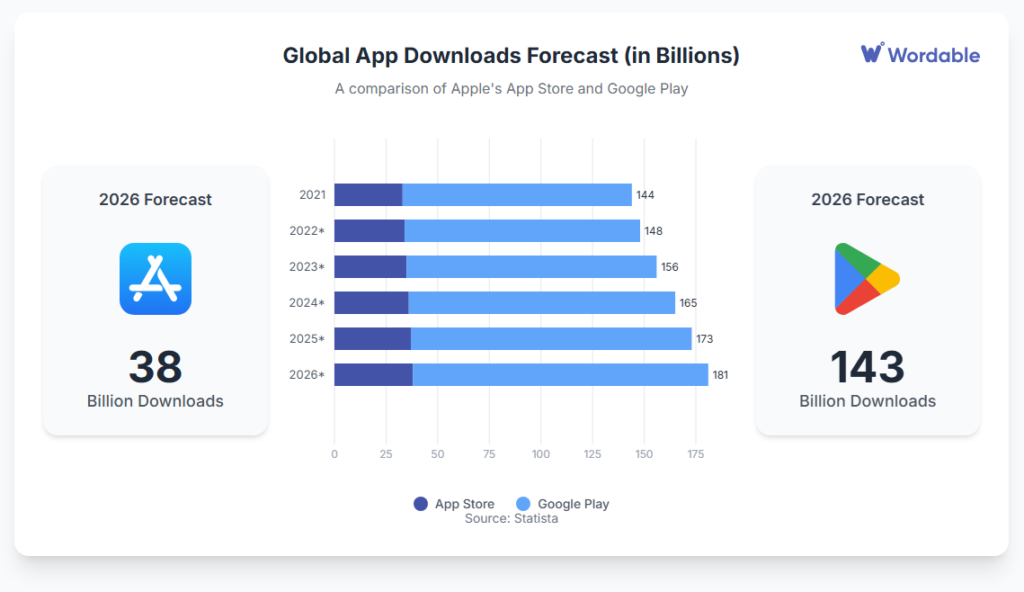
It’s the same reason a good food critic understands the basics of cooking. You don’t need to be the chef, but you need to know why a dish works. With Statista forecasting 181 billion mobile app downloads by 2026 (about 22 apps for every person on Earth), understanding the “recipe” is more important than ever.
(Image provided by author)
Here’s how this knowledge makes you a more effective, agile, and indispensable marketer.
The biggest project killer isn’t a bad idea; it’s miscommunication.
Developers and marketers speak different languages. A marketer sees a “simple tweak,” while a developer sees a 100-hour job that touches three databases and a critical REST API.
Having a little technical empathy helps you speak the same language. You’ll understand why a request is complex, which helps you design better, more cost-effective products and build massive respect with your tech team.
We’ve all felt the post-launch pain. There are always a hundred little things that you might need to change:
Instead of filing a new ticket and waiting two weeks, understanding the basics empowers you to provide “prescriptive guidance.” You’ll learn to stop sending vague tickets like “improve our SEO” and start sending actionable ones like “please update the H1 and meta description on these five pages,” or, in some cases, you might even be able to make the change yourself.
This is about your own project management sanity.
Knowing the difference between building native apps (a long, expensive process) and hybrid apps (a faster, more iterative one) helps you set realistic timelines.
You won’t be the marketer who promises a major feature by next week that your dev team knows will take an entire quarter to build. This builds trust and makes you the go-to person for realistic, achievable, and successful project plans.
The history of mobile apps isn’t just a tech timeline; it’s a series of crucial marketing lessons that define our jobs today.
Remember the early 2000s? We had personal digital assistants (PDAs) like the Palm Pilot and early mobile phones with WAP browsers. These were the first attempts at web-based application programs on the go.
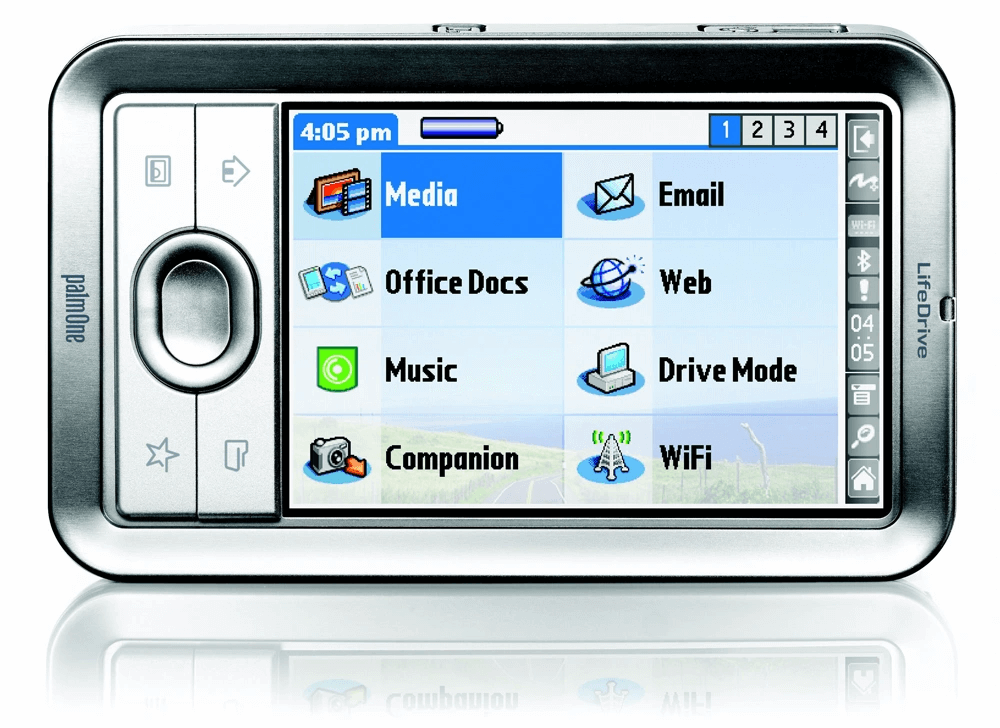
They were, in a word, terrible.
You had to click a button 10 times to type a single letter. The lesson from this era was powerful and simple: technology doesn’t win. A great user experience (UX) does.
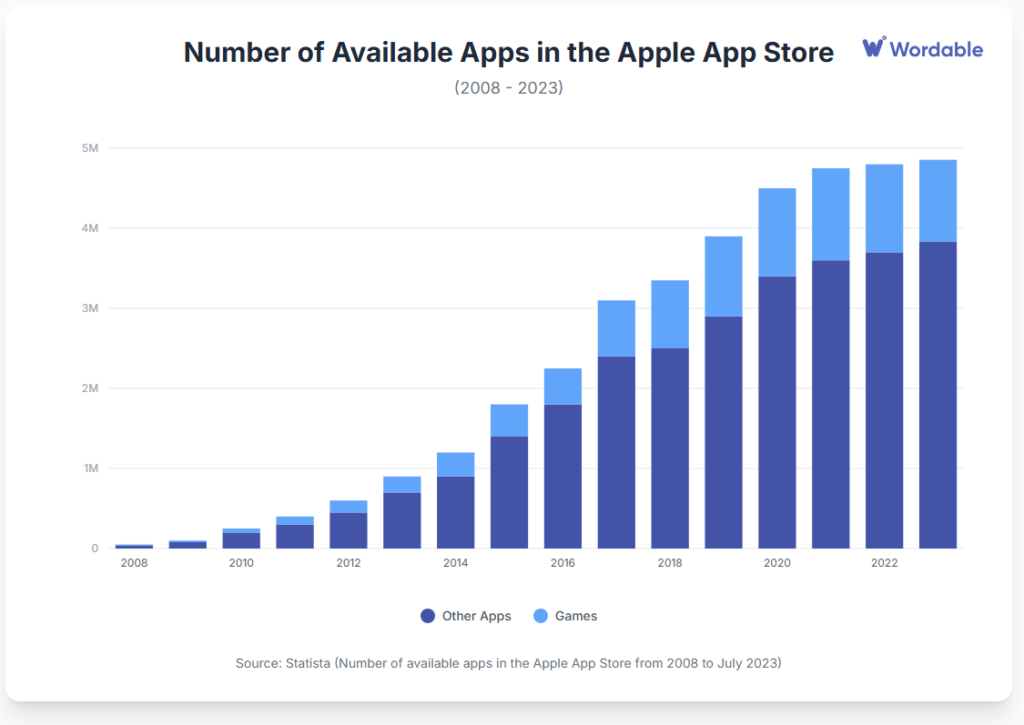
Everything changed in July 2008 when Apple launched the iPhone App Store. It started with just 500 apps and has since ballooned to nearly five million by 2023 (source: Statista).
(Image provided by author)
A few months later, the Google Play Store (then called the Android Market) arrived and grew to offer millions of apps.
This wasn’t just a new feature; it was the birth of an entire economy. Revenue from the global App Store ecosystem reached $1.295 trillion in 2024, $150 billion of which came from in-app advertising (source: Apple).
Once the floodgates opened, we entered the Wild West. Suddenly, there were thousands of apps for everything. The problem shifted instantly from “Can we build it?” to “Can it be found?”
This problem gave rise to App Store Optimization (ASO) as a new marketing discipline, akin to SEO.
Imagine trying to launch new music download apps into a sea of established competitors. This era proved the ultimate marketing truth:
The best technology doesn’t win. The best-marketed technology wins.
This is why the partnership between developers and marketers isn’t just a nice-to-have—it’s the only way to survive.
So, how does mobile app development work?
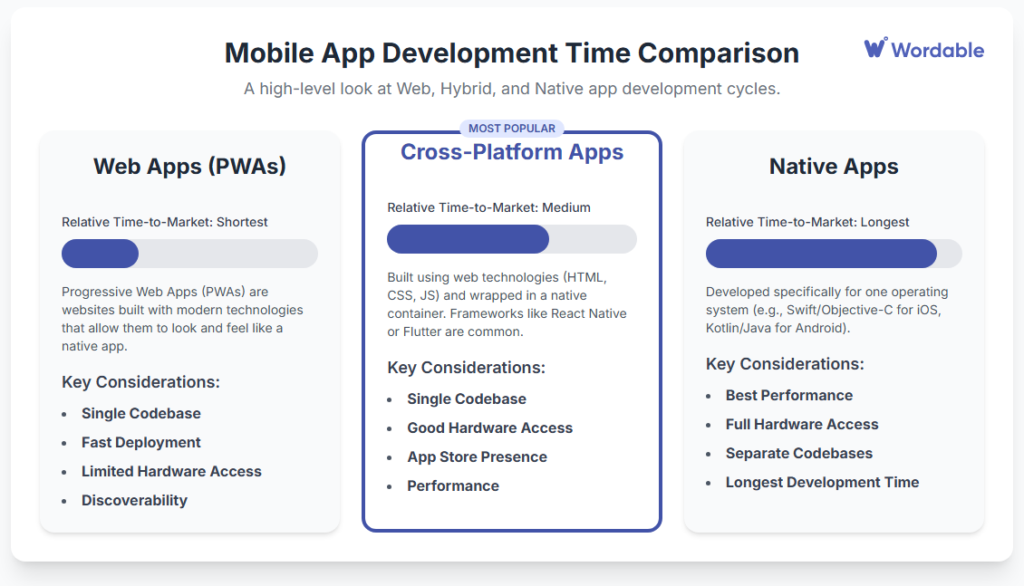
When your dev team discusses how to build the next project, they’re usually choosing between three main paths.
(Image provided by author)
It’s your job to understand the choice and know the marketing angle for each.
This is the “premium” option. A native app is built specifically for a single operating system—one for the iOS platform (using languages like Swift) and a completely separate one for Android (using languages like Kotlin).
They’re built using the official software development kit (SDK) from Apple or Google.
Native apps have direct access to the phone’s hardware (camera, GPS, etc.), offering the best possible performance and the most seamless mobile user interface. Companies that need unique features and full control over performance often invest in bespoke mobile app development services to build a native app around their exact business goals.
If you’re marketing a native app, you want to focus on performance features like:
This is the “efficiency” option. Cross-platform development lets your team write one set of code (a single codebase) and deploy it as native apps on both Apple and Android stores.
This is the modern efficiency driver that has taken over the smartphone market. You’ll hear two big names tossed around: React Native (from Meta) and Flutter (from Google, check it out at flutter.dev).
These frameworks include features like hot reload, which lets developers see changes they make to code in real time. For you, the marketer, this translates to a huge benefit:
The marketing angle here is: “Get the features you love, on any device, all at once.”
This path blurs the line between a web app and a mobile application.
Older hybrid apps are basically a website stuffed inside a “native shell” that you download from the app store. They’re faster to build but can feel clunky.
The real future is in Progressive Web Applications (PWAs). A PWA is a website built with modern technology that acts like an app. It can:
All without ever visiting an app store.
Though not yet the most popular path, it offers many benefits:
Devs also love it because it leverages your existing web tech stack and web development team.
Different paths obviously require different processes, but we can’t realistically cover them all here. Instead, we’ll focus on the current industry standard to give you an idea of how the mobile apps development process works and where you fit in as a marketer or SEO.
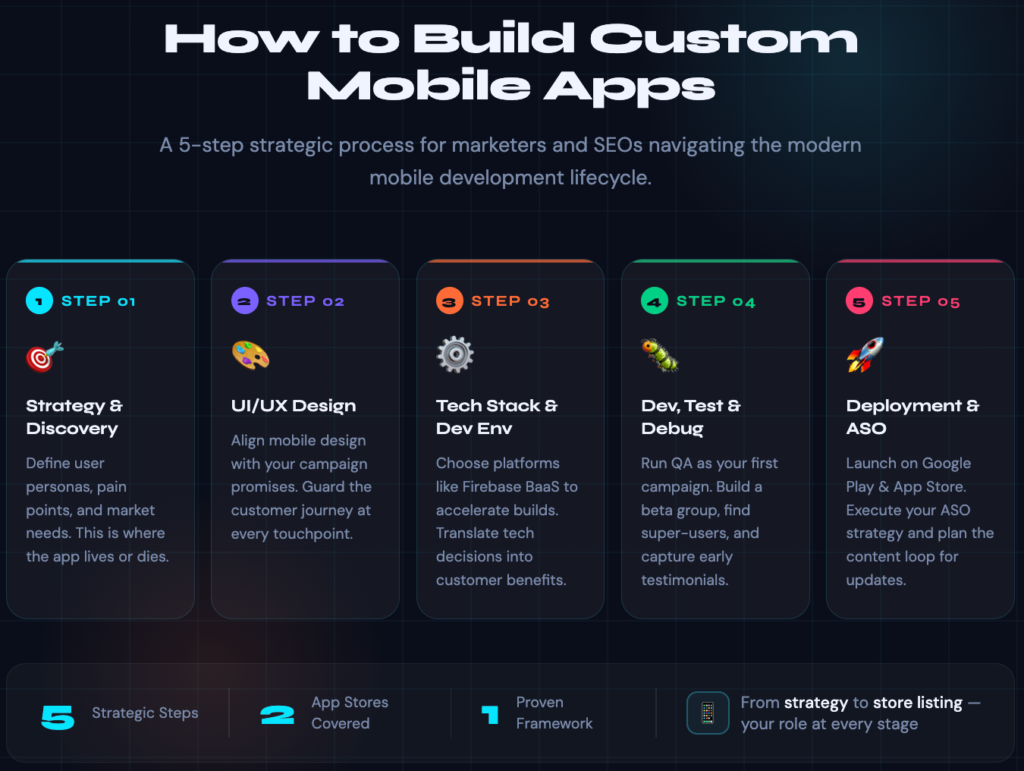
This phase is where the app (and your marketing) lives or dies. The dev team isn’t supposed to guess what the market wants. That’s your job. Just like you create buyer personas for your content marketing, you have to create user personas and describe their pain points.
This is where you bring your core expertise to define and plan what to build. If you don’t have a dev team yet, this is also when most companies bring in a SaaS application development company to scope the build with them.
You’re not the designer, but you are the guardian of the customer’s journey. Your role here is to ensure the mobile UI design and UX match the promises you’re making in your Google Ads and social media campaigns.
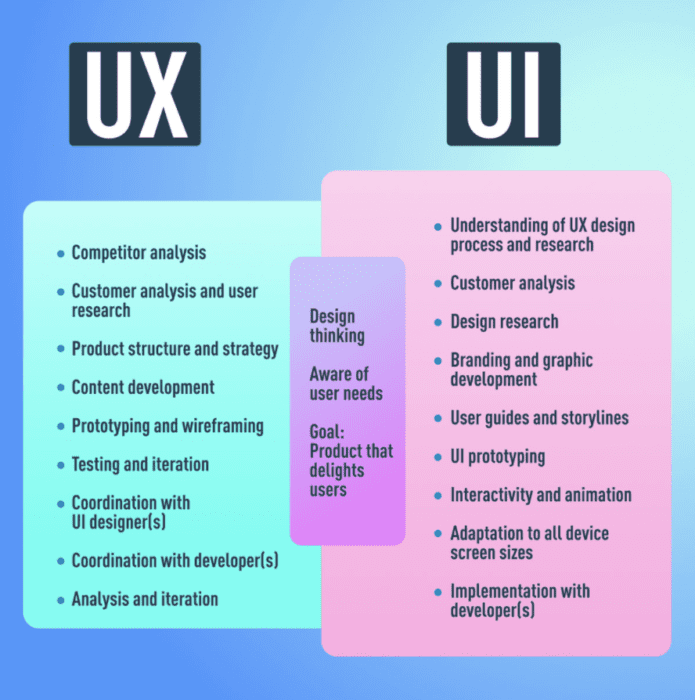
Ask the hard questions: “Is this user input form too long?” “Does this flow match the ‘easy-to-use’ angle we’re selling?” “Is this mobile user interface intuitive enough for a brand-new user?”
In this stage, some of the most critical decisions are made. The dev team will huddle to discuss the best approach and development environment to build the app with the functionality, UI, and UX you so carefully crafted.
They might mention using a development environment like Firebase as a Backend-as-a-Service (BaaS) platform. It’s critical that you understand enough of the conversation to translate it into a customer benefit. For example:
This stage is about execution. The dev team is now heads-down coding in their integrated development environments (IDEs) like Visual Studio.
But your job isn’t over.
The testing phase is basically your first marketing campaign. Use this QA phase to:
Let them feel the excitement of being an “insider” before you even launch. Beta testers will find bugs too, so give them a simple bug report template that asks for the steps to reproduce, what they expected, what happened, and a screenshot.
This is your home turf. The app is ready. Now you market it.
This step is all about executing the App Store Optimization (ASO) strategy you’ve been building. It’s about:
A good deployment strategy keeps working long after launch day. NuovoTeam PTT, a push-to-talk app built for field teams, does this well. It’s live on both the Google Play Store and the Apple App Store, and its store listings stay current with regular updates. That’s the ASO playbook in action: ship, update, and keep showing up.
So, after all this, do you actually need to learn to code?
The provocative answer is… maybe not. At least, not in the way you think. The future is getting weird, and it’s awesome for marketers.
The next frontier in mobile apps development is “vibe coding.”
This is the concept of using natural language to describe the app you want, and having an AI generate the code and application components for you.
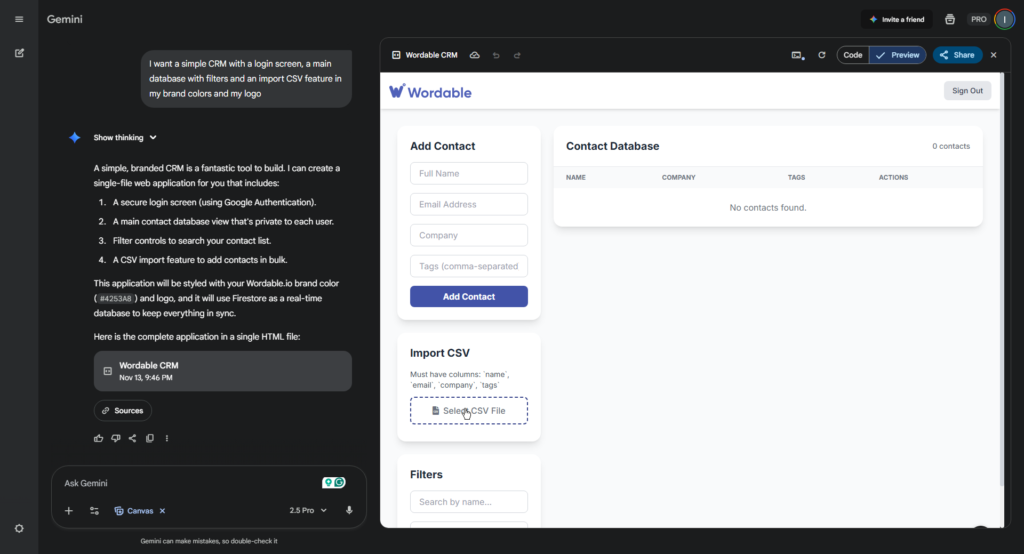
Think: “I want a simple CRM tool with a login screen, a main database with filters, and an import CSV feature in my brand colors and my logo,” and the AI builds the scaffolding.
Here’s what that exact prompt looks like on Gemini’s Canvas tool, which I frequently use for brainstorming and prototyping:
(Image created by author)
It took less than 60 seconds, and the app actually works to store client data. It makes it incredibly easy to create contact forms that feed into this CRM, add export features, add some level of AI functionality, and more. In the worst case, it lets you create an interactive mockup to show your vision for functionality and UX to the dev team.
The possibilities are endless!
Do you want to develop an app that creates digital marketing reports?
This is the ultimate “cut out the middleman” for prototyping.
There’s a long way to go from this prototype to a finished app. This won’t replace your dev team. Complex, scalable, secure mobile applications still require brilliant engineers.
But it will make you a 10x better translator.
Instead of trying to describe your idea in a 10-page Google Doc, you can now “vibe code” a simple prototype and show your team what you mean:
“I built this rough idea. Can we make this real?”
It’s the ultimate empathy-builder, empowering you to show, not just tell, and empowering your devs to build on your vision.
So, no, you don’t need to become a developer. You just need to learn enough to understand their processes and pain points and to communicate your requirements in their language while showing some much-appreciated empathy.
Your power isn’t in writing code. It’s in translation, empathy, and agility.
Speaking of empathy and agility, don’t call the tech person who’s building the company’s next million-dollar app to help you upload a blog post from Google Docs to WordPress or another CMS and optimize all the meta tags.
While you’re busy bridging the gap with developers, let Wordable.io handle the tedious content export. You can streamline your entire content workflow in one click—no more fixing formatting, re-uploading images, or fumbling with HTML. Get back to what matters: building the strategy that makes your app win.
Try Wordable for free and see how much time you can save.