


Most people think file management software is just a place to store files. That may work for tax records or old project folders. But content teams have a different problem. They create blog drafts, images, content briefs, and SEO feedback every day. Each file also passes through several people before it reaches the CMS.
Storing everything is easy. The hard part is making sure everyone uses the right file at the right time.
That’s why modern file management software should do more than store files. It should help teams work together and track versions. It should also handle approvals and support publishing, from the first draft to the final article.
In this guide, you’ll learn which features matter and how they help content work. You’ll also learn what to compare when you choose software for your team.
Highlights
Marketing and editorial teams don’t handle files the way most IT teams do. Their work changes every day. A single article can pass through different writers, editors, SEO specialists, and designers before it reaches readers.
That work creates a growing pile of drafts, images, briefs, and other assets. For example, one campaign might include several drafts, a featured image, social graphics, and design files. Without a clear system, it’s easy for people to open the wrong file or miss the latest update.
Content teams also work against deadlines. Often, their contributors are spread across many places. Everyone needs to see the same version and know what comes next.
So file management software for content teams should support teamwork, version control, and approvals. Storage alone can’t keep up with how content teams work.
Storage space used to be one of the first things businesses checked. For content teams, that’s no longer true. Cheap cloud storage gives companies plenty of room for documents, images, and other assets. The challenge starts after those files are uploaded.
Content teams work on the same files for days or even weeks. New versions appear after every review. Feedback ends up in different places. Duplicate files pile up because people aren’t sure which copy is current. For example, a writer may update one draft while an editor reviews an older one. The editor has no idea a newer version exists.
Poor organization creates even more confusion. Airtable’s 2024 Marketing Trends Report found that 69% of marketing leaders call their workflows somewhat efficient. Only 24% call them very efficient. Another 48% say their workflows are outdated or rely on ad hoc processes.
This suggests many teams still manage work in slow ways. That can delay approvals and make files harder to find.
When comparing file management software, don’t focus on storage limits alone. Look closely at how the platform handles version control, teamwork, and approvals. Also check how it moves content from draft to publication.
Version control is one of the most valuable parts of file management software. It protects content as it moves from the first draft to publication. Your content team can:
Here are the features to evaluate:
Good version control records every edit as it happens. Teams can open earlier drafts without saving a new copy after each change. This keeps projects clean and shows how content has grown.
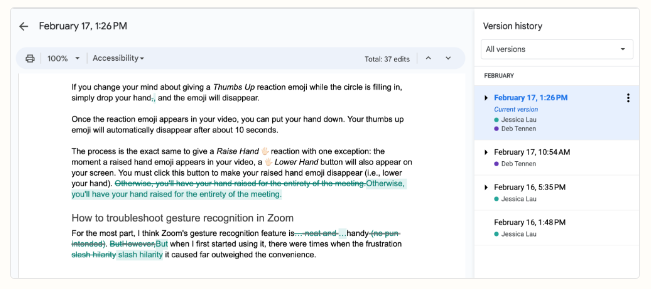
For example, a writer can compare today’s draft with last week’s. Then they can accept an editor’s suggestions. Nobody ends up with files named “Final,” “Final 2,” or “Final Approved.” Everyone works from one shared document with a full history.
Mistakes happen, even after a file is approved. Someone may delete content, overwrite approved copy, or publish the wrong draft. File recovery and rollback let teams restore an earlier version. They don’t have to rebuild lost work from memory.
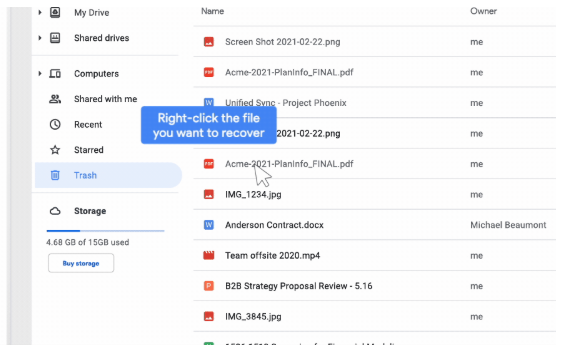
Say the approved copy gets replaced during a last-minute edit. You can return to the right version and keep working without starting over.
When several people edit one document, it helps to know who made each change and when. Change tracking keeps a clear record of the whole editing process. It also makes it easier to answer questions during review.
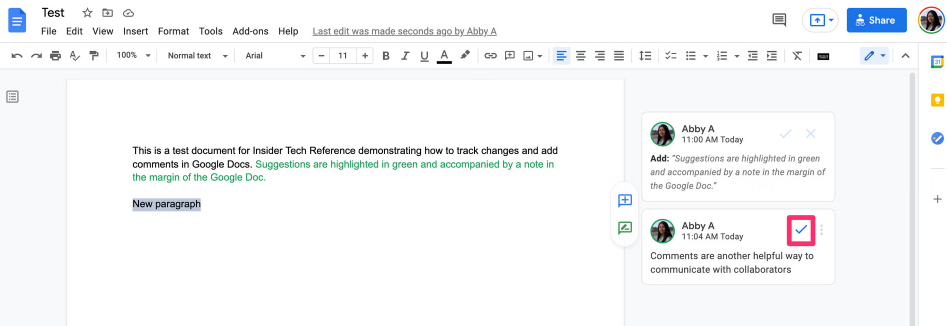
For instance, say unexpected copy shows up before publication. Your team can see who added it and when. (If you’re new to this, make sure to give our How to Use Track Changes in Google Docs post a read).
Several contributors may need to work on the same file at the same time. Good version control stops one person’s changes from overwriting another’s. Everyone can keep working without creating conflicting versions.
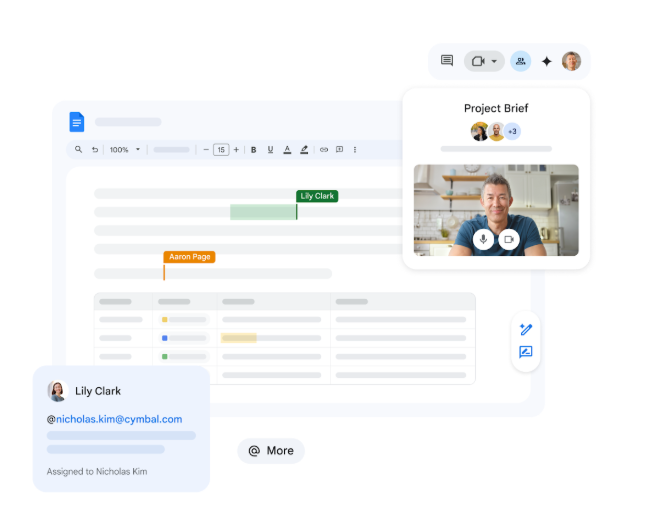
For example, a writer can update the intro while an editor edits another section. Both sets of changes stay in the same document.
Version control protects the content itself. Collaboration features keep that content moving between people. They help teams review, discuss, approve, and hand off work. They do it without long email threads or needless delays.
Content often passes through several reviewers before publication. Approval workflows move work through each stage in the right order. That way, people know when it’s their turn to review or approve it.
For example, a writer finishes a detailed guide on social media content creation. The article moves to the SEO team, then to design. After that, it gets final approval.
People shouldn’t have to rely on email to know when work is ready. Notifications tell people when someone asks for changes, leaves a comment, or shares a file. Activity tracking also shows recent updates across a project.

Screenshot provided by author
For example, a writer can see that an editor asked for changes. They can respond without waiting for an email.
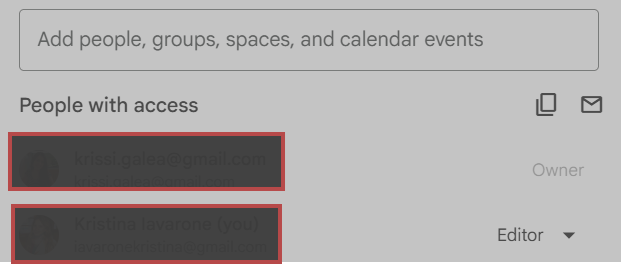
Content teams need to share files without giving everyone the same level of access. Role-based permissions let people view, edit, approve, or share content based on their role.
Screenshot provided by author
Sharing controls also make it easier to work with freelancers, clients, and other outside contributors. For instance, a designer can upload campaign files without seeing other projects.
Getting content approved isn’t the final step. You still need to move it into your publishing platform. Then you check the formatting and get it ready for readers.
The right file management software cuts the manual steps in those tasks. So content gets published faster and with fewer errors.
Many content teams write in Google Docs before publishing to a CMS. Software that connects those tools keeps work moving. People don’t have to copy content from one platform to another.
Writers and editors can stay in the tools they already use. That saves time and cuts extra work after review.
A finished article includes more than the text on the page. Headings, links, images, and other formatting must stay intact when content moves to a new platform.
Export options also let teams publish wherever they need. They don’t have to rebuild content after each transfer.
Publishing often follows the same steps from one article to another. Automation removes repeat tasks. It also helps teams follow the same process every time.
The Data & Marketing Association’s 2025 Value of Automation Report notes that companies using marketing automation get 32% higher ROI. This shows how set workflows can improve both speed and results. This reduces manual work. It also helps you publish without avoidable formatting or workflow errors.
Wordable is a content planning tool that helps content teams move approved articles from Google Docs into WordPress and other publishing platforms. It keeps formatting intact during the transfer. So teams spend less time fixing headings, links, images, and layouts after export.
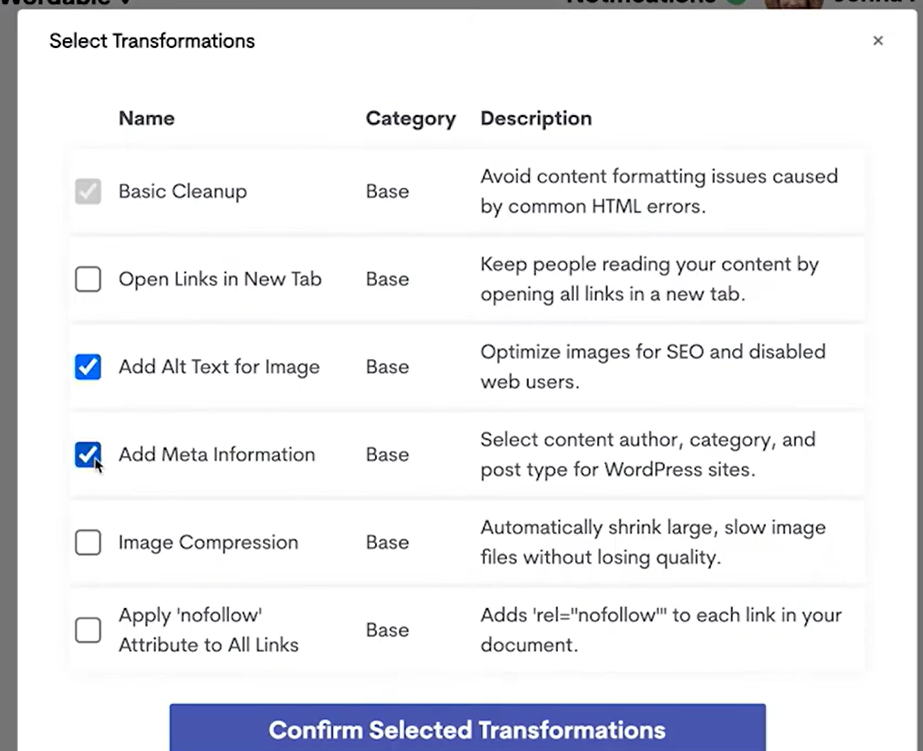
Editors no longer repeat the same publishing tasks for every article. They can focus on reviewing content and getting it ready for readers.
Many platforms offer similar features. The difference is how well they fit your team’s work, from first draft to publication.
Before you compare options, use this checklist. It helps you see if a platform fits how your team creates, reviews, organizes, and publishes content.
Storage no longer sets one platform apart from another. Content teams need file management software that helps them:
When you compare options, look beyond where files are stored. Focus on how each platform supports your whole content workflow.
If your team creates content in Google Docs, try Wordable to make publishing simple and keep your formatting.
File management software helps teams store, organize, and manage digital files from start to finish. Many platforms also include version control, teamwork tools, permissions, approvals, and workflow features. These help content teams keep projects organized. They also move work from first draft to publication without losing track of files or edits.
Content often goes through several rounds of editing before publication. Version control records each edit and keeps old drafts on hand. It also shows who made changes. This helps teams avoid duplicate files and accidental overwrites. They can also recover earlier versions if mistakes happen.
Cloud storage gives teams a place to keep files. File management software also helps:
Beyond storage, it keeps content work organized from creation to publication.