


In 2026, the web page is no longer the primary unit of digital experience. Content that lives in a static container is content that disappears. To reach your audience, you must stop thinking like a writer and start thinking like a systems architect.
One way to do this is to use content modeling. This allows you to break your ideas into reusable, machine-readable blocks. It transforms your static articles into a dynamic library of “content atoms.”
Structuring your data this way helps AI find and deliver your work. This ensures your expertise reaches any device, from neural wearables to voice assistants.
It also future-proofs your intellectual property against shifting platforms, interfaces, and distribution algorithms.
In this guide, I’ll show you how to build a framework that lasts. You’ll learn to move beyond simple pages and create content that machines can index as entities.
Here, we cover the tactical steps to move your brand beyond the “blob” and into a scalable knowledge graph.
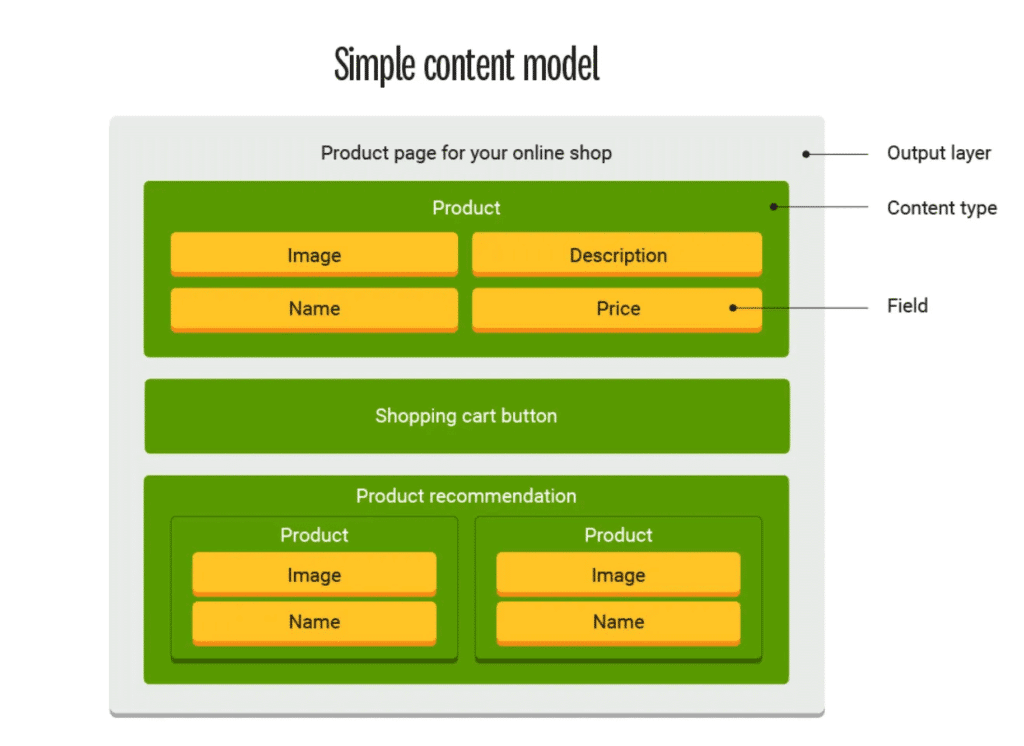
Content modeling is the process of defining structured content types, fields, and relationships so your content can be reused across channels. Forget the old way of seeing a blog post as a single wall of text.
A content model treats that post as a collection of distinct data points, like a headline, an author, a specific takeaway, and a product ID.
By defining your content architecture, you stop building pages and start building entities. This ensures that any interface, from a smartwatch to an AI assistant, can find and use exactly what it needs.
Traditional content organization relies on folders or categories. These tell you where a file lives, but they don’t explain what it is. Today, the location of your data matters less than its DNA. A strong model identifies:
Weak content modeling drains time and trust. When structure fails, efficiency drops, and the audience suffers.
Poor models force manual workarounds. This creates friction in content workflows, slowing content creation. Instead of scaling, teams waste hours fixing layouts.
The data confirms this struggle. According to Content Science’s State of Content Operations in 2025 report, 61% of organizations still operate at mid-level content operations maturity. This means content exists, but the systems required to scale it consistently are weak.
The same study found that only 30% of organizations consider themselves very or extremely successful with content, which reinforces the gap between producing content and operationalizing it.
Backend structure dictates the front-end feel. Inconsistent models lead to a fragmented user experience design. If a product name changes between your app and help center, users lose trust.
Weak structure causes:
To build a content model, you need a structured framework that machines can read and humans can manage. Here are the six pillars of a 2026-ready model.
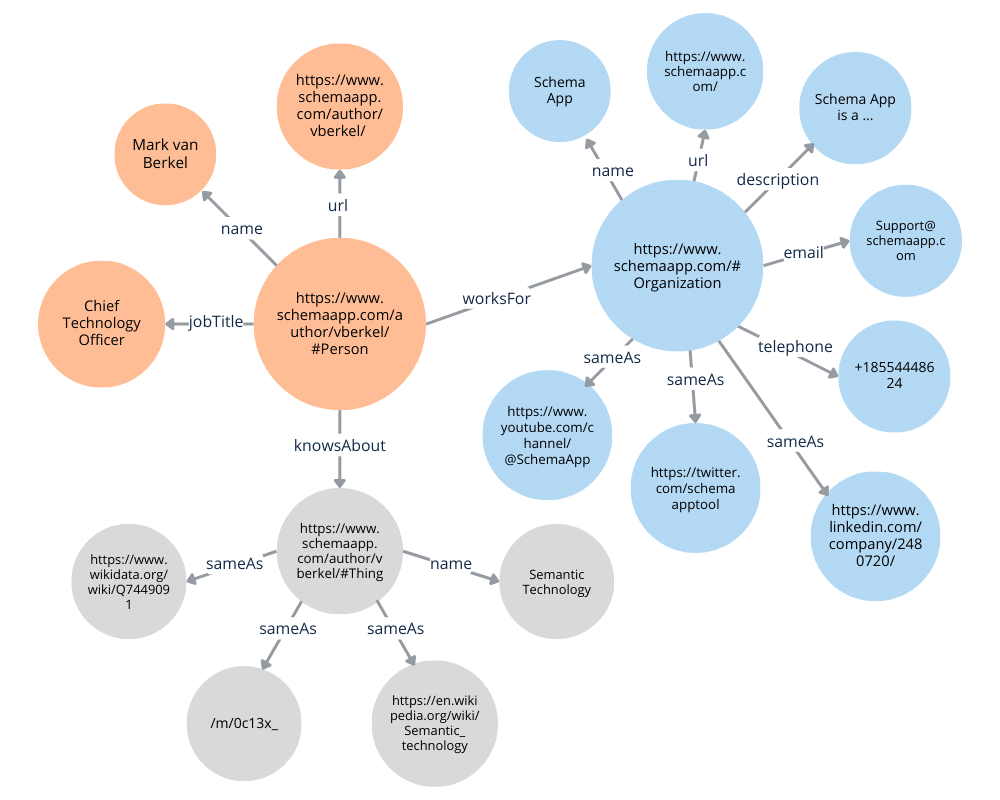
Entities are the high-level buckets where a specific content type lives. Think of them as the “nouns” of your system. For example, instead of a generic page, you might define product descriptions as a distinct entity.
This allows you to treat a product as a unique object with its own lifecycle. You should also define a media content type for images, videos, or 3D assets to ensure your non-textual data remains searchable and organized.
If entities are nouns, content attributes are the adjectives. These specific content fields break down an entity into small, usable parts.
For a product, fields might include “SKU,” “Material,” or “Price.” Even in a decoupled world, you still need page metadata, like canonical tags or social share settings, attached to your entities to ensure they behave correctly when they do appear on a traditional web interface.
Relationships turn a list of data into a network. You connect different entities using reference fields. For example, you can link a “Blog Post” entity to an “Author” entity. This creates a reliable content source where you update the author’s bio once, and it changes everywhere.
Breaking your data into these modular content elements allows AI to map the hierarchy of your information and understand how your topics relate to one another.
Rules govern how data enters your system. These constraints ensure your content workflows remain clean and error-free. You might set a rule that a “Headline” field can’t exceed 60 characters or that a “Price” field must be a number.
By using appropriate SEO tools to validate these rules at the entry point, you prevent “dirty data” from breaking your front-end design or confusing search engines.
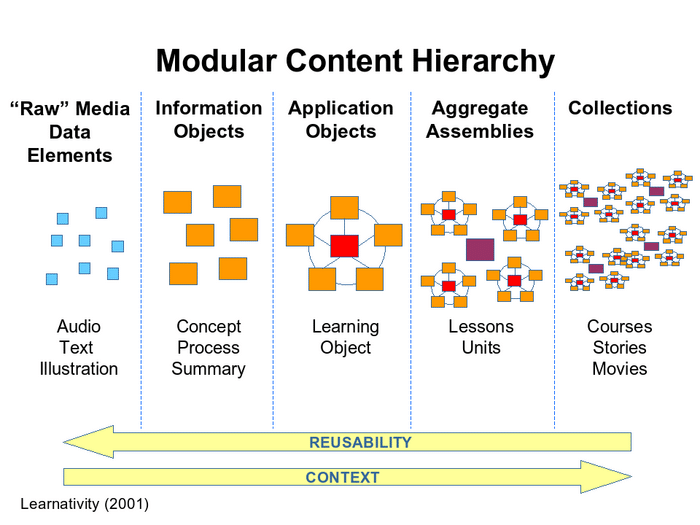
In 2026, you build once and publish everywhere. By using content components, you can swap parts of a page without rebuilding the whole thing. This modularity is essential for content-rich applications like AR shopping apps or personalized portals.
When your components are truly reusable, you can scale your content marketing across thousands of touchpoints without increasing your headcount.
Data shows that moving toward this modular, decoupled approach pays off.
According to Storyblok’s 2025 research, teams that adopt headless CMS platforms report clear gains. 69% improved time-to-market, 58% saw better performance, and 57% achieved stronger personalization.
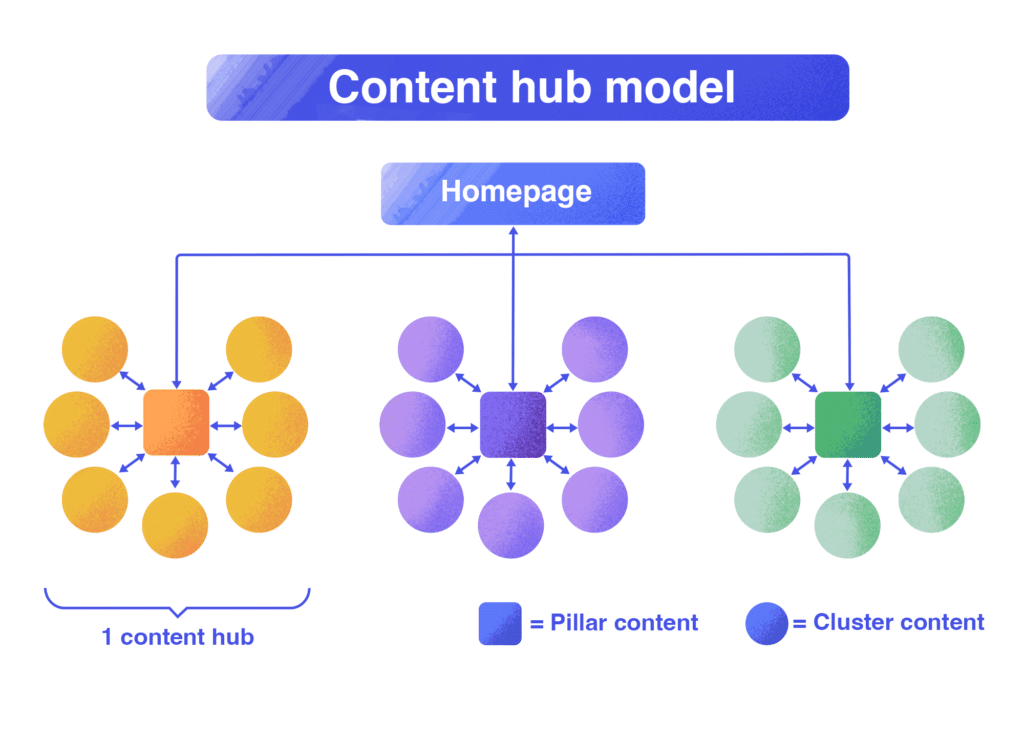
In 2026, your data needs meaning to survive. A semantic content model adds a layer of intelligence to your structure. It uses clear labels so machines understand context.
When an AI scans your data, it should guess if Java means a programming language or a cup of coffee. Your model provides that answer. This depth turns your database into a living knowledge graph, making your brand more authoritative in an AI-driven world.
Below are some of the biggest content model mistakes you can make.
Many teams fall into the trap of page-first thinking. They model content to fit a specific website layout, then struggle to reuse it elsewhere. This forces content creators to manually rewrite copy for email, search snippets, and social media management.
When you treat a page as the model rather than an output, reuse becomes repetitive manual labor instead of an automated system outcome.
A common mistake is reverse-engineering your content model to fit a specific CMS feature. When you design around tool constraints instead of content needs, you end up with a rigid structure.
These models often break the moment your channels, formats, or workflows change. Your modeling should stay tool-agnostic, focusing entirely on meaning and long-term reuse.
Technical teams often build models in isolation and fail to account for how content creators and editors write, review, and approve content.
Many models exist only within the CMS, even though content starts its life in docs or collaborative tools.
When structure doesn’t travel with the content from creation to publication, you lose formatting and metadata. This leads to “cleanup” sessions at publish time, where editors must manually fix what the system should have handled. Structure should be a constant thread from the first draft to the final API call.
Follow this tactical guide to build a structure that survives the shift to AI-driven ecosystems.
Don’t model in a vacuum. Look at your final distribution points, such as social media posts or your email marketing tool.
Identify the specific data points these channels require. By working backward from the output, you ensure your model serves actual business needs rather than theoretical ideas.
Break your information down into content elements.
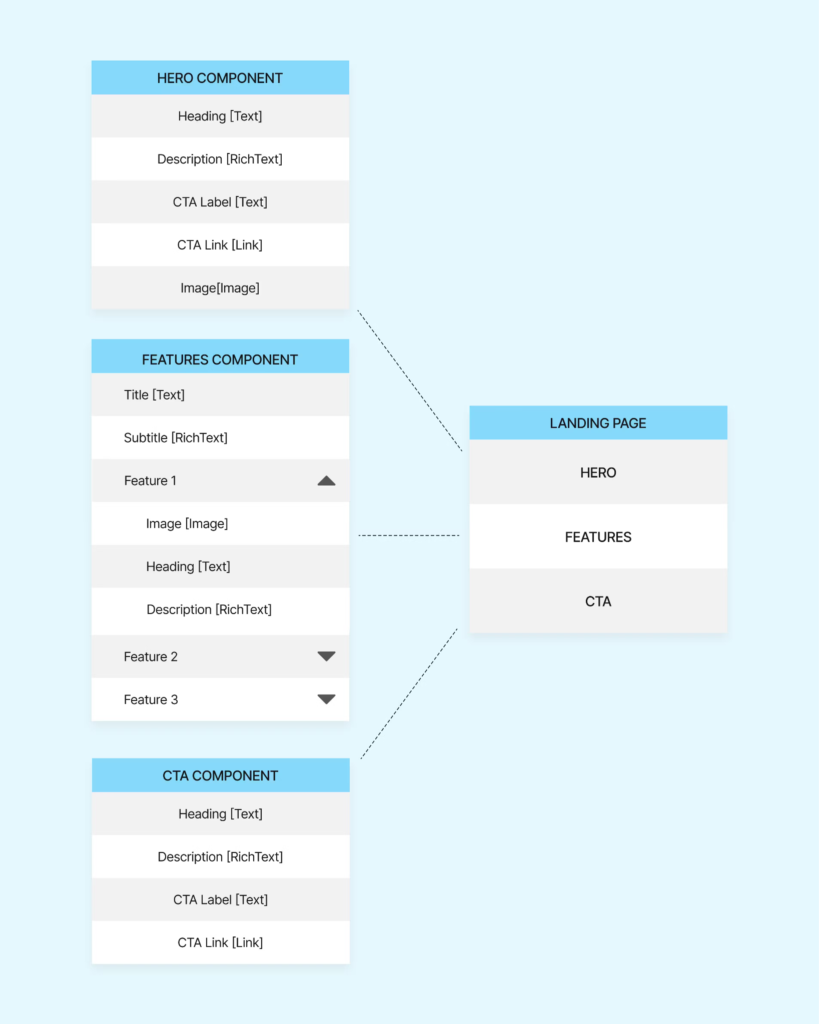
If a piece of data can stand alone, like a product page or a call-to-action (CTA), it should be its own field.
These content components become the building blocks for your entire system. The smaller the unit, the easier it is to reuse across different platforms.
Decouple your structure from your layout. Don’t design for specific web pages. Start designing for intent.
This separation is vital for user experience design because it allows the same data to look different on a mobile app than it does on a desktop browser. Focus on what the content is, not how it looks.
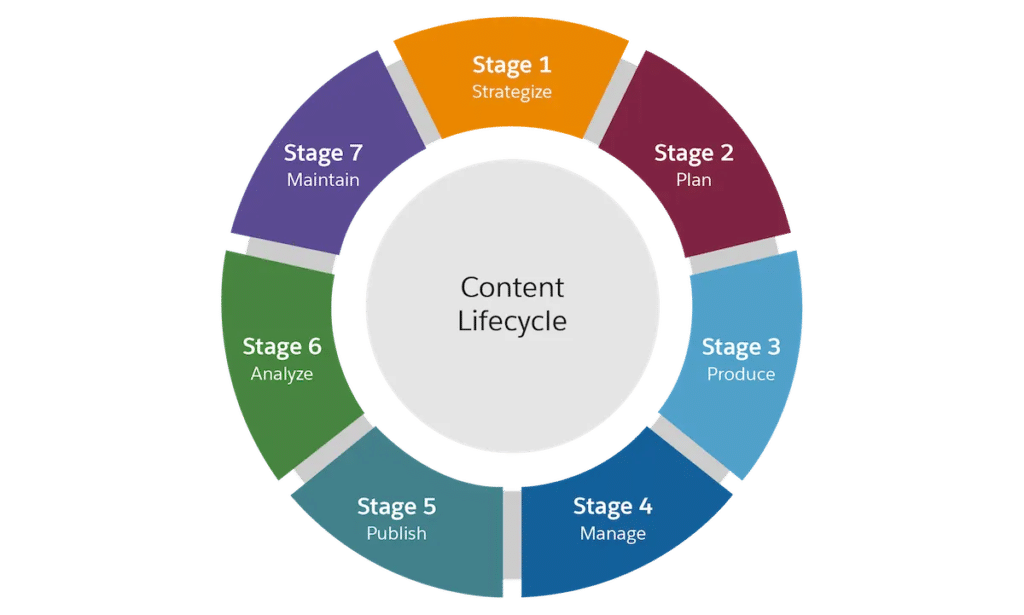
Model your content for the full lifecycle, not just the final publishing stage. Information typically begins in collaborative documents, undergoes several reviews, and changes hands multiple times before it ever touches a CMS.
You must define a structure that survives this journey. Ensure headings, links, lists, and metadata remain intact as content moves between different tools. If your structure breaks during a transfer, your model is incomplete.
Automation bridges this gap by mapping your document styles directly to your content fields. Instead of losing data during transfer, an automated pipeline pushes headings, lists, and images into their specific containers while preserving their meaning.
This ensures your metadata and relationships remain intact without manual cleanup.
Decide how your entities talk to each other. Use reference fields to link related data, such as connecting a “Service” to a “Pricing Tier.” This step designs your content architecture and prevents data silos.
It ensures that when you update a source entity, every related piece of content reflects that change instantly.
A model only works if people understand it. Create a clear guide for content organization, so every team member knows where data belongs.
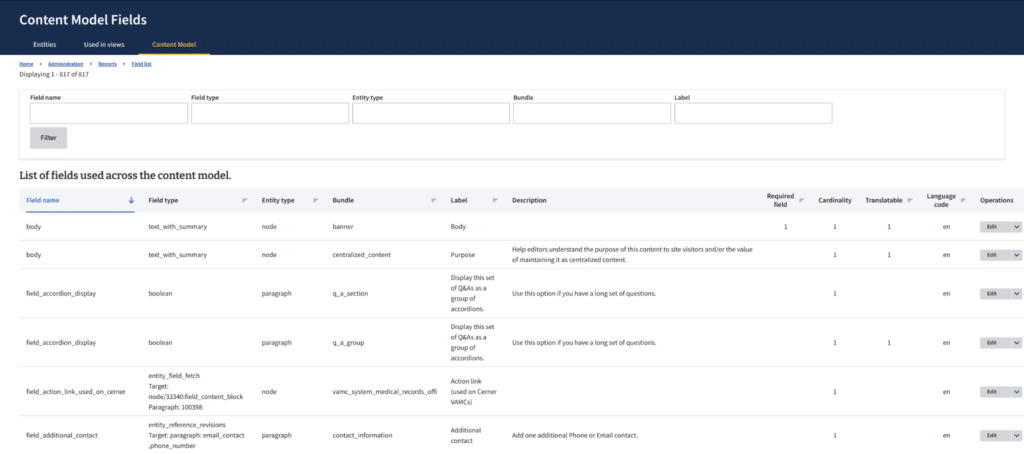
Integrate embedded analytics into your documentation process to track how specific fields perform.
This allows you to see which parts of your model drive the most engagement and adjust accordingly.
A technical model must work for the people using it every day. Test your content workflows with staff responsible for content development.
If the fields are too complex or the rules are too rigid, editors will find workarounds that break your data integrity. Refine the interface until the process is seamless.
Content modeling is the difference between a mess of files and a smart system. As the digital world shifts toward AI and new devices, your content needs ot be more than just text on a screen. It needs ot be organized so machines can understand it and humans can find it.
By breaking your work into small, reusable pieces, you make sure your ideas can live anywhere without you having to rebuild them every single time.
Stop wasting time fixing broken formatting and manual errors when moving work from Google Docs to your CMS. Wordable handles the heavy lifting by pushing your content into your system perfectly every time. This keeps your structure intact and your team focused on writing.
Get started with Wordable today to automate your publishing and keep your content structure perfect with one click.