

Your content calendar looks great on paper. Then the month ends, and half the posts are still stuck somewhere.
One draft is waiting on a subject matter expert. Another is on its third round of edits. Two more are “done,” but nobody has uploaded them yet.
The easy answer is to hire more writers. But more content creators usually just means more drafts in the same jammed spots. If the problem is in briefs, reviews, or publishing, extra hands only lengthen the line.
The good news? Most bottlenecks are process problems, not people problems. That means you can fix them with the team you already have, and scale content without adding headcount.
In this guide, you’ll learn how to:
Let’s dig in.
Think of your content process like a highway. If one lane narrows to a single car, adding more cars upstream doesn’t help. It just makes the traffic jam bigger.
Digital content works the same way. Writing is only one stage of the content creation process. Ideas need approval. Drafts need editing. Finished posts still need formatting, images, and a final check before they go live.
The pressure to move faster is real. In the Content Marketing Institute’s 2027 B2B trends research, 65% of B2B marketers said they faced more pressure to produce content faster. Among those feeling it, 35% reported more burnout and 22% reported more internal rework.
“A team doesn’t always need more writers. Sometimes it just needs fewer people standing between a finished draft and the publish button. Adding writers won’t solve a problem that happens after the writing is done.” — Jeffrey Zhou, Co-Founder and CEO of Fig Loans.
That rework number matters. Every piece of content sent back for a rewrite eats time you could spend on new posts. Hiring more writers doesn’t remove that rework. A well-defined workflow does.
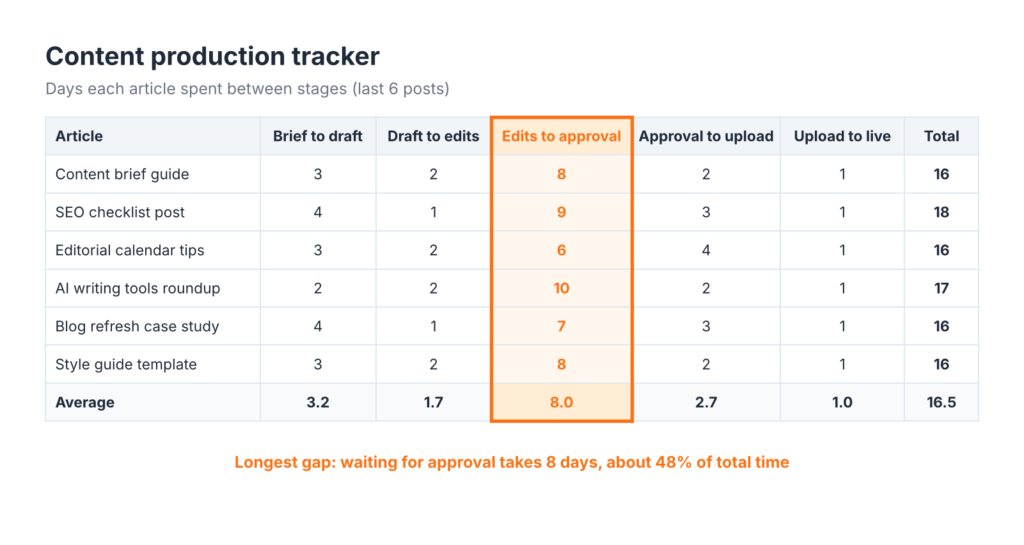
Start by pulling your last 10 to 15 published articles and recording the date each one hit every step in the content workflow. A simple spreadsheet works fine.
Here’s a basic set of stages to track:
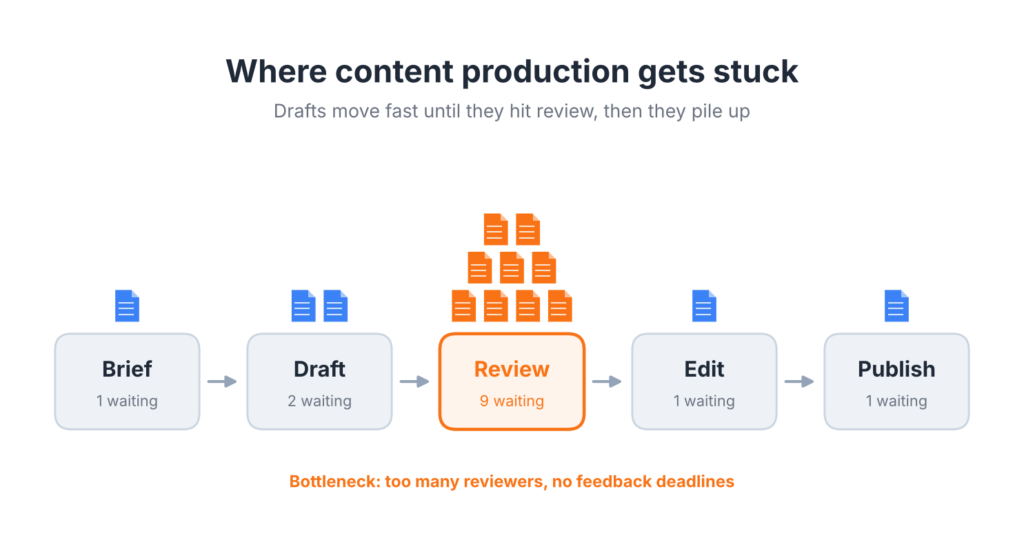
Now look at the gaps between dates. Where posts sit the longest is your bottleneck: the stage where content demand exceeds the team’s ability to deliver on time.
Most teams are surprised by what they find. Writing often takes a few days. But a post might wait a full week for approval, or sit “finished” for days before someone uploads it. A well-designed workflow makes those gaps obvious.
Watch for patterns like these as you review your data:
Once you know where the jam is, fix that stage first. Without a content workflow that shows where work sits, you’re only guessing.
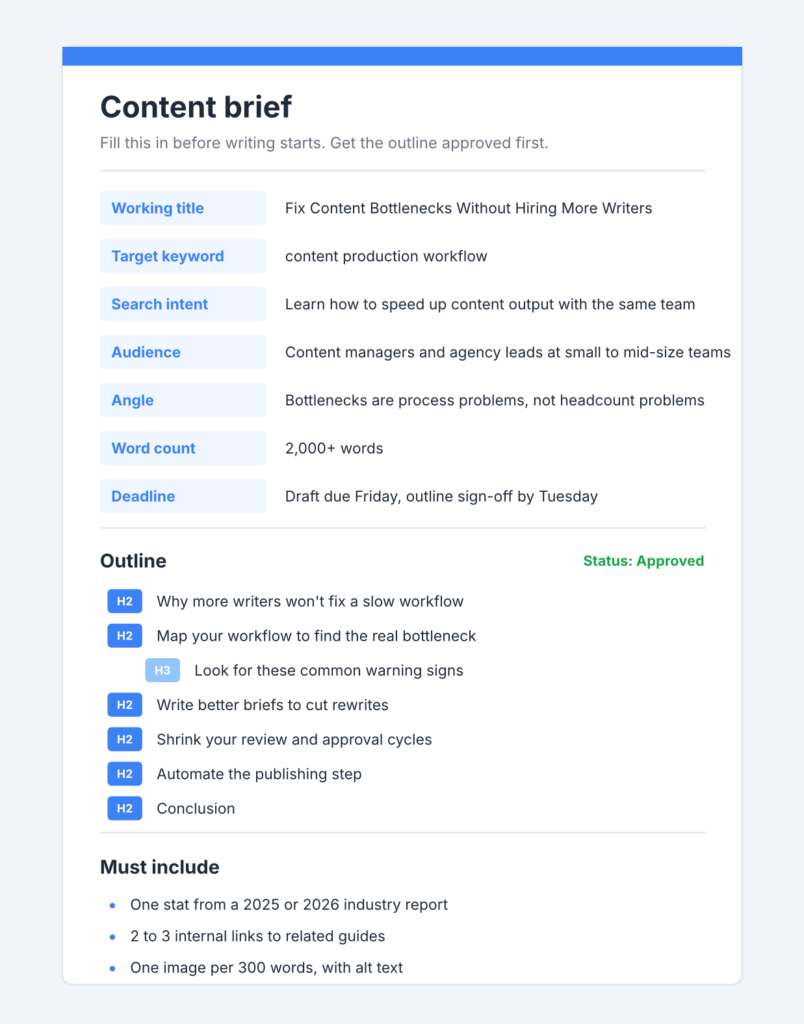
A weak brief forces writers to guess, and when they guess, drafts miss the mark and go back for another round. A good brief answers every big question before writing starts, so the first draft lands much closer to the finish line.
“One of the biggest reasons content teams fall behind is that important decisions are made too late. When a draft is already complete and the team is still discussing who the content is for or what message it should deliver, valuable time has already been lost. These questions should be settled before writing begins. A clear direction from the start helps writers stay focused, reduces unnecessary revisions, and keeps the entire content process moving without delays.” — Tal Holtzer, CEO of VPSServer.
Make sure each brief covers these basics:
Each brief should also tie back to your overall content strategy, so every post earns its spot on the calendar.
This one step saves a significant amount of time. Ask stakeholders to sign off on the outline, not the finished draft.
Changing an outline takes five minutes. Rewriting 2,000 words takes hours. Catch direction problems early, and draft review becomes a quick polish instead of a rebuild.
Keep a brief template in a shared folder so every editor uses the same format. Pair it with a simple content workflow template that lists each stage, its owner, and its deadline. Over time, you’ll see first drafts get stronger, and edit rounds get shorter.
When nobody knows who should give feedback or when it’s due, reviews become the black hole your content workflow disappears into.
Every extra reviewer adds time. They also add opinions that may clash with each other. A lean approval workflow keeps things moving.
Try this simple setup:
Everyone else can see the post after it’s live. If someone wants input on every piece, invite them to the outline stage instead.
Give each reviewer a clear window, such as 48 hours. If they don’t respond in time, the post moves forward.
This sounds strict, but it works. People respond faster when they know the clock is running. It also stops one busy person from holding up your whole workflow.
A review with no deadline is just a parking lot. Without a cutoff, feedback drifts indefinitely, and your content calendar pays the price. Setting a firm window forces a decision: either the reviewer weighs in on time, or the editor moves forward without them.
Subject matter experts are busy. Don’t send them a 2,000-word draft and ask for “thoughts.”
Instead, send three to five specific questions. Or book a short 15-minute call and record it. Your writer can pull quotes and insights from the transcript.
“Experts don’t skip reviews because they don’t care. They skip them because a full draft feels like homework. Send a few clear questions instead, and you’ll usually get answers the same day.” — Bryan Henry, President and Founder of PeterMD.
Orbit Media’s 2026 blogging survey found that marketers with a more formal process and human oversight are much more likely to see strong results. So the fix isn’t to skip editing. It’s to make editing faster and more consistent, so you can keep producing high-quality content at a steady pace.
A style guide answers the small questions that slow editors down. Do you use the Oxford comma? How do you write numbers? What tone fits your brand?
It is one of the cheapest workflow fixes you can make. When writers follow the guide, editors spend less time on small fixes. They can focus on flow, clarity, and accuracy.
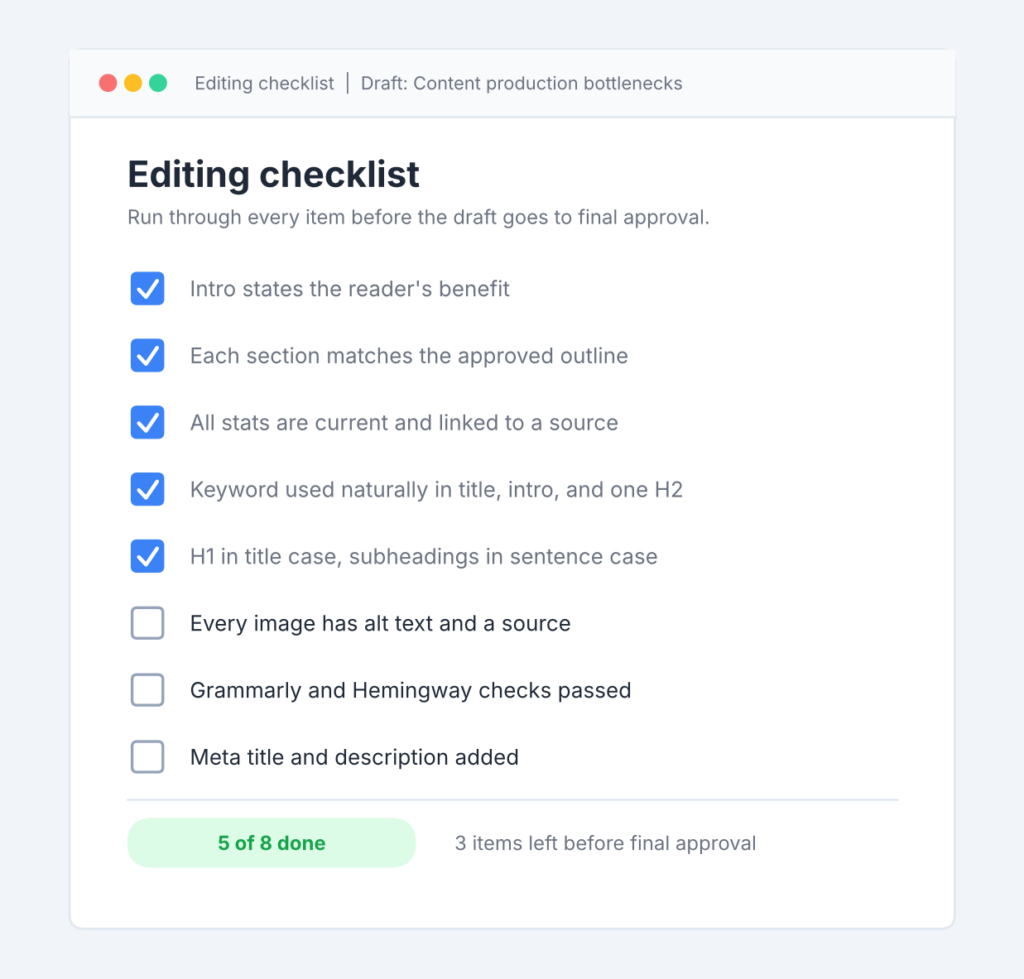
A checklist keeps every editor on the same page. It also helps newer team members edit with confidence.
Your checklist might include:
Ask writers to run drafts through tools like Grammarly and Hemingway before submitting. This first round of proofreading clears out typos and long sentences before an editor ever sees the draft.
The result? Editors spend their time improving ideas, not fixing commas.
Artificial intelligence (AI) is now part of most teams’ toolkits. The Content Marketing Institute’s 2027 B2B research found that 88% of B2B marketers use AI content creation tools. But 54% of them name accuracy and quality control as top concerns.
That’s a big clue about where AI fits best. Use it to speed up the prep work around writing, not to replace the writer.
Here are some smart ways to use AI in your content creation workflow:
Keep a human in charge of the final draft. Readers can tell when content lacks real experience or a clear point of view.
For more ideas, Wordable’s breakdown of which content workflow steps to automate is a great next read. Smart workflow automation frees your team to focus on the writing itself.
Group similar work together so your team stays in one mode at a time before moving to the next.
Group similar tasks together. For example:
Batching gives your content creation workflow a weekly rhythm and protects time for creativity. It also makes it easier to spot when one stage starts to fall behind. This type of workflow suits small and large teams alike.
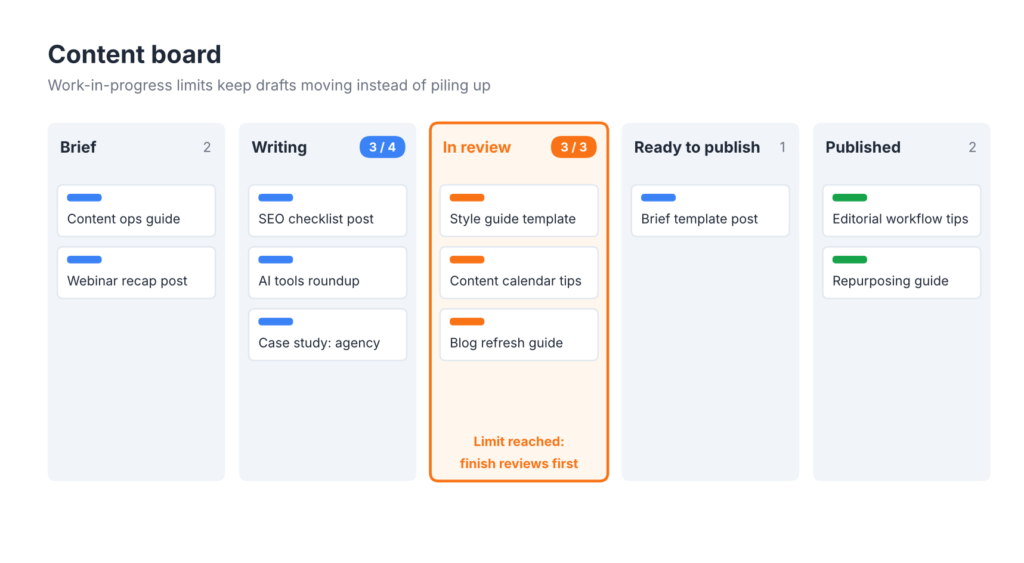
It’s tempting to start lots of posts at once. But ten half-finished drafts are worth less than five published ones.
Set a limit on how many pieces can sit in each stage. If the “In review” column is full, nobody starts a new draft until something moves forward.
A simple Kanban board in a tool like Trello, Asana, or ClickUp makes this easy to manage. Most workflow management software has this view built in. Wordable has a helpful roundup of software for your content marketing workflow if you’re still choosing a tool.
Publishing is the bottleneck most teams forget about. The post is written, edited, and approved. Then it sits.
Why? Because moving content from Google Docs into WordPress or other content management systems by hand is slow and messy. Someone has to copy and paste the text, fix broken formatting, re-upload every image, add alt text, and set up headings and links again.
“A finished article sitting in a Google Doc isn’t helping anyone. Content teams spend so much time improving the writing that they sometimes forget how much time they lose getting it published. That last step deserves just as much attention.” — Gavin Yi, Founder & CEO at Yijin Solution.
That might take 30 minutes to an hour per post. Multiply that by 20 posts a month, and you’ve lost a day or two of work.
This is where a tool like Wordable helps. It exports Google Docs to WordPress in one click, with clean formatting. Images, headings, links, and alt text carry over, so there is far less cleanup.
You can also set export rules once and reuse them. For example, you can open external links in a new tab or compress images on upload. That means fewer small tasks for your team and a faster path from “approved” to “live.” An effective content workflow makes the last step as smooth as the first.
Even with automation, a quick final check helps. Look at:
When publishing content takes minutes instead of hours, finished posts stop piling up.
Sometimes the fastest win for search engine optimization (SEO) is updating something you already have. Regular content audits help you find those posts.
Look for older posts that:
“A refresh is one of the most underrated content strategies. It often takes a fraction of the time a new post needs. The structure, internal links, and existing authority are already there. You just need to bring the content up to date.” — Paul Posea, Outreach Specialist at Superads.
If a refreshed post still won’t climb, it may need more authority. Earning a few editorial backlinks from relevant sites can give it that push.
You can also stretch each new post further. One strong guide can become a LinkedIn carousel, an email series, a short YouTube video script, or a podcast episode outline. Turning one post into different types of content gives your team more value from every piece, and over time you build a content library you can keep drawing from.
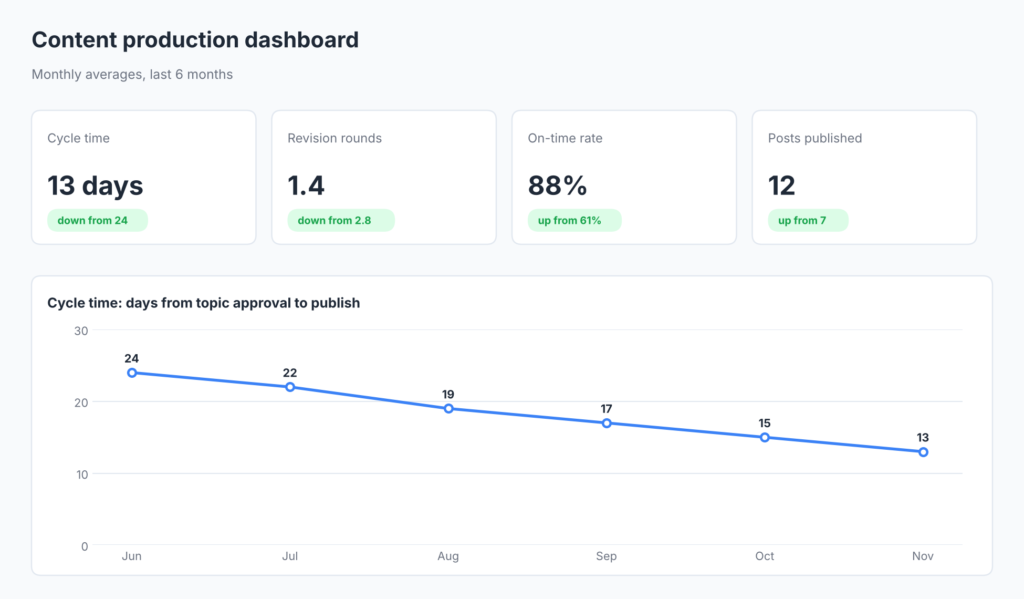
Fixing a bottleneck once isn’t enough. New ones pop up as your team and goals change. A few simple numbers help you catch them early.
Track these each month:
You don’t need fancy software. A shared sheet that pulls dates from your project board works just fine.
Review these numbers in a short monthly meeting. Ask one question: “Where did work get stuck this month?” Then fix that one thing. That habit is most of what good content workflow management comes down to.
For context, the median B2B SaaS company publishes 11 to 20 blog posts a quarter, or about one a week, according to the Benchmarker 2026 B2B SaaS content report. If your content volume is lower than you’d like, the numbers above will show you why.
Content bottlenecks feel like a staffing problem. But most of the time, they’re a process problem.
Start by mapping your content production workflow and finding where posts wait the longest. Then fix that stage first. Tighten your briefs. Trim your reviewers. Give editors a checklist. Let AI handle the prep work. And automate the publishing step so finished posts go live fast.
Small changes add up. Fix one bottleneck at a time, and you’ll create content faster with the team you already have.