


If you’ve ever spent 45 minutes reformatting an article across three different platforms while wondering if this is really what you went to college for, this one’s for you. Your content workflow has become a weird mix of writing, coaxing AI systems to do what you want, and a host of other frustrations.
Many automation tools promise to save you hours, but you spend nearly as much time fighting new fires as you did doing the original tasks.
Thankfully, some tools deliver, but they’re not the ones that claim to do everything. They’re the quiet achievers that focus on solving specific steps in your process.
Together, these targeted tools can help you maximize your productivity like never before.
Here’s a scenario you might be familiar with. Someone mentions an idea in a meeting, and everyone says, “We need some content on that.”
A writer disappears for a day or two and comes back with a beautiful, well-researched article. You publish it, but three weeks later, it has fourteen views, and four of those are probably you checking if anyone’s reading it!
The problem is, nobody was searching for that topic in the first place, which brings us to the first content workflow management tool every marketing team needs. A keyword research tool helps you understand the demand for a given topic in just a few seconds.
Before you begin writing, check whether people are actually searching for the subject. You’ll see which angles drive search volume, which related questions surface, and whether to proceed with creating the article.

To streamline the content workflow, this is one of the simplest and most important steps you can take. Several elements can also be automated, such as saved filters or the export of a list of related keywords that can be used across multiple pieces.
Once you know what people are interested in, you can further refine your content. We cover this next.
Your customers are already telling you what content they need on a daily basis, if you know where to look.
They leave comments on blog posts. They email your support team with questions. They write reviews mentioning what confused them.
The problem is that most of this feedback goes unnoticed while your team is in (unnecessary?) meetings.
When someone emails support asking how to do something, that’s a new blog post. When three people ask variations of the same question in your forum, that’s another article.
When reviews mention confusion about a feature, that’s your next explainer. Plug it into a keyword checker to optimize your piece, and get started creating.
Of course, checking each of those channels regularly can be tedious, and this is the next automation tip. Use tools that consolidate everything into a single dashboard, so your help desk, social listening, forum, and review sites all feed into one place.
When the same question pops up a few times, your next piece of content is already planned.

Want more insights flowing in? Give people a reason to share by rewarding your most active community members. Consider sending custom hoodies to top contributors each month as a small investment that often pays off with higher participation.
AI writing assistants like ChatGPT or Claude are great for first drafts, outlines, and overcoming blank-page paralysis, but remember, they’re not designed to produce a finished piece.
While studies like ZoomInfo’s State of AI Report 2025 found that marketers boost productivity by 44% with AI tools and save an average of 11 hours per week, it’s clear that AI can’t replace the human touch entirely.
What these tools produce will likely need significant editing to ensure it’s engaging and connects with your target audience. Sorry to be the bearer of bad news, but you still need to get your hands dirty if you want to produce strong content. This knowledge alone can save you a lot of frustration.
Automated publishing tools aren’t as famous as ChatGPT, but they can improve your efficiency just as much, if not more. They handle moving finished content from your drafting setup into your CMS.
When you automate content publishing straight from your drafting environment to WordPress, HubSpot, or Medium, you can save a massive amount of time. Tools like Wordable transfer all your formatting, including image placements and hyperlinks, and trust us, it’s one of those things that you think, “How did I ever do without this?”
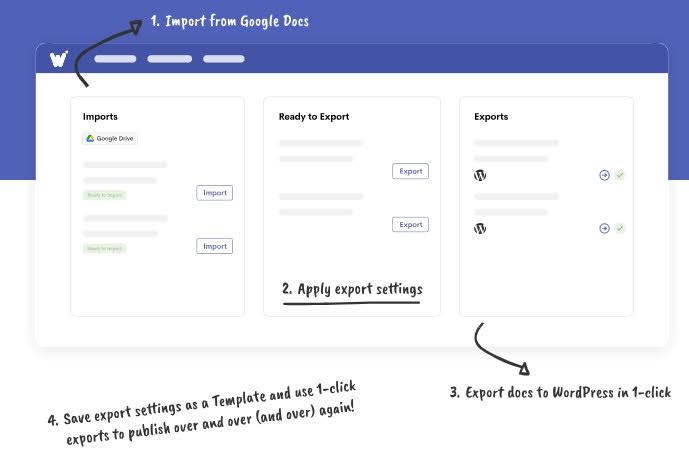
An ‘Honorable Mention’ goes to Google Docs, even though it’s not strictly ‘automation’. It solves collaboration chaos between drafting and publishing.
Everyone works in the same document simultaneously, and comments sit next to the text. Set up clear stages like Draft, In Review, Approved, Ready to Publish, then use naming systems that show status instantly.
Getting finished content published across multiple platforms is where automation really delivers.
Once you’ve automated the basics of moving content from drafting to your CMS, you can make it even more efficient by publishing to several platforms simultaneously.
The most advanced content publishing tools have evolved to support simultaneous, multi-platform distribution via direct API connections. Instead of exporting to WordPress, then starting over in HubSpot, then repeating the process for Medium, you can push to all three at once from a single source.
The tool automatically maps your formatting to each platform’s specific requirements. So your H2s stay H2s everywhere, and your bullet points don’t randomly turn into numbered lists on one platform but not others.
Those 15 to 20 minutes you were saving on one platform are now tripled. You can probably start to see how powerful this is when you’re publishing multiple pieces per week.
What used to take 60 hours per month now takes a couple of hours, giving you the entire workweek back for actual content planning and development rather than formatting.
Publishing content is only half the battle, though. You need to make sure it actually converts.
Adding social proof to strengthen conversions
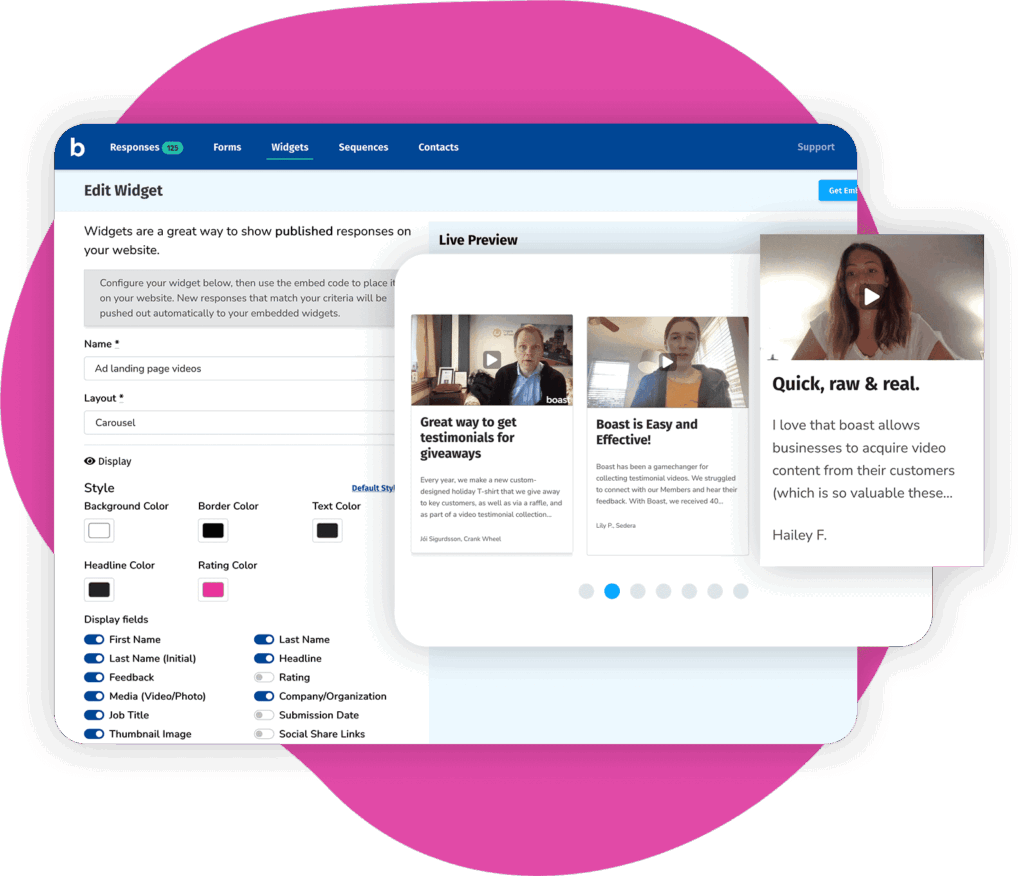
The importance of customer testimonials and case studies in your content can’t be understated. Real stories from actual customers build trust faster than any features list. However, manually collecting and organizing testimonials is tedious at best, which is why it’s another ‘top-tip’ for automation in your content workflow.
Testimonial collection tools such as Boast, Testimonial.to, and VideoAsk automate the request process by sending emails after key customer milestones. They include successful onboarding, project completion, or renewal by capturing responses through simple forms or video. You set the triggers once, and the system quietly builds your testimonial library.
Using testimonials strategically means matching customer stories to your content topics. Software companies handle this particularly well. Look at how contract management software companies organize testimonials by specific pain points and results.
Someone reading about document automation sees testimonials about time saved. Someone reading about compliance sees testimonials about audit trails.
The automation comes from tools like Airtable or Notion, which support tagging systems. Tag testimonials by industry, use case, and pain point. When you’re writing about workflow automation, filter for “time savings” tags and grab relevant quotes instantly.
The more social proof you naturally work into your content, the better your conversion rates will be. But you need to know which sections drive those conversions.
Figuring out if your content works takes more than glancing at page views. You need analytics tools that track what users do and how your CTAs perform.
Google Tag Manager lets you set up event tracking for specific buttons or links without touching your site’s code. Track click-through rates, scroll depth, and time spent around CTAs to see where readers engage versus where they bounce.
Heatmap tools like Hotjar or Microsoft Clarity show you where people actually click, how far they scroll, and where they abandon your content. The visual data makes it obvious which sections perform and which lose people.

Finance sites use this data well. Look at how debt relief programs place CTAs at natural decision points after explaining a problem or presenting a solution. The tracking tools show them which CTAs convert and which get ignored, so they can optimize content operations based on actual behavior.
Analytics dashboards like Google Analytics 4 or Mixpanel automate your performance reporting. Set up custom dashboards that track CTA performance across your content. Look for patterns in which topics drive clicks, which language resonates, and where placement matters most.
Once your content workflow runs more smoothly, you may notice new issues. Suddenly, you’ve got time to publish more, but now you need help with image sourcing, social scheduling, email management, and all the tasks that multiply when content production ramps up.
This is where delegation tools come in. The ROI becomes straightforward when you look at the virtual assistant cost compared to your team’s hourly rates. A $ 25-per-hour VA handling image sourcing and social scheduling frees up your $ 75-per-hour content manager for strategy work.
Delegation platforms like Belay, Time Etc., and Fancy Hands connect you with VAs who handle recurring tasks. Set up standard procedures once, and they execute repeatedly. Image sourcing, basic formatting, research compilation, and social posting. All the tasks that need doing but don’t require your team’s specific expertise.
Using project workflow tips can make delegation more effective. Document standard steps so VAs or team members execute tasks consistently without constant supervision.

Project management tools like Asana or ClickUp help you assign and track delegated work without constant check-ins. Your VA knows exactly what needs to be done, when it’s due, and where to put finished work.
To recap, automate your content-creation workflow first, then use the freed capacity to scale your content and other operations.
Theory sounds great until you see whether anyone’s actually making it work. Looking at real companies helps because you can see which tools deliver results versus which ones just look good in demos.
The practical lesson isn’t about matching what a larger company does. It’s about the approach they took and how you can apply it. Start with your biggest bottleneck. Fix that one thing. Prove it worked. Move to the next problem.
Companies that get the most out of automation do it in steps rather than sweeping changes that disrupt everything. They pick one painful manual process, automate it, let the team adjust, show the time savings, then tackle the next issue. This builds trust because people see genuine improvements instead of just more tools to learn.
Ken Chartrand, CEO of Encore Business Solutions says: “Teams often think automation only works when you rebuild the entire workflow, but that’s not the case.
The real impact comes from removing small, repetitive tasks that slow people down. Automating even one step that everyone uses regularly saves hours each week and gives you a clear proof point before moving on to bigger changes.”
Yes, ChatGPT gets plenty of attention, but AI content generators are just a small piece of an overall content workflow. As mentioned from the outset, it’s best to focus on specific tasks, like keyword research, gathering testimonials, content drafts, content editing, and then publishing.
Finally, delegation tools can improve how your team interacts, which is where you start getting into ‘well-oiled machine’ territory.
To be fair, you might already have many of the tools mentioned; you just aren’t using them in a coordinated way. One aspect many teams haven’t yet automated is publishing, which is why Wordable is worth considering.
It handles all the platform-specific formatting automatically, so your content goes from Google Docs straight to WordPress, HubSpot, Medium, or all three at once. That means you can spend your time writing instead of fighting with technology that should’ve just worked in the first place.