


Influencer marketing teams operate like content studios. They manage creators, organize feedback loops, launch multi-platform campaigns, and deliver performance, all at once.
The tools they use? Often custom. Sometimes hacked together. Rarely a traditional CMS.
That’s not the problem. The real issue is running without systems that align content creation, people, and timelines at scale.
CMS features fill that gap, not as a single tool, but as core capabilities: structured workflows, version control, approvals, digital content libraries, and performance tracking. These are the pieces that make fast content production repeatable and scalable.
Next, we’ll break down the CMS features influencer teams actually need to stay fast, organized, and scalable. Let’s begin.
A basic content management system (CMS) won’t cut it when you’re managing 30 creators, 100 video assets, and five platforms at once. You need more than a way to publish. You need:
Most CMS platforms were built for marketers publishing blog posts or landing pages. But influencer teams don’t work like that.
Their web content management system needs are different. Content flows aren’t linear. Stakeholders don’t work in the same tool. And content is never “final”; it gets repurposed, edited, reused.
That’s why high-performing teams build their own systems. They replicate CMS-like functions using whatever combination of workflow tools fits their setup.
According to Influencer Marketing Hub, 36% of marketers say their CMS is the most critical piece in their tech stack. For influencer teams, “CMS” isn’t a single tool. In reality, it’s a set of CMS features they can rely on, no matter how fast they scale.
The tools may be custom, but the principles behind them are the same: structured content, faster production, and visibility across every stage. If the system works, it doesn’t matter what platform powers it.
Pro Tip: Even though legacy CMS tools weren’t designed for the pace of influencer content, there’s still a lot you can learn from them. Check our breakdown of the benefits of CMS software to discover more.
There’s no out-of-the-box CMS for influencer marketing. But there are operational capabilities your team can’t afford to skip.
The top-performing teams don’t rely on traditional CMS platforms. Actually, they build systems that replicate the features that matter, using the tools that fit their content workflow.
Here’s what those features look like:
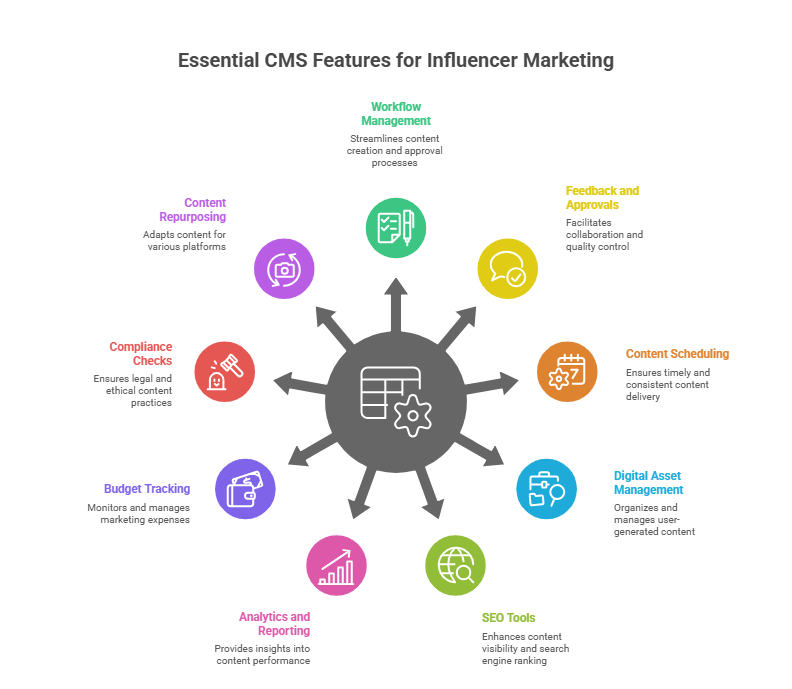
Image provided by author
Scaling content creation means scaling decisions. Without structure, campaigns stall, edits get buried, and creators fall through the cracks.
You need:
This is what keeps fast-moving campaigns from falling apart.
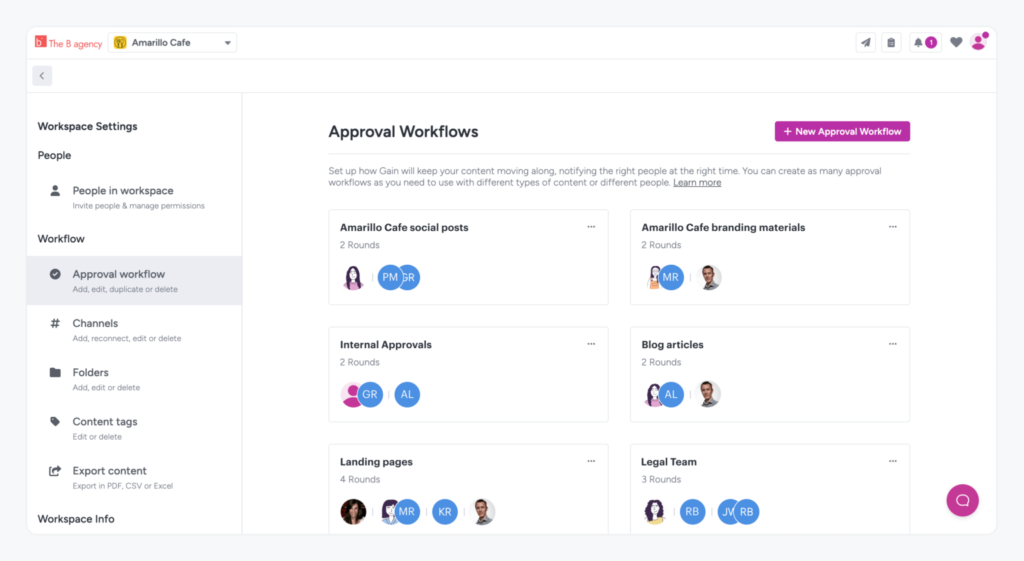
Approvals are where progress breaks down when the system isn’t built right.
Disorganized feedback slows production, creates version chaos, and sends teams into back-and-forth loops that kill timelines.
Your system should give you:
When this process works, campaigns stay sharp and on schedule. When it doesn’t, you burn hours trying to clean up confusion.
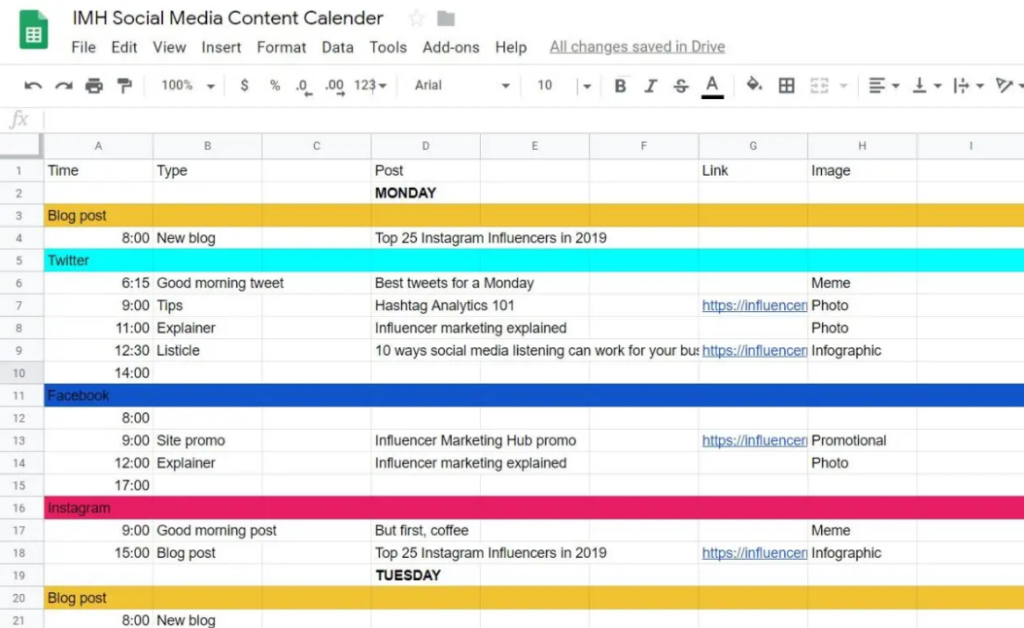
Publishing across platforms is the baseline. However, keeping that content aligned, approved, and on time is where teams start to lose control. When timelines shift and platforms multiply, things get messy fast.
For that reason, scheduling is the backbone of coordinated launches, especially when content needs to go live across regions, time zones, and formats.
You need systems that handle:
Most teams work across multiple tools and web platforms. According to research, 61% of content teams use more than one CMS to manage publishing across platforms, departments, or regions.
Fragmentation like that calls for real structure. A CMS-style scheduler keeps everything synced and launch-ready across platforms. It reduces last-minute fire drills, prevents content collisions, and helps every stakeholder know exactly what’s going live, when, and where.
You can’t scale user-generated content if your assets are lost in messy folders. One campaign creates dozens of versions. Ten campaigns in, things fall apart without a proper system.
You need:
This is about control: who used what, when, where, and under what terms. Without that, digital content gets reused incorrectly, usage rights get violated, and teams waste time looking for the “final” file.
UGC doesn’t have to live exclusively on social. High-performing teams repurpose top content into evergreen, searchable web pages: creator hubs, testimonial sections, and even product pages powered by real users.
But to make that work, your system needs basic SEO tools and functionalities. That implies:
This turns short-lived UGC into durable assets that show up in search engine optimization results. It also bridges paid, organic, and social strategies. That way, your top content drives value long after the campaign ends.
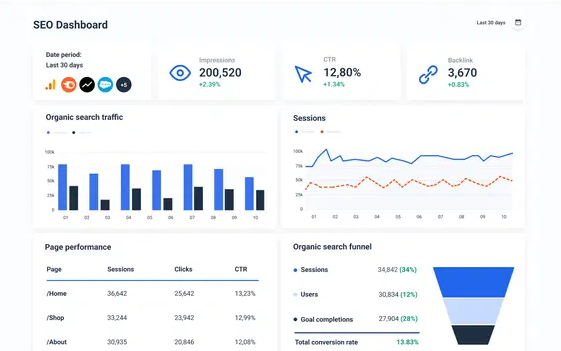
You can’t improve what you can’t measure, and spreadsheets aren’t enough. When you’re moving fast, you need a clear view of what’s working and what isn’t.
Good reporting goes beyond charts; it’s about making sharper decisions with every new campaign.
That’s why your CMS-like system should help you track:
This is about feeding those insights back into production. That way, your next batch of content starts smarter with help from self-service analytics tools and real-time analytics integrations.
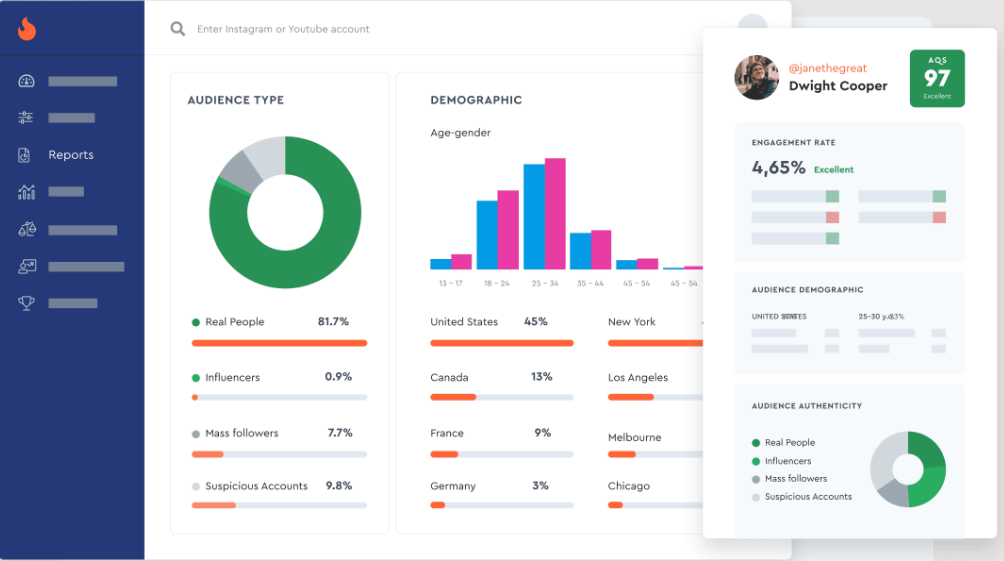
Missing spend data cuts into the margin. Poor asset tracking kills reuse. Your system should give you a clear view of:
This goes beyond budgeting; it’s about making smarter decisions. If a piece of content costs $500 and drives zero results, you need to know that. If you’re repurposing assets across campaigns, you need visibility on usage and rights.
And if you’re running multiple clients or brands? This level of clarity is mandatory.
Legal mistakes are expensive. And UGC opens the door to all kinds of risk: improper disclosures, expired rights, and missing contracts. Your CMS-style system should cover:
The goal is simple: protect the team from publishing what shouldn’t go live. A misstep here would cost credibility and budget.
Great content shouldn’t be used once. That’s why high-performing teams squeeze every drop of value from what they produce by adapting, resizing, and redeploying assets across channels.
So, your system should support:
Repurposing manually works on a small scale. At volume, it drains your team. CMS-style distribution features extend the shelf life of every asset, without adding hours to the workload.
Pro Tip: Repurposing is just one lever. If you’re in B2B, emotional hooks and smart creator strategies can give you the edge. Our guide on leveraging emotional and influencer marketing shows how top teams make it work.
None of these teams grabbed a plug-and-play CMS. Instead, they created their own systems to handle what off-the-shelf tools couldn’t: asset chaos, workflow delays, scattered approvals, and missing performance data.
It started with pressure: too many creators, too much content, and timelines that didn’t wait. The solution wasn’t a shiny platform, but smart systems built around real production needs.
Here’s what that looks like in action:
inBeat runs influencer and UGC campaigns at volume, blending production with process. This agency is known for turning micro-influencer content into scalable assets that fuel paid and organic growth.
In their campaign for Native, for instance, they produced over 1,000 pieces of content. While doing that, they didn’t lose control of a single step.

They built a structured system around:
Everything moved fast, but nothing got lost. They applied the same thinking for clients like Hurom, building a UGC content library, testing variations, and feeding performance data back into production.
They don’t call it a CMS. But it does the job of one.
Known for blending influencer marketing with custom tech, IZEA builds internal systems that keep creative and logistics in sync.
A good example is their campaign for Hidden Valley Ranch. They worked with 14 food creators to deliver recipe content across Instagram, Pinterest, and Stories.
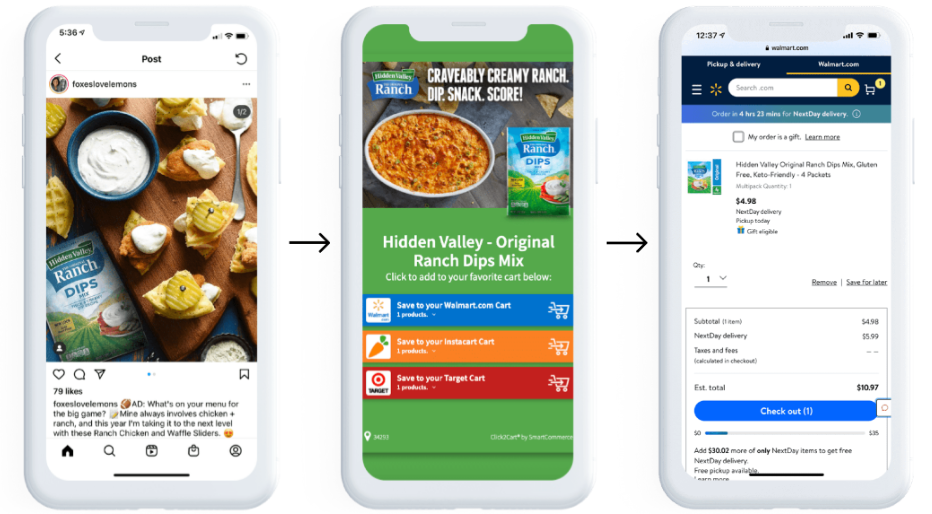
They handled:
None of that happens without tight systems. Their stack mirrored core CMS features: workflow visibility, asset control, and structured delivery.
And because they were working across formats and platforms, everything had to move fast. That’s where a CMS-style structure made the difference: every creator, asset, and placement stayed on track.
The last example comes from Socially Powerful. This global agency runs influencer campaigns powered by its proprietary tech platform, ARIA.
For TikTok’s B2B launch, they built a content engine designed to engage small business owners.
The system delivered:
Instead of relying on off-the-shelf tools, they used a CMS-style structure adapted to fit UGC workflows and paid media velocity.

There’s no universal tool that fits every team. But you can evaluate platforms (or build your own stack) based on the CMS attributes that matter to your content workflow.
Here’s how to choose with clarity:
Start with your actual operation, not what the platform promises. So, ask yourself:
Map these realities to pain points. If you’re losing track of approvals, you need stronger feedback flows. If your team is re-creating assets every time, you need better content reuse.
An all-in-one tool isn’t the answer. What actually works is a CMS integration that fits into the systems your team already runs on.
Influencer marketing teams already rely on a mix of creative, tracking, and communication tools. That’s why your CMS should work alongside those, not replace them.
Look for:
Beyond saving time, strong integrations reduce friction across the entire content workflow. Teams waste less energy jumping between tools and spend more time producing, reviewing, and optimizing content.
And the numbers say it all: 57.5% of marketers use third-party platforms to run influencer campaigns. That highlights a clear point: most teams are already combining tools. The right CMS should connect with that stack.
A CMS can look great in a demo and still fail under pressure. The only way to know if it works for your team is to run a real test. Look for:
Simulate your actual workflow: brief → upload → feedback → approval → publish. If that process feels clunky, slow, or confusing, it won’t scale with you.
Pro Tip: According to DemandSage, 63% of influencer marketers plan to use AI in their campaigns, and 64% would apply it to influencer identification. So, make sure your system can support that level of automation, including future integrations with tools powered by Generative AI.
Short-term needs are easy to meet. Long-term growth? Not so much.
Before you commit, make sure the system can scale with your volume, team size, and complexity. You’ll want to evaluate:
In addition, a report by WP Engine found that 82% of businesses plan to switch their CMS, and 56% are adding more than one CMS to their stack. That tells you most systems fail to keep up, so flexibility and extensibility are mandatory.
In other words, it’s not just about what the CMS offers now; what matters is how well it adapts when your needs shift. A rigid setup locks you in. But a flexible one grows with you, supports new workflows, and won’t crumble the moment your team scales up or diversifies.
Pro Tip:Choosing a CMS that grows with you matters more than it sounds. Our breakdown of cloud CMS features can help you spot what’s flexible and what’s going to break later.
Some platforms look polished but break down fast under real production pressure. Others feel flexible until you try to scale.
So, avoid systems that:
If your team works with creators, paid media, and content creation at scale, you need a system that can actually keep up.
Let’s be clear: teams that scale influencer content don’t rely on luck or scattered tools. They’ve built a structure that holds up under pressure.
These teams aren’t running on legacy CMS tools or chasing files across folders and chat threads. Actually, they move fast because the workflow is clear, approvals are quick, and everyone knows where the content stands.
In short, CMS features are what hold the entire operation together.
If your team’s producing at volume, now’s the time to tighten the system behind it.
Looking for more free resources? Head to Wordable’s blog page to read more about influencer marketing and SEO tools.