


Contact forms play a central role in digital marketing and lead generation. They act as a direct bridge between a brand and its audience. A simple form on a website can guide a visitor from interest to action. With search competition rising and customer expectations growing, brands need clear and reliable communication pathways.
A well-structured Contact Form helps achieve that goal by collecting the right information, routing each message, and starting new customer relationships smoothly. Research from Salesforce shows that 71% of consumers expect companies to communicate with them in real time.
A contact form supports this need when it works with automated email notifications, segmentation tools, workflow automation tools, and customer support systems¹. Even with chat tools and social channels growing, forms remain a core part of marketing funnels because they start conversations in an organized and measurable way.
This article explains why contact forms still matter, how they influence conversions, and how you can build high-performing forms that support lead generation and strong customer experience.
Many businesses rely on live chat, phone calls, AI chatbot tools, and social media messages. While these options help, contact forms remain one of the most reliable ways to reach people. A form gives structure to the communication. It captures details that support team members can use to solve issues or qualify leads.
HubSpot’s research on high-performing Contact Us pages shows that users prefer simple forms with clear expectations. A form also reduces the friction that comes with open-ended communication. Visitors know what to fill out, how long it takes, and which details will help the support or sales team respond faster.
Forms also help with data accuracy. Unlike messages sent through social media or email, a form collects the exact inputs you need. This leads to fewer misunderstandings and more targeted replies.
A well-designed contact form improves user experience by guiding visitors with clarity. Layout, simplicity, and clear instructions drive higher completion rates (Source: Jotform). A strong layout uses short fields, grouped content, and labels that help users understand what is needed.
A clean structure lowers abandonment rates (Source: GetSiteControl). When users feel confident and safe, they complete the form with less hesitation. Good forms avoid long blocks of text. They keep friction low. They use only the fields needed for support requests, sales questions, or Feedback Form submissions.
Conversion rates also improve when a form reduces the cognitive load. Each extra field can lead to a drop in submissions. A study by HubSpot found that forms with fewer than five fields tend to convert significantly better than longer forms. Users appreciate short steps and fast submissions.
Your navigation menu also affects form performance. If visitors struggle to find the Contact Us page, you lose leads before they reach the form. A clear menu link improves access and reduces the time users spend searching.
Brand voice matters too. A form speaks for the company. Friendly instructions and clear labels help reflect that voice. A friendly contact form encourages users to reach out without feeling overwhelmed or confused.
High-performing forms use modern features that help automate tasks, guide users, and ease communication for both sides.
Here are key features backed by research and industry examples:
Conditional logic hides or shows fields based on user input. This reduces clutter and improves clarity. It also keeps the form short, which increases completion rates. Conditional fields improve accuracy because users only see relevant questions.
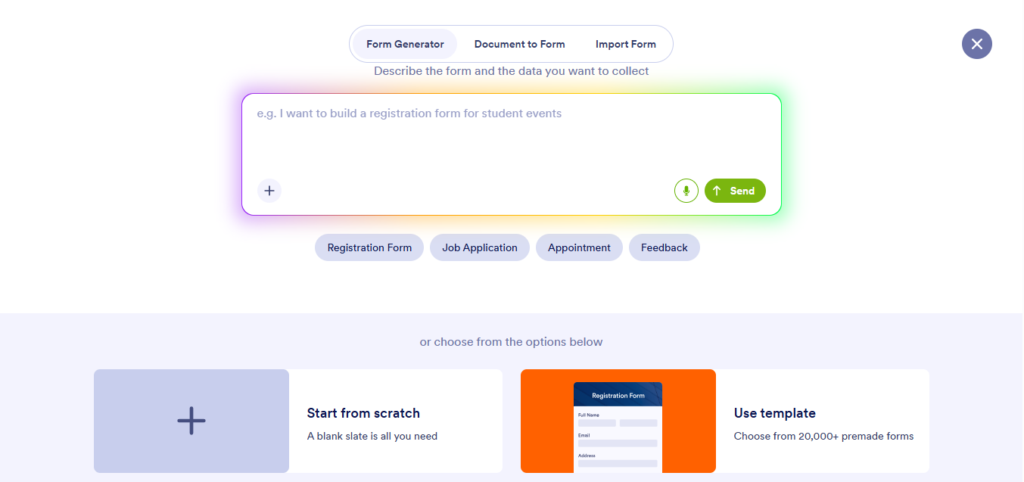
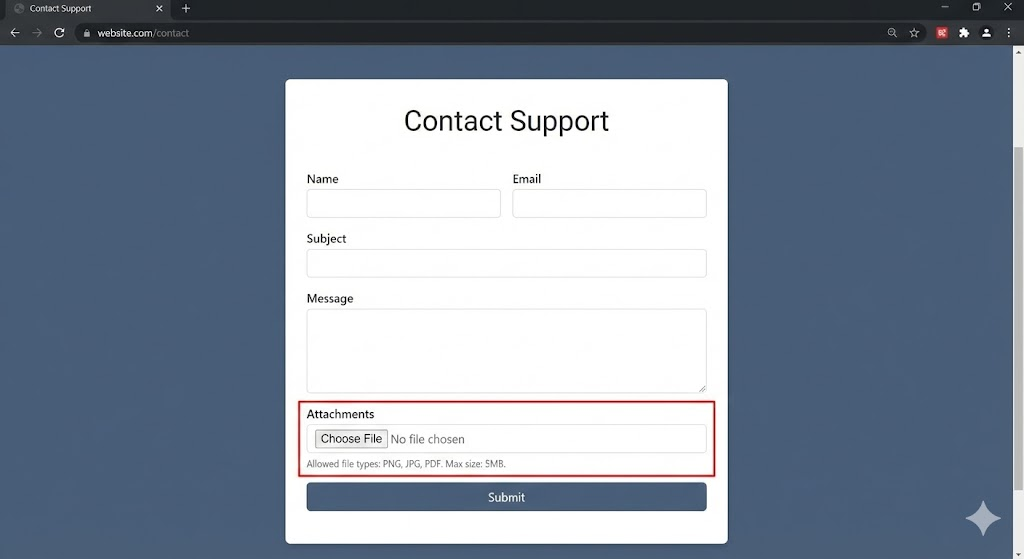
Source: Gemini
File upload options help users provide screenshots, documents, or reference files. Support teams resolve issues faster when they receive complete details upfront. For teams handling a high volume of visual files, having a centralized system helps keep uploads organized, secure, and easy to access across departments.
When those uploads include invoices, reports, or receipts in PDF format, teams often need to convert PDF to Excel doc so tables, numbers, and structured data can be edited, tracked, or analyzed in a spreadsheet.
Email notifications send alerts to staff members after each submission. This keeps the support team updated. You can also send automated replies to the user with clear next steps.
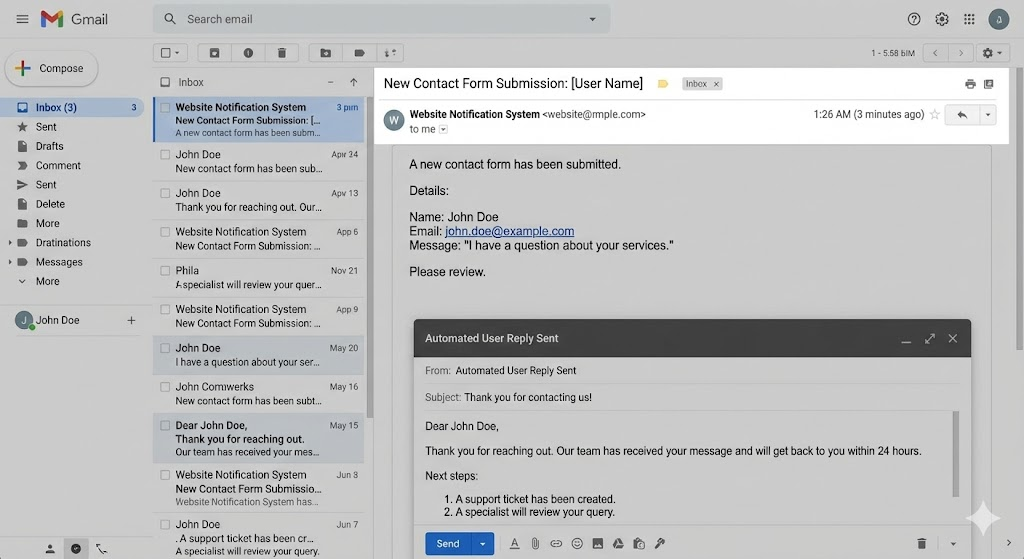
Source: Gemini
Modern forms let you route support requests based on type. This helps each support page or team handle relevant issues.
As of Q2 2025, around 62% of global traffic comes from mobile devices, according to Statista. Forms must load quickly, adapt to small screens, and support touch interactions. A mobile-friendly design reduces form abandonment.
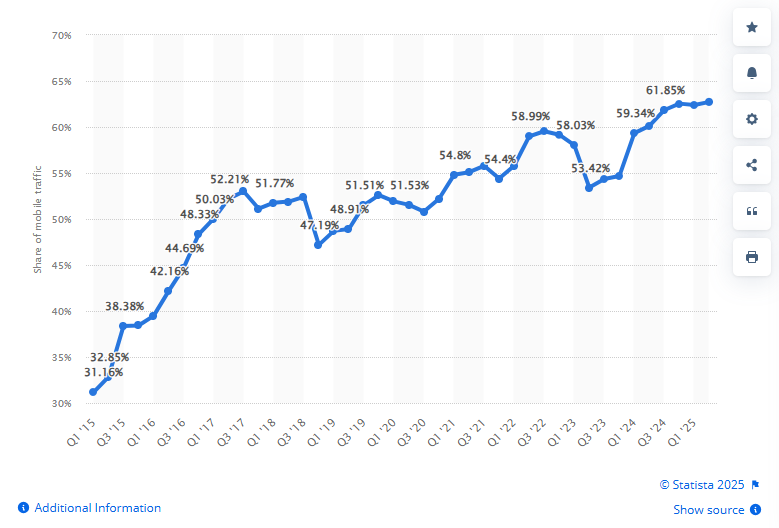
Source: Statista
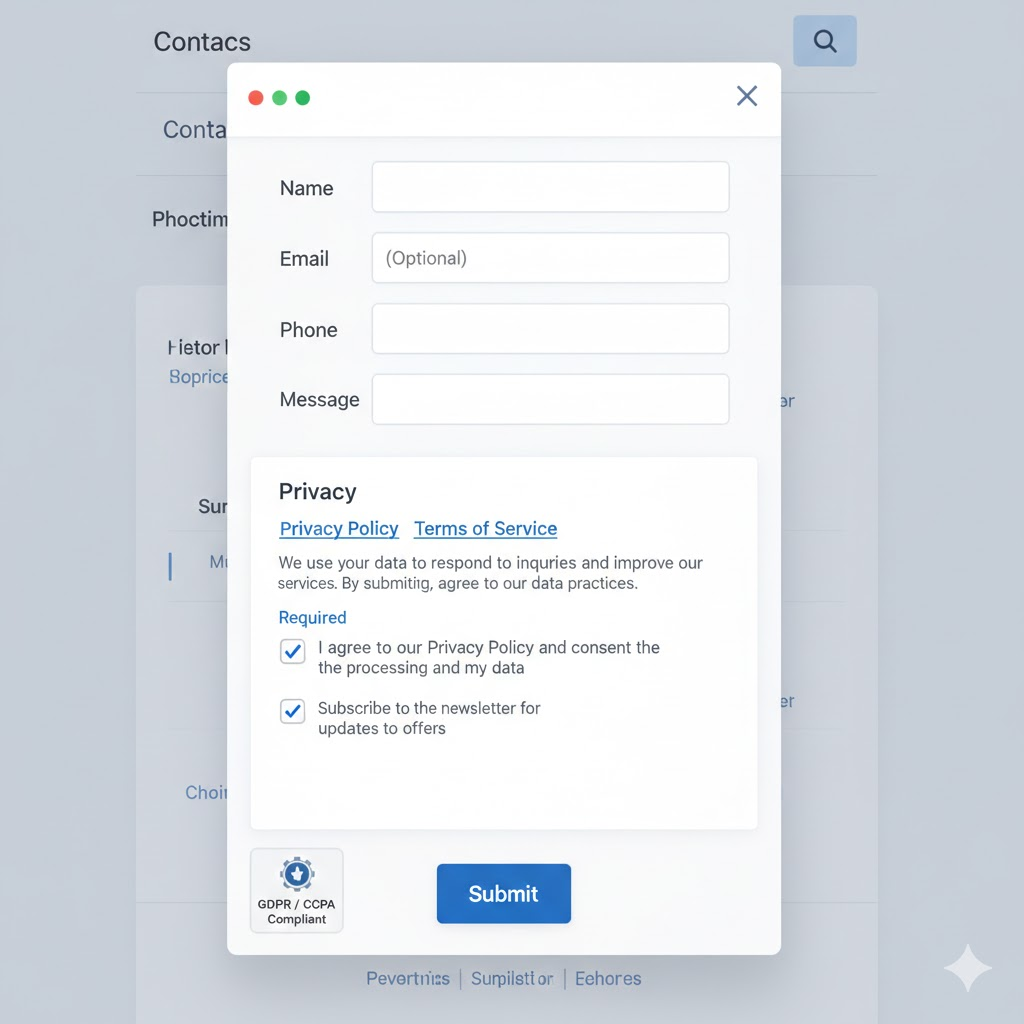
Users want clarity on how their data is used. High-performing forms include privacy policy links, explanations of data use, and checkboxes that comply with privacy regulations such as GDPR and CCPA.
Source: Gemini
Forms that send leads directly into email marketing tools help with segmentation and promotional emails. This makes follow-up simple and helps marketers automate early touchpoints.
Pairing your contact forms with an easy-to-use CRM platform helps keep each new enquiry in one place. It becomes easier to assign ownership, track follow-up, and set reminders so leads don’t go cold. While email automation handles segmentation and nurture, the CRM helps manage conversations, notes, and next steps.
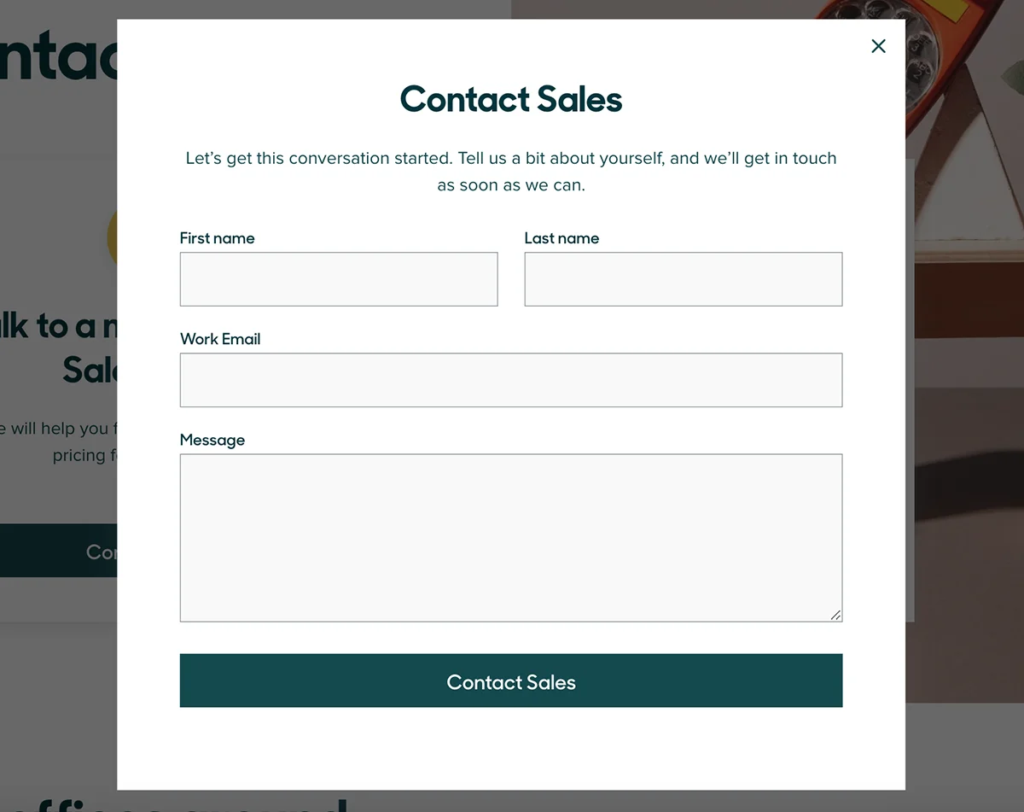
Spam submissions drain time and resources. Strong forms use CAPTCHA tools, timed submissions, or hidden fields to reduce unwanted messages.
Source: LTHEME
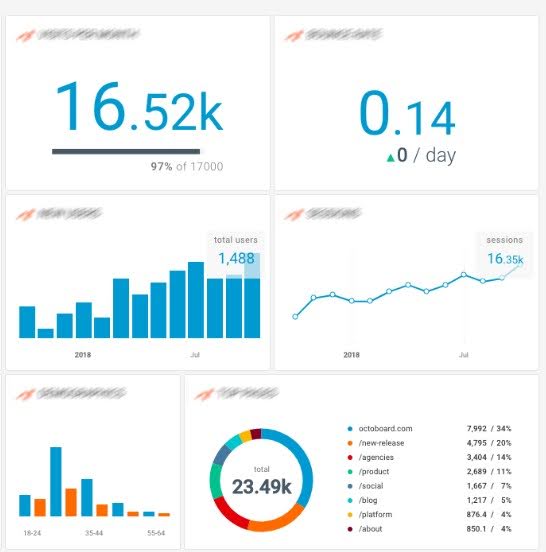
Contact forms help collect leads in a structured manner. Each submission becomes a data point that guides future marketing, especially when synced with a team productivity and collaboration tool that keeps sales and marketing aligned. A form builder with strong integrations can send leads to email marketing systems like Constant Contact or similar platforms.
Source: Octoboard
Forms help with segmentation. When users select topics, budgets, or service interests, you can automatically tag their data. This leads to more relevant promotional emails. A segmented list increases engagement. MailChimp’s data shows that segmented campaigns can achieve open rates up to 14.31% higher than non-segmented lists.
Forms also support lead scoring. When a user fills a detailed Contact Form that matches ideal client traits, your sales team can prioritize that lead. Forms become the first step in a funnel that captures interest, qualifies the user, and triggers follow-up steps.
For customer support, forms capture structured support requests that route to the correct team. They reduce confusion and shorten resolution time. When visual references are involved, storing screenshots and attachments in an image database helps teams quickly access context and respond accurately. A form that captures the right details makes this possible.

Source: Publii
Brands use many contact methods. Each option brings benefits, but forms remain central for structured communication.
Live chat offers real-time help, which users value. Zendesk reports that 42% of customers prefer chat. However, chat depends on staff availability. Forms collect details even when the support team is offline. They also allow for longer or more complex reports.
Beside forms, modern technologies like AI-powered systems are playing a bigger role in supporting customer interactions. These systems can automatically collect and organize information, ensuring no request is missed. Similarly, an AI receptionist can handle customer queries and data collection even when staff members are unavailable, ensuring that communication remains uninterrupted and organized at all times.
Best use case: Live chat works best for quick questions and real-time assistance, while forms are better for detailed or non-urgent requests.
AI chatbot and AI avatar tools handle quick questions and simple tasks. They help reduce teams’ workloads. Still, many users prefer forms when they need to explain issues in detail or attach files. A form also saves data in a clean, structured format.
Best use case: Chatbots are ideal for FAQs and simple workflows, while forms are best for complex issues that need human review.
Social platforms work well for quick outreach, but messages can get lost among notifications. Forms capture structured information, protect privacy, and give the support team a reliable way to track each message.
Best use case: Social media is best for casual or public interactions, while forms are best for private, trackable communication.
Phone support works best for urgent or sensitive issues. However, it does not scale well. Forms help businesses filter requests and respond based on priority.
Best use case: Phone support is best for urgent or emotional issues, while forms support scalable and organized handling.
Email messages vary in length and structure. A form guides the user to include all the necessary details. This results in fewer back-and-forth messages.
Best use case: Email works for ongoing conversations, while forms are best for first contact and structured requests.
While each contact method has its place, forms offer the strongest structure for lead generation and organized customer support.
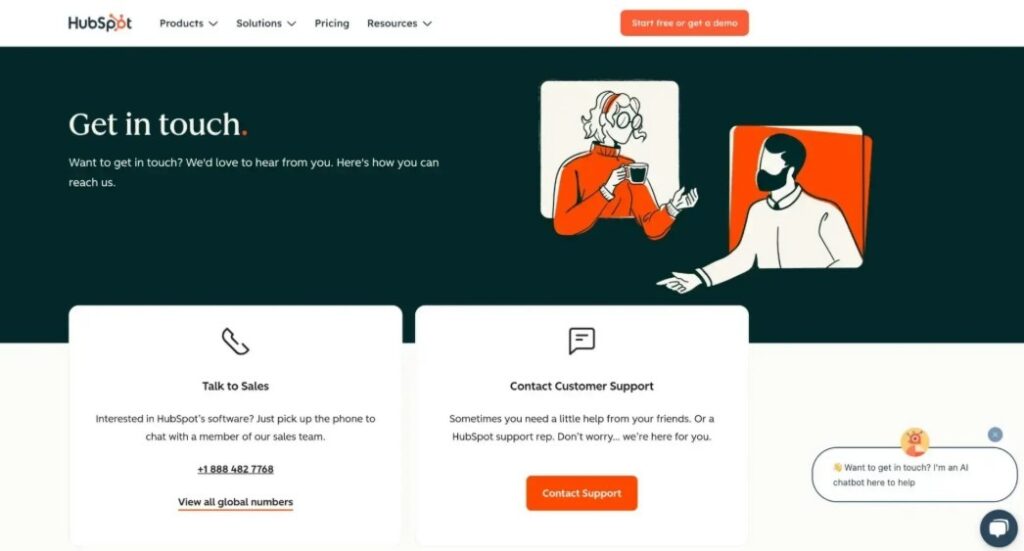
A good contact page does more than display a form. It guides the visitor with clarity. HubSpot’s examples show that layout, instructions, and trust elements play a key role.
Source: HubSpot
Here are practices that help:
Place your contact link in a visible area. Users should not hunt for ways to reach you. A simple link in the top Navigation Menu increases engagement.
Place the form near the top. Add short instructions. Reduce distractions. Keep the design consistent with your brand voice.
Include details for support team outreach, such as email or phone, along with live chat or AI-driven chatbot options. This helps users choose the method they prefer.
State your response time. Users respond better when they know what will happen after they press submit.
Users care about data safety. A clear privacy policy link builds trust.
If you have a knowledge base or help center, place links near the form. Some users prefer self-service content.
A short form keeps users moving. Only ask for details you truly need.

Source: Sinch
Customer experience improves when forms reduce friction and give helpful guidance. A form can enhance Customer Support by collecting the details the team needs to resolve issues quickly.
Some ways to boost experience:
A friendly contact form encourages users to reach out without stress. Labels should be simple. Instructions should be clear.
When users can share screenshots or documents, the support team can solve issues faster.
Example: After adding conditional logic and file upload fields to its support form, a SaaS company reduced back-and-forth emails and resolved most issues in the first response. Customers no longer had to explain the problem multiple times, which improved satisfaction and shortened resolution time.
Conditional fields keep the form short. Users see only questions that match their situation.
Connect the form to your support page, CRM, or ticketing system. This helps team members stay organized.
Users feel confident when they receive confirmation messages. These emails should guide them on the next steps.
When forms reduce effort and improve accuracy, customers trust the brand more. This leads to stronger retention and more positive engagement.
Data protection matters. Users want to feel safe when they submit personal information. Brands must comply with privacy regulations like GDPR or CCPA. These rules require clear disclosure of data use, storage, and rights.
A strong form includes:
These steps build trust and protect the brand from compliance risks. A report by Cisco shows that 90% of consumers care about data privacy. Clear transparency improves brand reputation and long-term loyalty.
Source: Stackby
Many tools help create high-performing forms. The choice depends on your platform and goals.
Tools like Jotform, Typeform, and GetSiteControl offer templates and features such as conditional logic, file upload, and automated routing. These platforms help businesses build forms without technical skills.
Best for: Beginners, non-technical teams, and businesses that want fast setup with built-in automation.
Contact Form 7 is one of the most popular WordPress plugins. It offers flexibility, custom fields, spam protection, and integrations. It works well for websites that need simple or advanced forms with custom code.
Best for: WordPress users, developers, and teams that want full control over form behavior and styling.
Constant Contact supports email marketing and lead nurturing. When paired with a form, it helps segment leads, send promotional emails, and track engagement.
Best for: Email-heavy teams, small businesses, and marketers focused on newsletters, promotions, and email list growth.
Tools like HubSpot CRM, Zendesk, and Freshdesk connect forms to support tickets, making Customer Support faster and more organized.
Best for: Sales-driven teams, customer support departments, and businesses managing high volumes of leads or support requests.
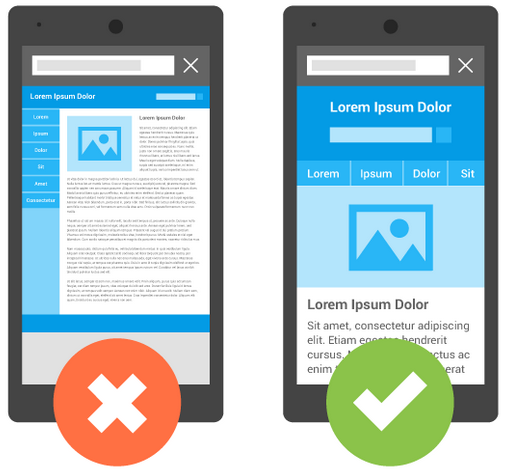
Source: MockPlus
Many brands lose leads due to avoidable mistakes. Common issues include:
Fixing these issues can lead to immediate improvements in conversions and user experience.
Here is a simple process you can follow:
Know if the form targets support requests, sales leads, or general questions.
Pick a tool that offers conditional logic, file upload, and strong integrations.
Remove unnecessary fields and keep the form simple.
Use direct and friendly language. Match your brand voice.
Test the form on multiple devices. Speed matters.
Make sure Constant Contact or your preferred tool receives data in real time.
Keep transparency clear.
Run usability tests. Fix broken fields or slow scripts.
Keep your team updated and guide users with automated replies.
Give users the option to sign in, use live chat, or access your knowledge base.
These steps help create a smooth interaction that boosts lead generation and customer satisfaction. You can also hire an e-commerce virtual assistant to efficiently manage your forms, lead follow-ups, and customer communications.
Contact forms remain one of the strongest tools in digital marketing. They help guide visitors, collect the right data, improve customer support, and support lead generation.
A well-crafted form enhances user experience and helps brands build trust through clear communication and strong privacy practices. When paired with the right form builder, integrations, and layout, a contact form becomes a reliable asset for marketers, small businesses, and website owners.
Now is the time to review your contact forms.
Audit your current contact form for clarity, speed, and structure. Remove unnecessary fields, add conditional logic, and connect it to your CRM or email marketing tools. A few small improvements can turn more visitors into qualified leads and deliver faster, more reliable customer support.
For more information on other essential WordPress Plugins, trends, and productivity hacks, check out our other Wordable blog posts!
-: Sources :-¹ – 10 Best n8n Alternatives and Competitors in 2026