


It’s one thing to start a blog. Getting WordPress blog hosting right is a whole different story, and many bloggers quietly lose traction in the space between the two.
A slow site, a platform that isn’t well-supported, or a hosting plan that falls apart as soon as traffic picks up are all examples of problems that keep good content from ever reaching an audience. And the worst part is that most of them can be avoided if you know what you’re really getting when you choose a host.
If you’re a blogger who wants a clear and honest look at WordPress hosting, this guide is for you. It’s not just a list of names; it also explains what each option means, what to look for in a hosting plan, and how to make a choice that will still work as your site grows.
Highlights
A lot of the web runs on WordPress. According to WordPress statistics, WordPress is the most popular software for building websites, powering over 43% of the internet.
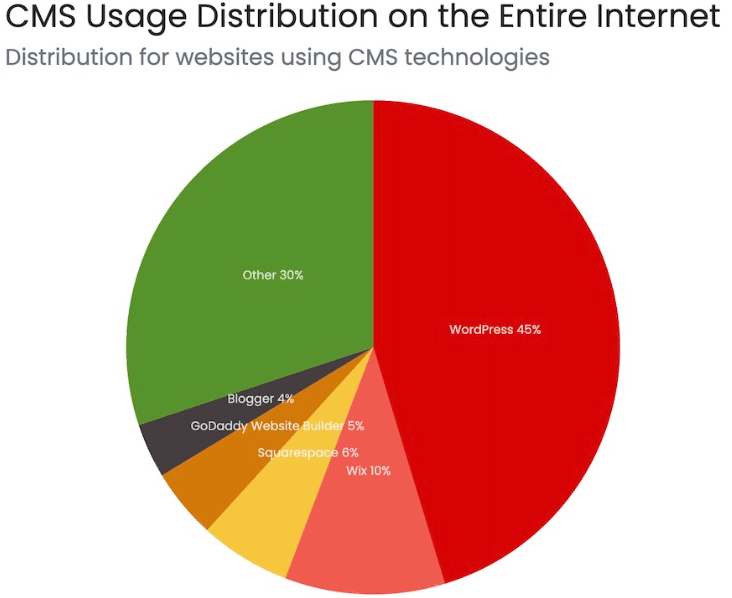
It is a flexible and well-supported Content Management System that is designed for workflows that put content first. But the platform is only one part of the whole thing. The server environment your WordPress site runs on affects almost everything, including how quickly pages load, how well the site handles traffic spikes, how safe your content and user data are, and how much technical work you have to do.
Speed is a real-life example. If your hosting plan has poor infrastructure, pages can take a long time to load, causing readers to leave. There is a lot of information about how loading time affects bounce rate, and for bloggers who want to get more organic traffic, this is not a problem you can solve by writing more content.
Security is another. A site without proper protections is more likely to be targeted over time. Shared server environments, in particular, carry risks that managed or cloud-based alternatives address more deliberately.
Here, it is worth stating plainly: the cheapest web hosting option is rarely the most cost-effective one over time. The costs of downtime, slow performance, and migration headaches tend to appear later and matter more.
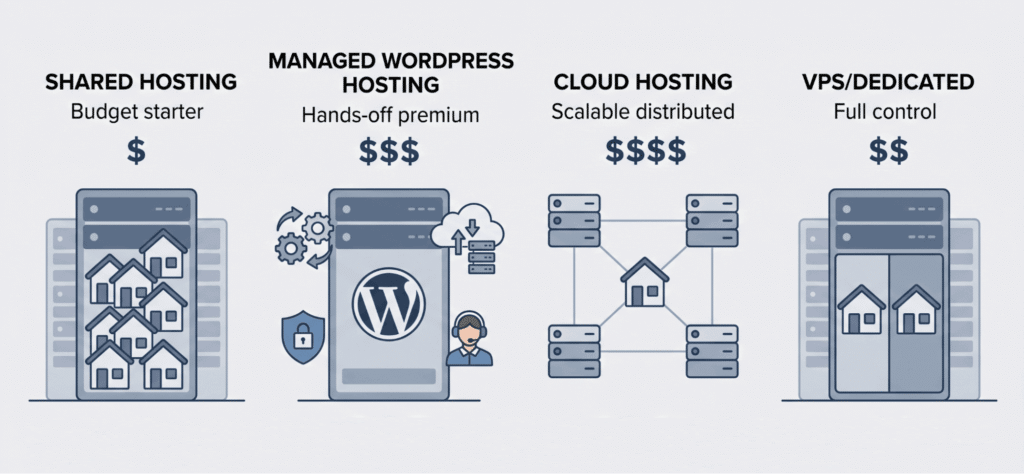
It helps to know how different types of hosting are set up before you compare specific web hosts. You can learn a lot about what you’re getting just by looking at the provider’s category.
Screenshot provided by author
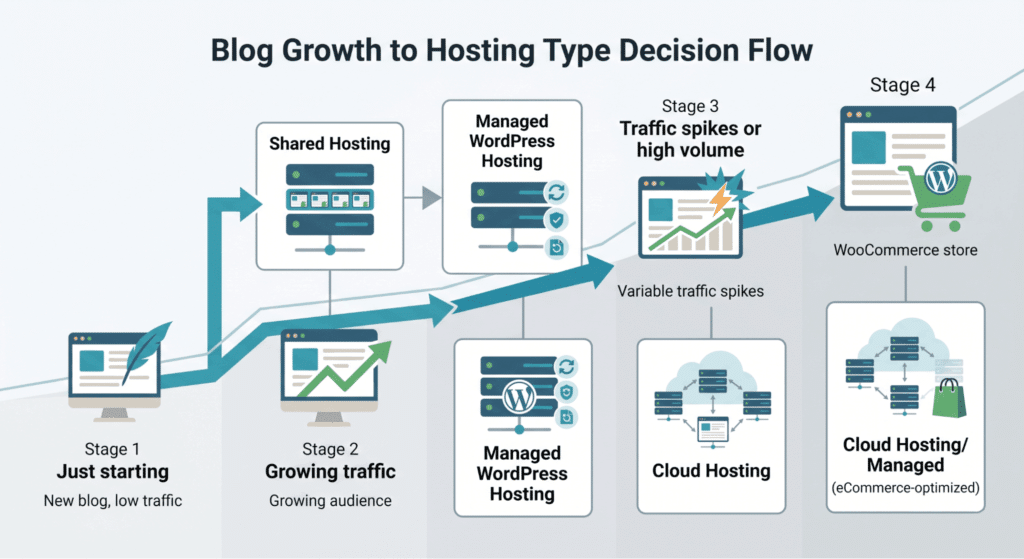
As the name suggests, shared hosting means your WordPress site runs on a server that also hosts many other sites. All of them share resources like CPU, memory, and bandwidth.
The price is the best part. Most of the time, shared hosting plans are the cheapest way for new bloggers to get started. If your site is just starting and doesn’t get much traffic, the performance tradeoffs are usually fine.
When traffic goes up, the downside becomes clear. A spike on one site can affect the others because they all share resources. There isn’t much room for growth, and performance tends to get worse before the plan gives you any clear warning.
Shared hosting makes sense as a starting point, but it has a ceiling. Growing blogs will eventually need to move off it.
Managed WordPress hosting is a less hands-on setup. The hosting provider handles server setup, automatic updates, backups, and much of the security work. You work in a WordPress environment, and the provider has already optimized for the platform.
The value here is time. For bloggers who would rather focus on content than on server management, managed WordPress hosting removes a real category of ongoing work. Expert support from teams who understand the WordPress stack specifically is also part of what you are paying for.
The tradeoff is cost. Managed options sit above shared hosting on the pricing ladder, though the gap is often justified by the additional features they include.
Cloud hosting distributes your WordPress site across a network of servers rather than a single physical machine. The practical effect is that resources can scale dynamically with traffic, and a hardware failure on one server does not bring your site down.
Cloud hosting gives bloggers a level of stability that single-server environments can’t match. This is especially true for bloggers whose content sometimes gets a lot of attention or who are working toward steady traffic growth. Cloud infrastructure can support faster response times and steadier uptime when well configured.
Cloudways is one company that has built its platform around managed cloud hosting just for WordPress users. This means that you get the speed of cloud infrastructure along with an easier way to manage it. The Cloudways WordPress hosting platform gives bloggers access to cloud performance without having to worry about server-level settings. This makes it a good choice for people who want cloud-grade infrastructure without having to learn how to use it. On the Cloudways website, you can view all the plans.
With Virtual Private Server (VPS) hosting, your WordPress site gets a separate part of a physical server with its own resources that other sites can’t use. Dedicated hosting goes even further by providing an entire server to a single site.
Both options sit at the higher end of the cost-and-complexity range. For most bloggers, they represent overkill unless traffic and technical requirements genuinely demand them.
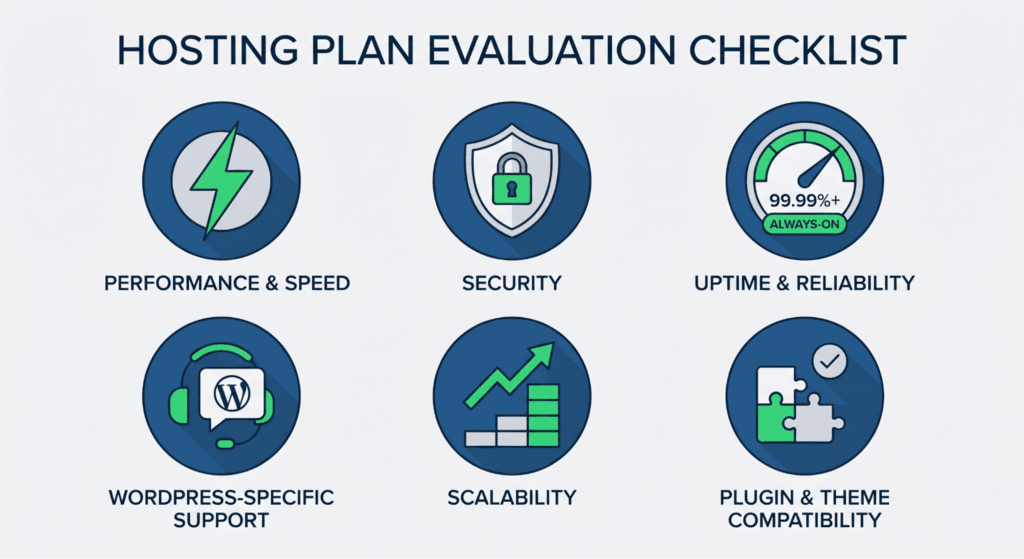
The hosting plan comparison space is cluttered with feature lists and marketing language. Below are the specifications that actually matter for a WordPress site.
Screenshot provided by author
Readers and search engines both care about speed. The infrastructure behind your host affects how quickly your WordPress site can respond to requests by sending HTML, images, and scripts to a browser.
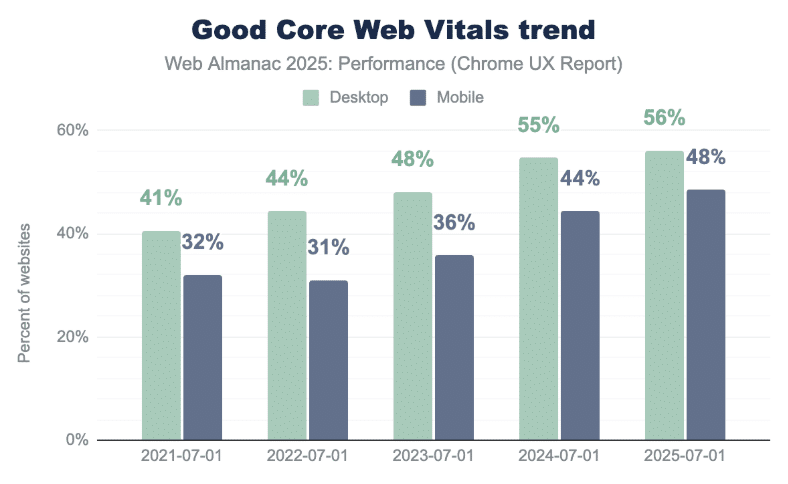
According to the HTTP Archive’s 2025 Web Almanac, only 48% of mobile pages met Core Web Vitals in 2025, while desktop performance reached 56%, indicating how much room many sites still have to improve loading speed, interactivity, and stability.
Look for hosts that provide server-level caching, content delivery networks, and modern server configurations. PHP version support is worth checking too. Older PHP versions slow down WordPress applications in ways that no amount of WordPress-side optimization can fully compensate for.
Bandwidth allocation is also a relevant figure. A hosting plan that throttles bandwidth during traffic peaks will produce exactly the kind of slowdowns that damage audience retention.
Screenshot provided by author
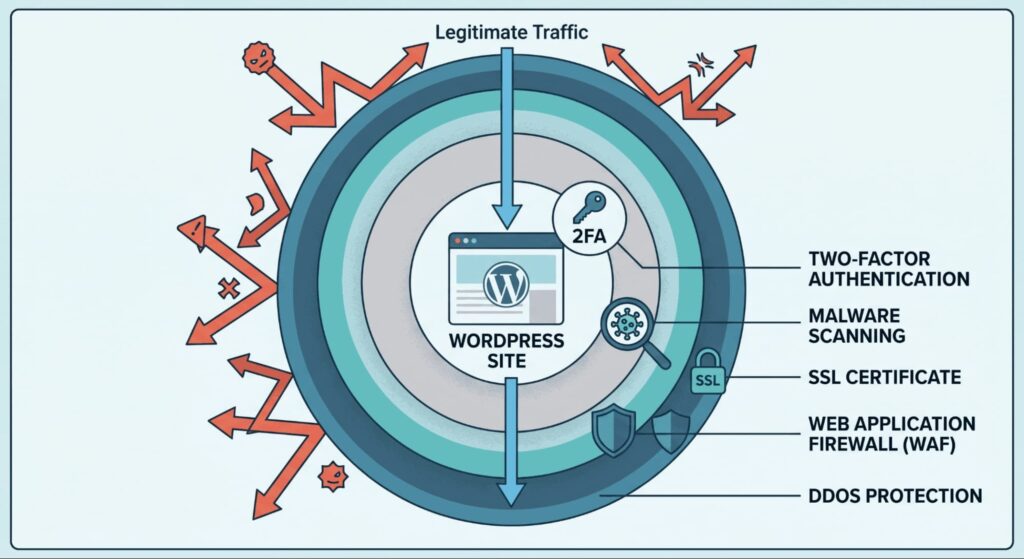
A production WordPress site needs a basic set of security features, such as an SSL certificate for encrypted connections, a firewall to block malicious traffic, and DDoS protection to withstand large attacks that could take the site offline.
Managed hosts usually include most of these features in the plan. When you use shared hosting or a self-managed VPS, extras are usually available as add-ons or need to be set up by you.
It’s a good idea to ask about malware scanning, automatic core updates, and two-factor authentication support. A WordPress site breach isn’t just an annoyance; it can hurt reader trust, search rankings, and, depending on the data the site handles, could also lead to compliance issues.
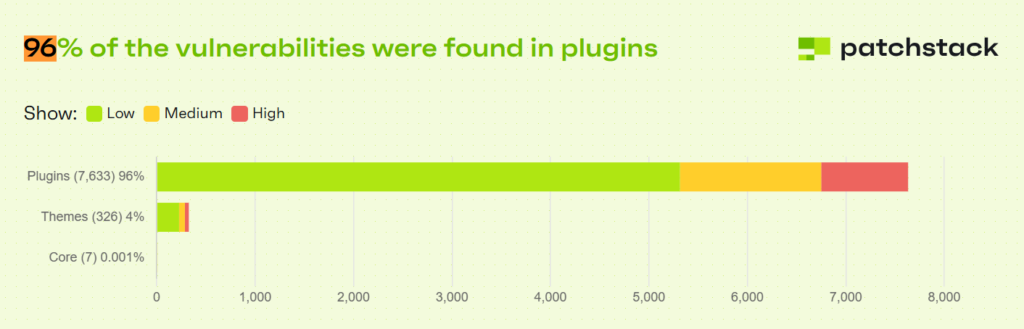
Patchstack’s 2025 WordPress security report found 7,966 new WordPress ecosystem vulnerabilities in 2024, with 96% found in plugins and 4% in themes.
Most good hosts offer an uptime guarantee of at least 99.9%. What matters more is whether the provider has the infrastructure to back it up, such as backup and failover systems, and a support team that can quickly fix problems when they arise.
Even short periods of downtime during busy times are real losses for bloggers who want to grow their audience.
Generic hosting support is not always useful when the problem is specific to WordPress. Hosts that employ WordPress experts on their support teams can diagnose and resolve issues that a general-purpose support desk simply will not recognize.
This is one of the areas where managed WordPress hosting tends to distinguish itself. The depth of WordPress knowledge available through their customer support channels is typically higher than that offered by shared hosting providers.
If your content starts attracting steady traffic, a small blog may not stay small for long. Before you make a decision, consider how easy it is to upgrade to a higher-tier hosting plan or add more resources without switching providers.
Cloud-based platforms usually handle this better than single-server setups because resources can be scaled across the infrastructure rather than relying on a single machine.
Plugins and themes for WordPress add to what your site can do, but not all hosting environments support them in the same way. Some managed hosts don’t allow certain plugins because they can slow down the site or make it less secure. Some users run into problems when certain themes do not work well with their hosting environment.
If your workflow depends on specific plugins, such as WooCommerce for an eCommerce layer, or certain premium themes, make sure they will work with the host before you sign up. A hosting plan that doesn’t work with your stack causes hard-to-figure-out problems and is expensive to fix.
A domain is needed for a WordPress site. Before you sign up, you should consider whether that is included in your hosting plan or handled separately by a registrar.
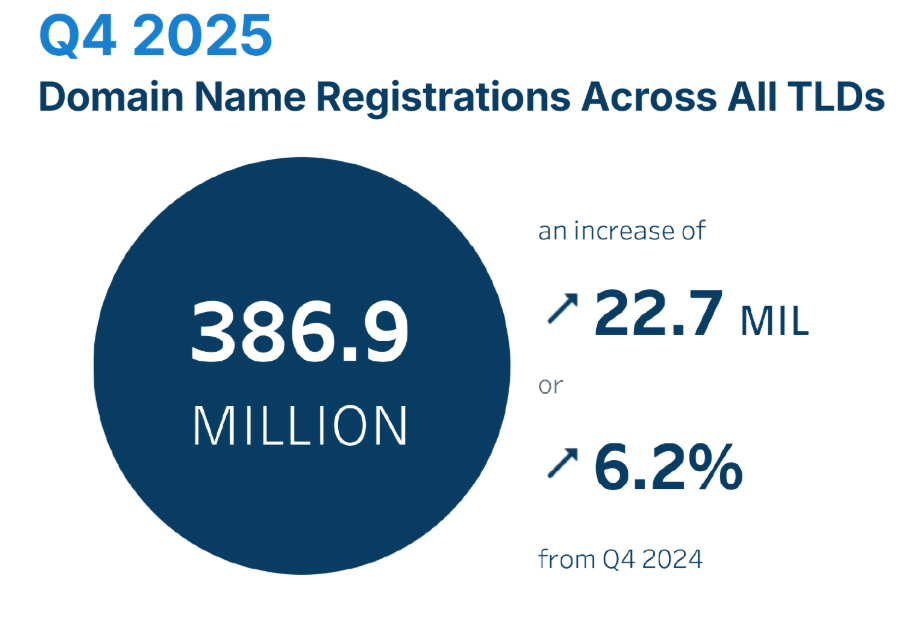
DNIB reported that the internet had 386.9 million domain name registrations across all top-level domains at the end of Q4 2025, underscoring that domain ownership is not a minor setup detail for bloggers building a long-term site.
Some hosts include free domain registration for the first year as part of their hosting plan. Others prefer that you manage domains independently, which can actually simplify things if you ever need to move providers. The registrar and the host do not have to be the same company.
Email hosting is a related consideration. Not all WordPress hosting plans include professional email. If your blogging workflow involves an email address at your domain, check whether that is included or requires a separate setup.
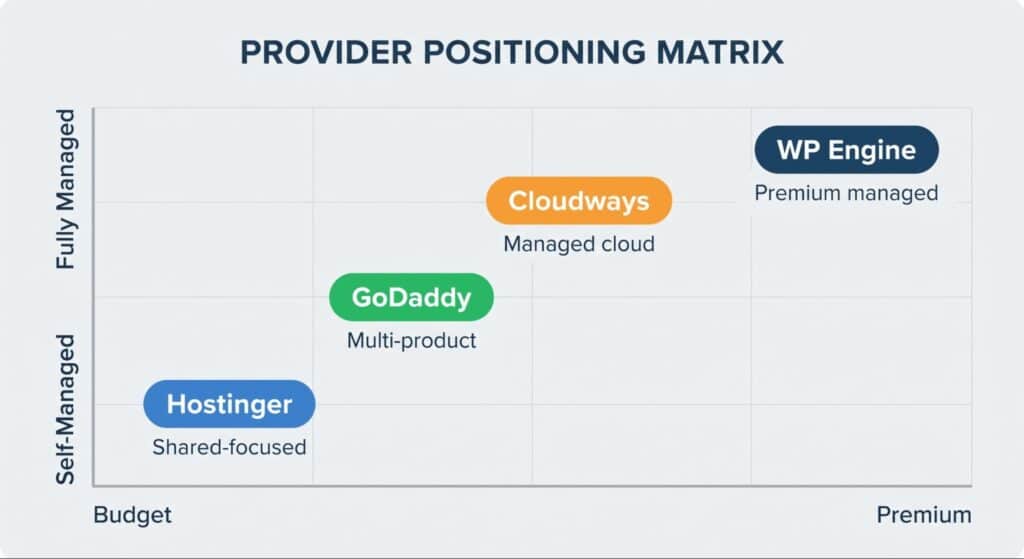
A useful way to approach host selection is to understand where the major players position themselves, rather than treating the decision as a purely feature-by-feature comparison.
The goal is not to find the most popular provider, but to match each host’s strengths and tradeoffs to the blog’s stage, traffic patterns, and technical needs.
Screenshot provided by author
Hostinger’s main selling point is its low prices. It has some of the cheapest shared hosting plans on the market, and it also has a website builder for people who want something more ready-made. Hostinger is a popular choice for bloggers who are just starting and don’t have much money.
The tradeoffs are the same as those of shared hosting: you can’t scale up as much, and performance degrades as traffic increases.
WP Engine is a high-end managed WordPress hosting company. It is aimed at sites where performance and managed support are most important, and price is less important. Their managed environment handles backups, updates, and security, and their support teams are made up of WordPress experts.
For bloggers with meaningful traffic or professional requirements, WP Engine sits toward the top of the managed hosting tier. The cost reflects that.
GoDaddy is a well-known name in website hosting and domain registration. It offers a wide range of products, including shared hosting, managed WordPress hosting, and domain services. This makes it a good choice for bloggers who want to use just one provider.
Its hosting works well enough for low-traffic sites, but it’s not optimized for WordPress like dedicated WordPress hosts are.
Cloudways has a unique place in the market. It doesn’t run its own data center; instead, it adds a managed layer on top of major cloud providers. This lets WordPress sites leverage cloud performance without needing to manage servers.
This method works especially well for bloggers who have outgrown shared hosting but aren’t ready to manage an unmanaged VPS or dedicated server yet. At this level, cloud hosting makes things a lot faster and more reliable. It often makes the cut for growing blogs because of its performance, clear pricing, and access to real WordPress-specific support resources.
The best hosting plan for a blog is not the same at every stage of its growth. A decision that makes sense when you are starting may not hold up once traffic is real and consistent.
Screenshot provided by author
A useful way to frame it:
Beyond these broad categories, the specifics of customer support quality, the comprehensiveness of the security provisions, and the provider’s track record on uptime are the differentiating factors worth investigating before you commit.
Reading independent reviews, testing support response times during a trial period, and checking whether the hosting plan’s resource limits align with your actual usage patterns are all part of due diligence that pays off later.
You can switch hosts after a site is up and running, but it could cause problems. It takes time for DNS to spread, and if a migration is not done correctly, data could be lost, or downtime could last longer than expected.
Migration can also affect SSL settings, redirects, forms, images, analytics tracking, and plugin behavior. Even when the content moves over correctly, these smaller checks are what usually determine whether the new setup feels seamless or creates cleanup work afterward.
Because of this, the choice of where to host at the beginning is more important than it might seem. If you start with a provider that can grow with your site, you are less likely to have to move at all.
Most reputable hosts will help you move, and some managed providers will even do it for you when you sign up. If you’re moving an existing WordPress site, make sure to check what migration help is included before you sign up for a new hosting plan.
Many new bloggers ask whether they should consider free hosting options. There is a free level on WordPress.com, which is the hosted version of the platform. Before you think of that tier as the same as a self-hosted WordPress site, you should know what it really includes.
The free plan on WordPress.com has many limitations. For example, you have limited storage space, ads are shown on your site that you can’t control, you can’t use all the plugins and themes you want, and you get a subdomain address instead of a custom domain. These limits quickly become problems for bloggers who want to build a real audience or make money from their content.
Self-hosted WordPress, installed on a proper web hosting plan, gives you full control over your site, your content, your plugins, and your domain. The content management experience is the same platform, but without the restrictions. The cost is the hosting plan itself, which at the shared level is low enough that the free hosted option rarely makes sense as an alternative.
This distinction matters because the path from a free hosted blog to a fully self-hosted WordPress site is not a simple toggle. It involves migration, and depending on how the free site was set up, some content and configuration work may be required. Starting with a proper web hosting plan from the beginning is generally a better use of time.
That decision becomes easier when the host can support the site beyond its earliest stage, instead of forcing another migration once the blog starts gaining traction.
When choosing WordPress blog hosting, you shouldn’t just look at the price or which provider has the most ads. The hosting plan that a WordPress site uses affects its performance, security, and long-term growth in ways that are hard to change later.
The first step is to learn about the structural differences among shared hosting, managed WordPress hosting, and cloud hosting. After that, you need to match the type of hosting to where your blog is now and where you want it to go.
Bloggers who treat hosting as an afterthought tend to run into the same set of problems: slow sites, poor support during critical moments, and avoidable migrations. The ones who get it right early spend their energy on content and audience, which is where it belongs.
If your blog is starting to gain traction, your publishing workflow needs to keep up, too. Wordable helps bloggers and content teams move Google Docs into WordPress with clean formatting, so you can spend less time fixing uploads and more time publishing consistently.