
Employee Onboarding: Tools and Best Practices for 2026

Employee Onboarding: Tools & Best Practices for Integration, Engagement, & Retention

Starting a new job comes with excitement, but also a lot of questions. 

So when onboarding feels messy, that excitement quickly turns into confusion. Missing logins. Unclear expectations. No training. Too much paperwork. These roadblocks overwhelm everyone.

And it disconnects new employees before they even start.

A structured employee onboarding process changes that. 

With the right tools, you can share policies and training early. This helps employees feel confident from day one.

Here’s a breakdown of the best tools to help you improve your onboarding workflows. 👇

Highlights

  • Poor employee onboarding is a widespread HR challenge. According to BambooHR’s 2024 State of HR report, 63% of HR teams cite onboarding as one of their biggest pain points, with 30% feeling buried in paperwork and 29% reporting that disorganized processes frustrate new hires before they even get started.
  • Effective onboarding directly improves employee engagement, productivity, and retention. Enboarder’s State of Employee Onboarding report found that when onboarding is clear and supportive, 46% of employees feel more confident in their job choice, 42% report higher engagement, and approximately 40% feel more productive — outcomes that directly impact retention and business performance.
  • Most companies use onboarding software, but very few use it effectively. While 74% of new hires use some form of onboarding software, only 19% rate those tools as “very helpful” — a gap that typically stems from mismatched tool selection rather than limitations of the onboarding technology.
  • Employee onboarding tools fall into four functional categories: end-to-end HR and onboarding suites (e.g., BambooHR, Workday), digital compliance and paperwork platforms (e.g., Rippling, Sapling), training and learning experience platforms (e.g., Trainual, Seismic Learning), and culture and engagement tools (e.g., HiBob, Talmundo) — each addressing a distinct phase of the new-hire journey.
  • Training gaps during onboarding are alarmingly common. Enboarder found that 43% of employees receive no training on job policies, and 53% don’t get the tools or resources they need to perform their role — making role-specific training platforms a critical component of any structured onboarding program.

Why streamlined onboarding is important 

According to Bamboo HR’s 2024 State of HR report, 63% of HR teams say onboarding is one of their biggest challenges.

It makes sense. 

HR teams have to juggle a host of tasks at once, including:

  • Collecting employee paperwork
  • Scheduling orientation
  • Welcoming new hires
  • Arranging IT access
  • Rolling out training
  • Setting up payroll

Without the right systems, it quickly becomes chaos.

BambooHR’s report agrees. It found that 29% of HR teams say messy onboarding creates extra work and frustrates new hires. On top of that, 30% feel buried in paperwork.

And new employees feel it too.

Take a look at the results from Enboarder’s State of Employee Onboarding report. It found that a third of employees have experienced poor onboarding. That early frustration makes it harder for them to connect with the team.
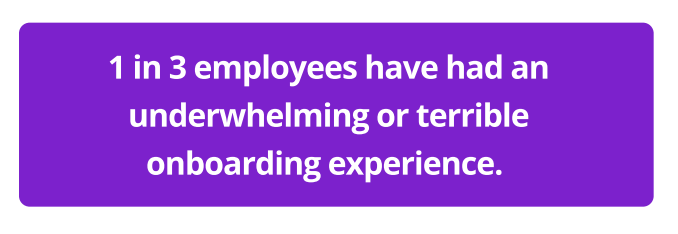
Statistics show that a third of employees have bad onboarding experiences

(Image Source)

But when onboarding is clear and supportive, it enhances employee satisfaction and performance.

As Enboarder’s report shows, when onboarding feels supportive:

  • 46% of employees feel happier with their job choice
  • Around 40% feel more productive
  • 42% feel more engaged

TL;DR: Great onboarding keeps HR organized. It also helps new hires feel confident from day one. But what makes this possible? The right tools. 👇

Best employee onboarding tools to improve integration, engagement, and retention

According to Enboarder, 74% of new hires use onboarding software. Yet only 19% rate those tools as “very helpful”. 

That gap happens when companies don’t use the right tools for each part of onboarding.

Here are four types of onboarding tools that help new hires and streamline HR work.

End-to-end HR and onboarding suites

These platforms cover the full employee journey. They bring hiring tools, onboarding portals, digital paperwork, and payroll software together. 

Here are some examples:

BambooHR

BambooHR is an easy-to-use HR platform for small and mid-sized businesses. It keeps all employee data in one place and handles everyday HR tasks. 
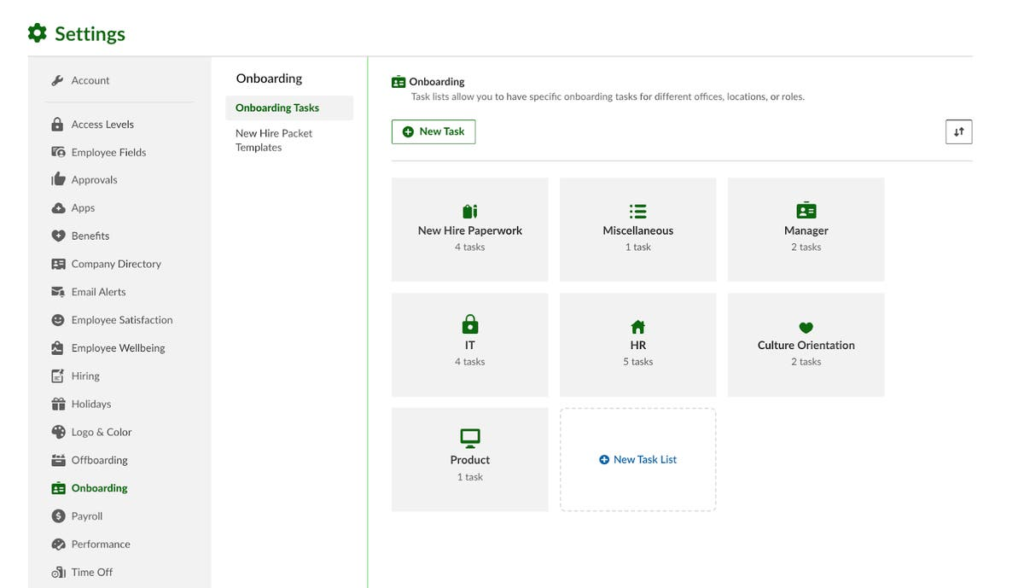
Bamboo HR’s onboarding dashboard shows a list of new onboarding tasks

(Image Source)

It also offers basic reporting to support compliance. It’s simple to set up and doesn’t need heavy technical work to get going.

Who it’s best for: Small to mid-sized companies that want a simple, all-in-one HR system.

Top features:

  • Employee self-service access for documents and requests
  • Onboarding checklists, tasks, and e-signatures
  • Central HR database and employee profiles
  • Performance reviews and goal tracking
  • Time-off tracking and basic scheduling

Pros:

  • Cuts down on paperwork with self-service tools
  • Works well for growing small businesses
  • Offers a clean and easy-to-use interface
  • Doesn’t need a heavy setup to get started
  • Sets key HR tasks on autopilot

Considerations:

  • Advanced features cost more
  • Reporting is basic

Workday

Workday is a powerful HR platform for large and global organizations.
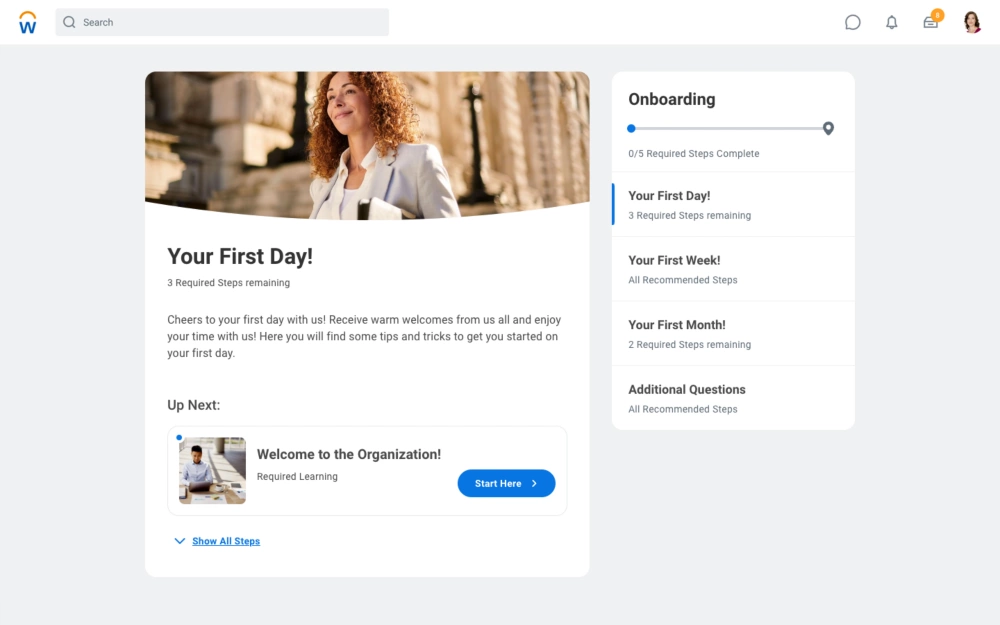
Workday’s onboarding dashboard shows employees where to start with a list of activities in the sidebar.

(Image Source)

It brings HR, payroll, learning, finance, and workforce planning together in one place. It’s ideal for tracking employee data, staying compliant, and making better HR decisions.

Who it’s best for: Large companies that want one system for HR, payroll, talent, and planning.

Top features:

  • Workforce reports and customizable dashboards
  • Built-in performance, talent, and learning tools
  • Standard onboarding and payroll workflows
  • Core HR database and employee records
  • Global payroll and benefits management

Pros:

  • Helps plan workforce needs with strong data reports
  • Protects sensitive data with strong security tools
  • Supports complex HR rules and compliance
  • Handles all major HR needs in one system
  • Scales for large and global organizations

Considerations:

  • Takes time to learn and set up
  • High upfront cost

Digital onboarding and compliance management

These tools handle the paperwork side of onboarding. (Think contracts, compliance forms, background checks, and IT access.) They’re helpful for both HR teams and recruiters.

Here are some examples:

Rippling

Rippling is a modern workforce platform that connects HR, IT, and finance. 
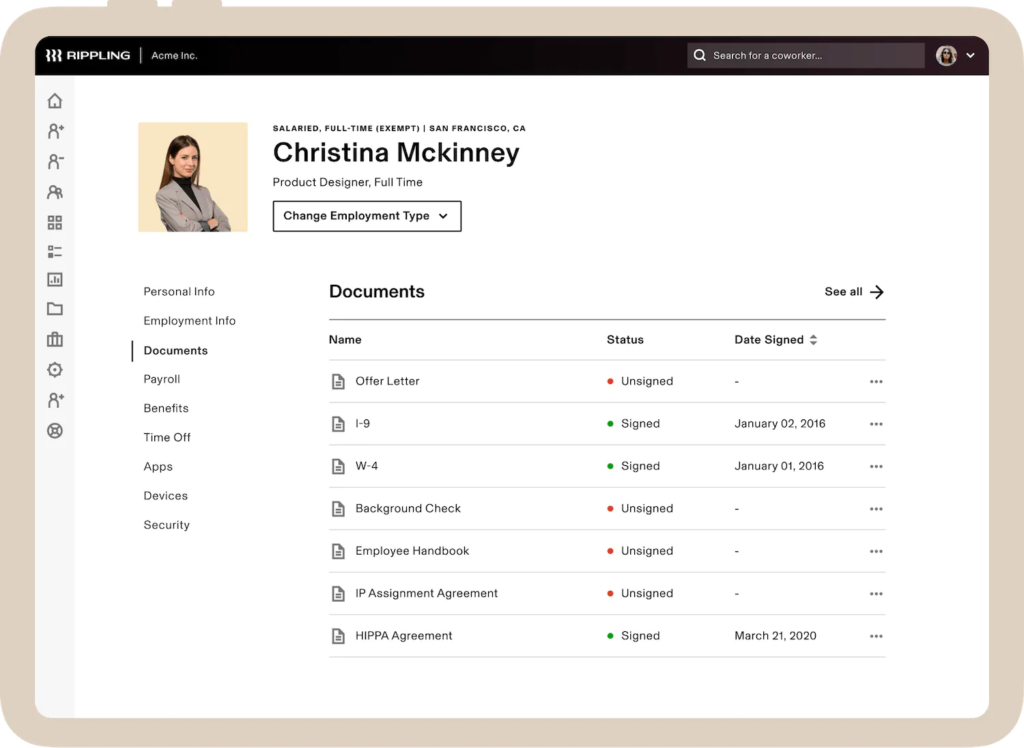
Rippling’s dashboard shows new employee documents with a sidebar for other HR activities.

(Image Source)

It helps companies hire, onboard, pay, and equip employees anywhere in the world. It also works well for remote teams that want to reduce manual back-and-forth.

Who it’s best for: Fast-growing, remote-friendly companies that want to automate HR in one place.

Top features:

  • Drag-and-drop workflow builder (no coding needed)
  • App marketplace with 500+ tool integrations
  • Global payroll and tax compliance tools
  • Device setup and app access control
  • Automated onboarding steps

Pros:

  • Supports global teams with built-in payroll tools
  • Grows easily as you add new modules
  • Reduces manual setup and handoffs
  • Automates HR, IT, and payroll tasks
  • Offers a clean, modern interface

Considerations:

  • Some users report payroll delays and screen glitches
  • Needs clear ownership to get full value

Sapling (by Kallidus)

Sapling helps HR teams manage employee lifecycle workflows in a structured way. 
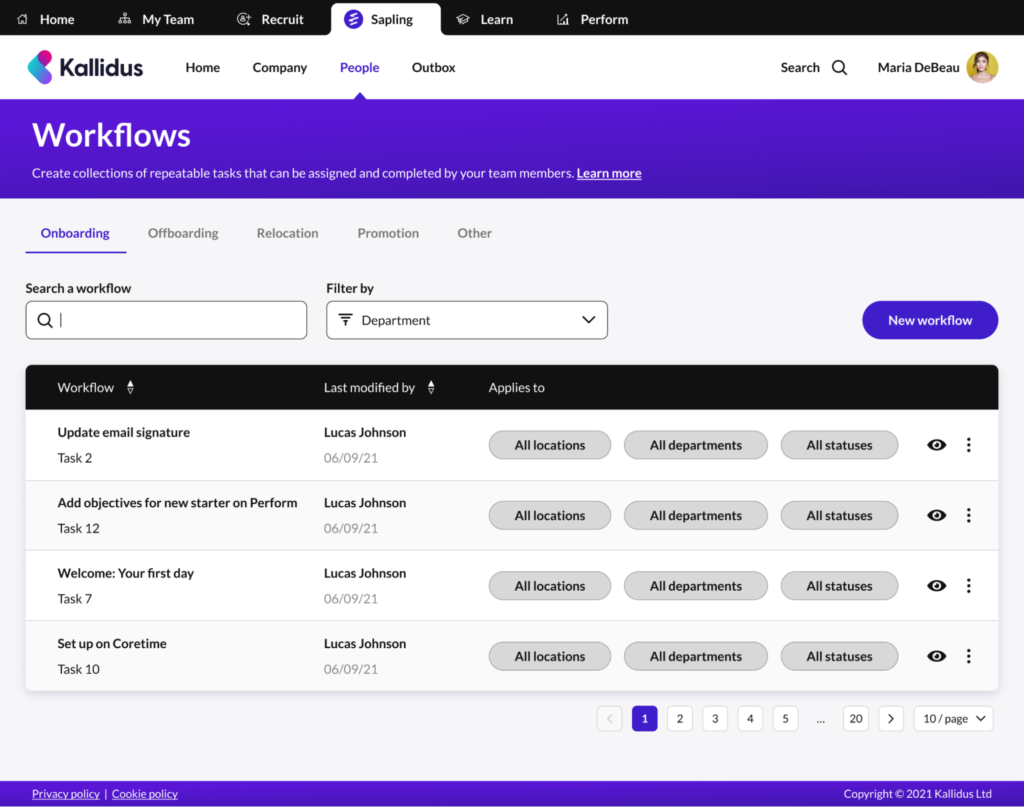
Sapling’s onboarding workflows library shows workflows for email signatures, objective, first day processes, and Coretime.

(Image Source)

It’s not an all-in-one HR tool. Sapling works alongside your existing HRIS — and adds automation and task tracking for a smoother new-hire experience.

Who it’s best for: Growing, remote companies that need automated onboarding.

Top features:

  • Self-service portal for forms and preboarding tasks
  • Workflow builder for onboarding and offboarding
  • Role-based task templates you can customize
  • IT access and equipment setup automation
  • Document storage and e-signatures

Pros:

  • Lets you tailor steps by role, team, or location
  • Keeps onboarding tasks clear and organized
  • Cuts manual work with self-service tools
  • Helps track compliance and approvals
  • Supports remote and hybrid teams

Considerations:

  • Setup takes time to build and organize
  • Reporting tools are basic

Training and learning experience platforms

According to Enboarder, 43% of employees don’t get training on job policies. Worse still, 53% don’t receive the tools or training they need to do their work. 

Training platforms solve this. They let you deliver role-based training consistently every time. (HR teams no longer have to repeat training in person.)

Here are some examples:

Trainual

Trainual is a simple training and playbook platform. 
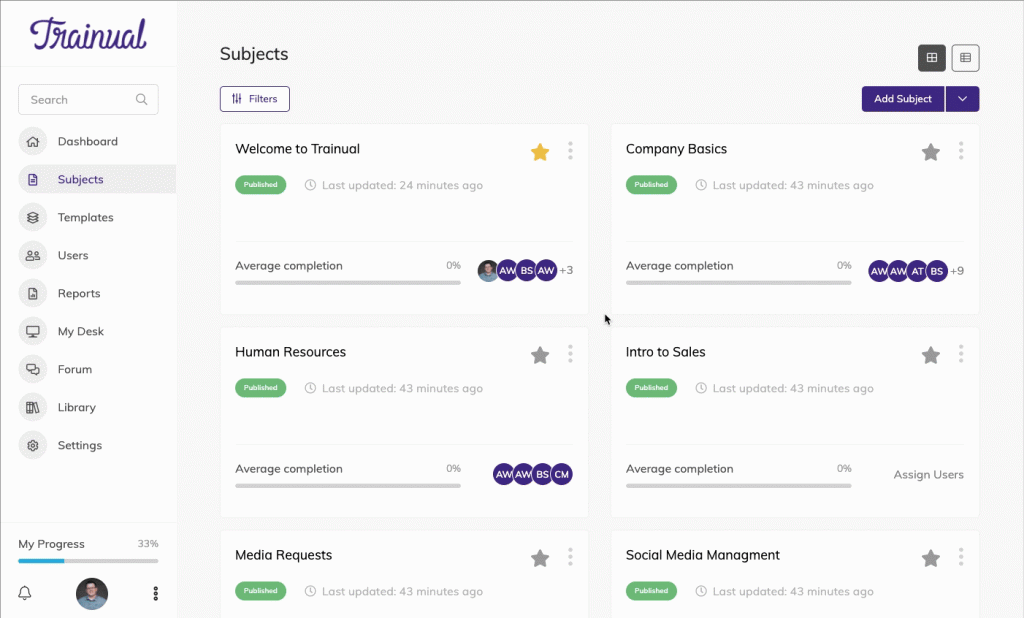
Trainual subject dashboard shows courses an employee needs to do with completion rates.

(Image Source)

It keeps all of your SOPs, policies, how-to guides, and onboarding steps together. HR teams can build repeatable, role-based training that new hires follow on their own.

Who it’s best for: SMBs that want clear, repeatable onboarding and training without a full LMS.

Top features:

  • Role-based training assignments and progress tracking
  • Multimedia support (video, screen recordings, quizzes)
  • Searchable company playbooks and policy wiki
  • AI-assisted content creation and updates
  • Process and SOP documentation library

Pros:

  • Cuts down repeat questions and manual explanations
  • Helps new hires ramp faster with self-paced learning
  • Facilitates remote and asynchronous training
  • Keeps onboarding consistent for every role

Considerations:

  • Not suitable for heavy compliance or regulated training
  • Requires other tools for payroll or HR data

Seismic Learning

Seismic Learning is a simple training tool to help build real-world skills. 
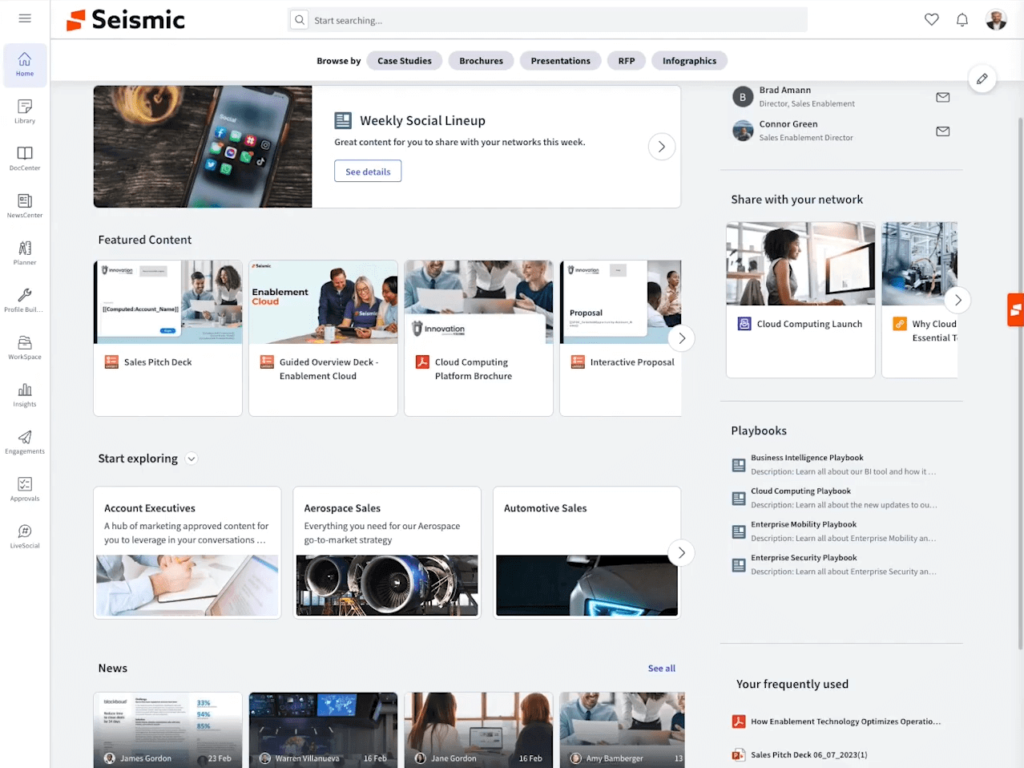
Seismic Learning’s content library shows featured content, role-based content, and news

(Image Source)

It delivers short lessons and real-world practice simulations, alongside coaching tools. It’s also designed to make training engaging and repeatable.

Who it’s best for: Teams that want interactive training for customer service, sales, or support.

Top features:

  • Shareable Content Object Reference Model (SCORM) support for reusable training content
  • Practice tools for video, chat, and scenario simulations
  • Role-based learning paths and onboarding journeys
  • Learning analytics and performance dashboards
  • Course builder with templates and rich media

Pros:

  • Provides a clean, intuitive interface for learners and admins
  • Delivers hands-on practice through real-world simulations
  • Offers fast lesson creation with ready-to-use templates
  • Accelerates onboarding with structured learning paths

Considerations:

  • Reporting and analytics are lighter than enterprise LMS tools
  • Some users note performance or navigation issues

Culture, engagement, and employee experience platforms

Gallup found that employee engagement dropped two points in 2024. This cost the world’s economy $438 billion in lost productivity

Culture and experience platforms help prevent disengagement. Their tools help new hires feel welcomed, seen, and connected from the beginning. ♥️

Here are some examples:

HiBob

HiBob blends everyday HR tasks with culture, engagement, and analytics. 
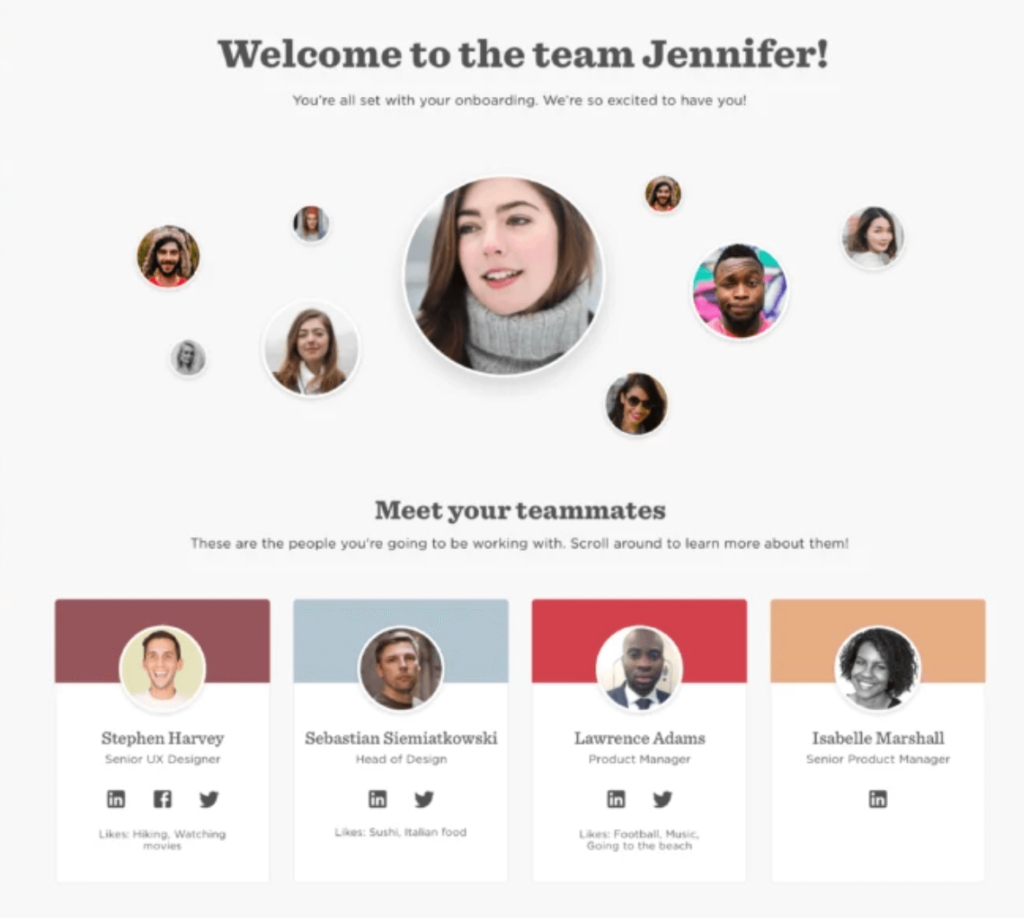
HiBob’s onboarding screen shows a welcome message and an invitation to meet teammates.

(Image Source)

It helps growing and global companies connect and support their employees. It also lets them manage HR in one place.

Who it’s best for: Growing SMBs that want an HR system with engagement and culture tools.

Top features:

  • Engagement features like surveys, recognition feeds, clubs, and anonymous feedback
  • Payroll hub with native payroll in select regions and integrations in others
  • Automated onboarding and lifecycle workflows with tasks and approvals
  • People analytics dashboards for headcount, retention, and engagement
  • Built-in performance reviews, goal tracking, and feedback cycles

Pros:

  • Combines HR, performance, payroll, and engagement in one system
  • Supports culture-building through recognition and feedback tools
  • Automates onboarding, promotions, and other lifecycle moments
  • Tracks people trends with real-time analytics and dashboards

Considerations:

  • Needs thoughtful setup to get workflows and reporting right
  • Offers less depth in specialist areas like recruiting

Talmundo

Talmundo is a specialist onboarding platform that sits alongside existing HR systems.
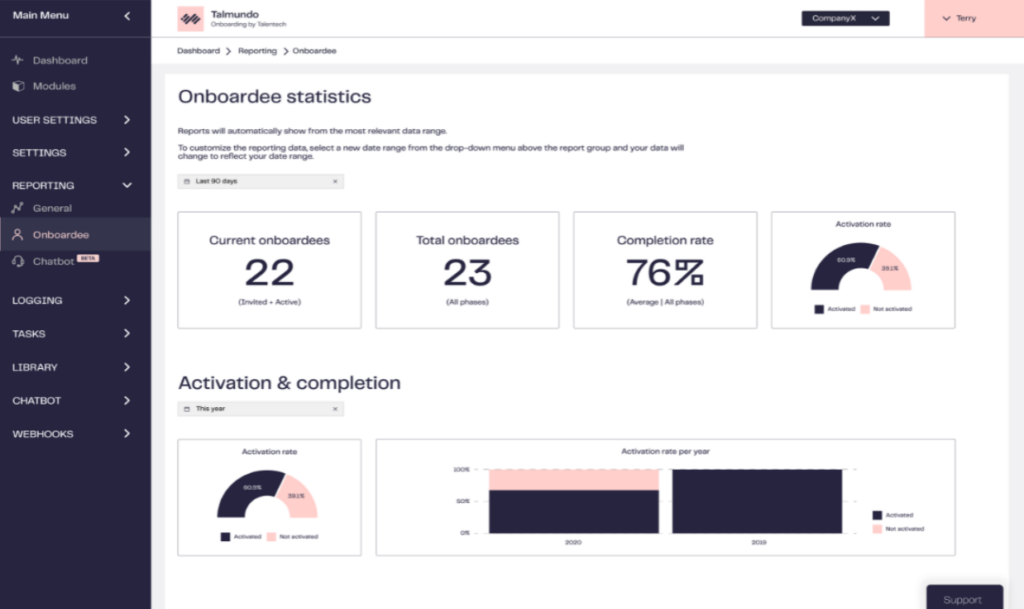
Talmundo’s onboardee analytics dashboard shows current and total onboardees, completion rate, and activation rate.

(Image Source)

It focuses on the first few months of a new hire’s onboarding, creating step-by-step journeys that help employees feel welcome and well-informed.

Who it’s best for: Companies with existing HR tools that want a branded onboarding platform.

Top features:

  • Reporting on onboarding progress, engagement, and experience scores
  • Preboarding tools with welcome content, FAQs, and digital forms
  • Customizable onboarding journeys and step-by-step timelines
  • Automated checklists, tasks, and buddy assignments
  • Mobile portal for new hires, managers, and buddies

Pros:

  • Boosts engagement and retention early in the employee journey
  • Reduces admin work through automated reminders and tasks
  • Supports hybrid and remote teams through one central hub
  • Builds engaging and personalized onboarding experiences

Considerations:

  • Adds another tool and subscription on top of existing HR platforms
  • Doesn’t handle payroll, core HR, or long-term people operations

Best practices for using tools to improve employee onboarding

The best employee onboarding experience happens when tools and people work together. Software can handle paperwork, training, and communication. But it’s your specific onboarding process that helps new hires feel ready to start.

Here are some best practices to help you get the most from your onboarding tools.

Assign clear role ownership

Use clear roles to stop delays and onboarding confusion. 

For example: 

  • HR handles paperwork and policies. 
  • IT teams set up equipment and access. 
  • Managers set goals and expectations. 

Create a complete onboarding checklist

Use an operations manual template to create an onboarding checklist so every hire follows the same steps. Include payroll setup, handbook access, SMART goals, timelines, and milestone tracking. 

(You may need to create a different checklist for various roles you hire for. For example, managers will have a different training process than front-line employees.)

Connect your tools and platforms

Link your ATS, HRIS, onboarding portal, and learning platform. This keeps data tidy and helps tasks move across teams and tools without manual work.

Support remote and in-person onboarding

Every new hire should have a supportive onboarding experience, whether they’re remote or in person. Use Welcome Days, video tutorials, and digital manuals to maintain consistency. 

Include mentoring and peer learning

Assign buddies or start a mentor program. Have mentors check in with new hires and answer questions to help them feel part of the team faster. (This is especially important if you have a mostly automated onboarding process.)

Use feedback and data to improve

Track surveys, training data, and engagement scores to find what’s working and fix what’s not.

Wrap up

Great onboarding is seamless and intentional. You need a structured path so new hires understand their roles and connect with your company culture

With the right tools, you can create clear steps that prepare new hires, so they feel ready and welcome. (Read through the tools again to find the best options for your unique goals.)

And when employees feel supported, they become engaged and stay longer. Win-win. ♥️

PS: If your employee onboarding process includes training articles or a company knowledge base, look into Wordable. It helps you publish content from Google Docs to your WordPress site in seconds. 

Employee onboarding FAQs

What is employee onboarding?

Employee onboarding means preparing new hires for their roles and helping them feel part of the team. It includes payroll setup, IT access, paperwork, training, and clear job expectations.

What tools improve employee onboarding?

Different tools support different parts of onboarding.

For example:

  • Culture and engagement tools help with recognition, feedback, and team connection
  • Compliance tools help with background checks, e-signatures, and access setup
  • End-to-end HR systems handle hiring, contracts, payroll, and paperwork
  • Training tools share SOPs, role-based lessons, and learning paths

What should you include in an employee onboarding checklist?

A strong onboarding checklist helps every new hire start with clarity and confidence. It should include:

  • Culture touchpoints like welcome messages or buddy programs
  • Employment agreements and compliance forms
  • SMART goals and milestone tracking
  • Employee handbook access
  • Workstation and IT setup
  • Training schedules
  • Payroll setup

Save time today by automating your publishing with Wordable

You do the hard work writing your content. Automate your Google Docs to WordPress publishing today.
Get Started Today
30-day Satisfaction Guarantee