


Your customers stopped waiting for the desktop version years ago. They compare prices on the train, approve invoices in a waiting room, and scroll product pages while standing in line for coffee. Mobile CMS solutions help enterprises manage and deliver content across devices. If your current system still treats mobile as an afterthought, it could be slowing down your digital transformation efforts.
This article explains what a mobile content management system does, why enterprise teams keep upgrading their stack in 2026, and how the right setup speeds up publishing, cuts technical debt, and ties content to real business results.
Highlights
A decade ago, “mobile-friendly” meant a responsive theme and a shrug. That bar is far too low now. According to Statista, mobile devices generate roughly 60% of global web traffic. That share climbs even higher across Asia-Pacific and Africa, where a smartphone is often the only way people go online.
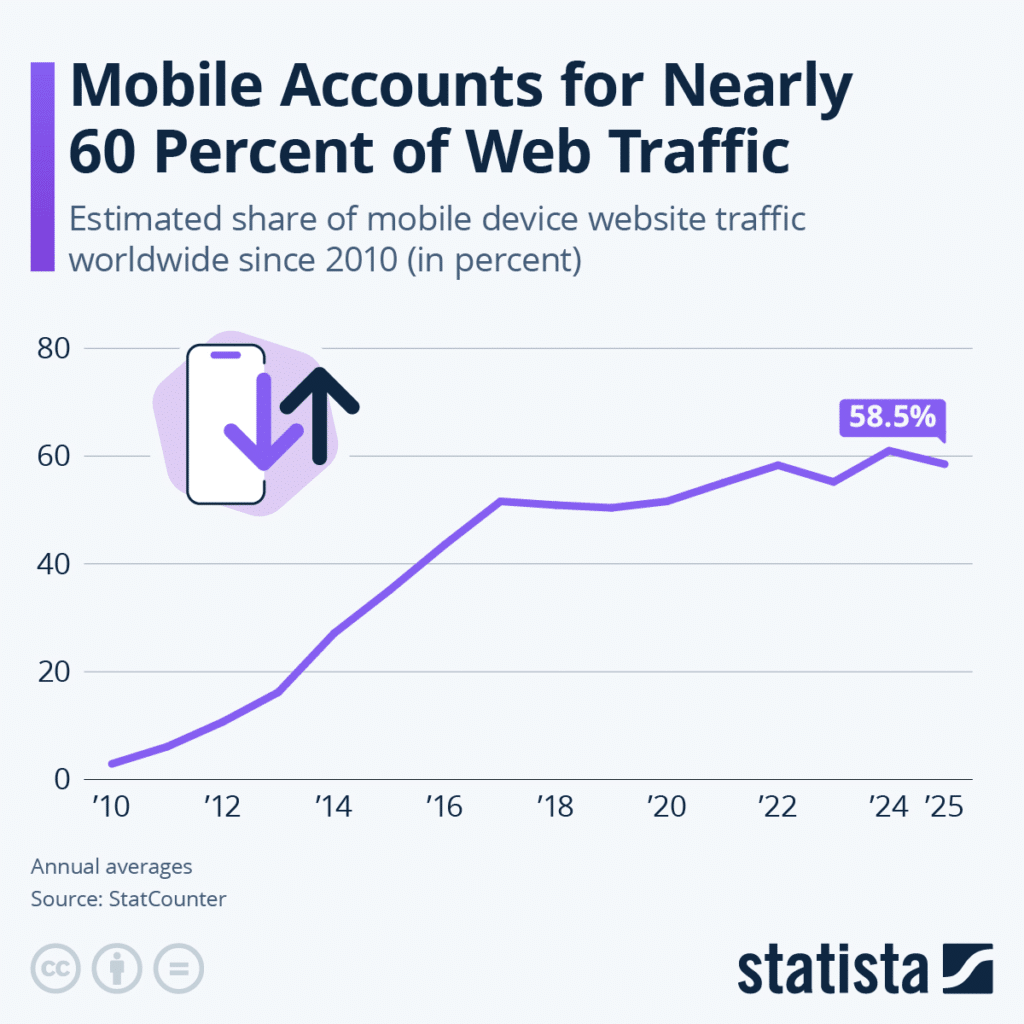
Enterprises feel this shift everywhere, not only on their public website. Field teams pull up product specs on a tablet. Sales reps close deals from an airport lounge. Staff check the internal knowledge base from a company phone between shifts. Each of these moments runs through a content system built to manage several kinds of information at once, and if that system cannot keep up, the business loses time, money, and trust.
Here is what is driving the urgency:
None of this is optional. A mobile CMS is not a nice-to-have feature bolted onto your website. It is infrastructure for how your whole business runs.
This is also where the bigger transformation story starts. A mobile-first content management system becomes far more powerful once it connects to the rest of your enterprise stack. Pair strong business process solutions with the right platform, whether that platform is a hybrid CMS or a fully headless one, and content creation, approval, and distribution move almost as fast as your team can think up the idea.
A mobile content management system is a platform built to help teams manage content and deliver content that performs well on phones, tablets, wearables, and any other screen your audience picks up.
That sounds simple, but delivering mobile-optimized experiences requires more than a responsive website or smaller versions of desktop pages. The best platforms are mobile-focused from the ground up, not an afterthought.
Mobile content management describes how a CMS supports content creation and delivery for mobile experiences, while headless architecture describes how the system separates content management from its presentation.
Responsive design adjusts how a page looks based on screen size. That is a front-end trick, and it still matters. A true mobile content management system goes further. It manages structured content that flows into a responsive website, a native mobile app, a chatbot, a smartwatch notification, or an in-store kiosk, all from one content source.
This difference matters because enterprises rarely publish to a single channel anymore. Editorial teams that once wrote one page for one site now need that same content to reach five or six destinations at once.
Most modern platforms in this category run on a headless or API-first architecture. The system that stores and manages your content sits apart from the system that displays it. Developers pull content through an API and render it however each channel needs, whether that channel is a website, a mobile app, or an in-house frontend.
Give content teams a single source of truth for that API, and cross-department confusion drops fast. This is also what makes it possible to reuse content across mobile apps without rebuilding pages from scratch for each one. Most CMSs on the market today support multiple content types out of the box, from simple text blocks to nested product data, and the better ones expose that structure through clean APIs so mobile teams never have to guess at the schema.
According to Business Research Insights, API-first adoption reached approximately 77% in 2025, reflecting growing interest in flexible content delivery across digital channels.
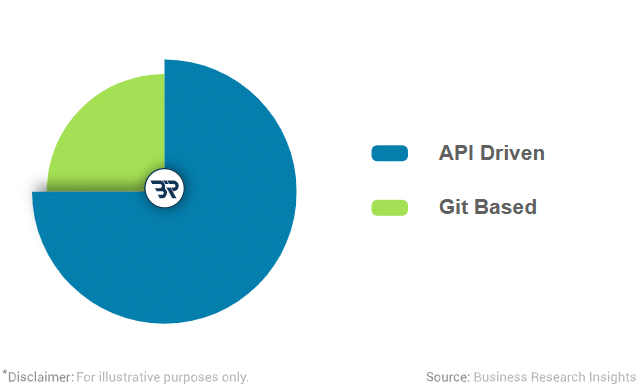
This shift reflects the growing importance of API-driven content delivery for enterprise teams. Platforms such as dotCMS illustrate the trend well, since dotCMS leans into hybrid, API-first delivery built specifically for enterprise teams that need to optimize content for mobile apps and desktop sites from a single system.
Teams with simpler publishing requirements may instead consider platforms such as Webflow, depending on their content management and governance needs.
Enterprises weighing which headless CMS platforms to shortlist often land on names like Contentful and Hygraph. Contentful built its reputation on a developer-first, API-first approach, with a backend that stores content as reusable chunks the frontend can request as needed.
Many teams choose Contentful to power their mobile app and website from one content model, since it ships with software development kits, or SDKs, that let a mobile team integrate content without a custom API layer.
That option leans on GraphQL and microservices, and both platforms offer an in-context preview, a visual editor, and other design tools, so your team can see how content will look before it goes live.
Image created by the author
Choosing a mobile content platform comes down to your team’s content modeling, governance, and cross-channel delivery requirements. If your roadmap includes mobile apps alongside your website, evaluate whether a headless or hybrid CMS can support those channels through a shared content model.
Not every platform labeled “mobile-ready” delivers what a large organization actually needs. When you choose a CMS, weigh how well it supports mobile apps against how well it supports your website, since those needs don’t always point to the same vendor. Before you sign a contract or greenlight a migration, check the platform against these core capabilities.
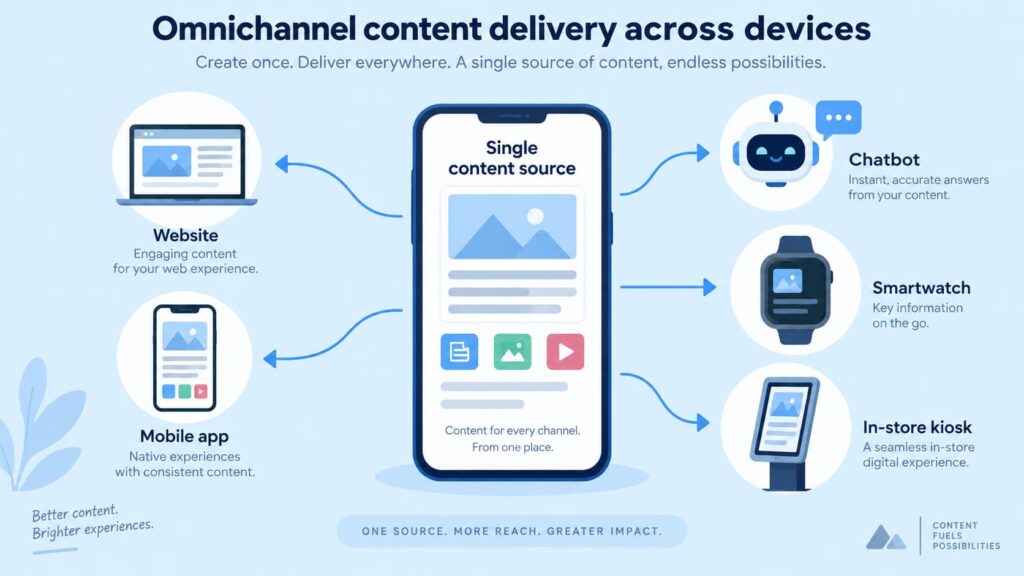
Image created by the author
Your content should travel wherever your audience goes. A strong platform structures content so your team can create content once and use it everywhere: your website, your app store listing, social media, email, and voice assistants included.
This approach kills the old habit of maintaining five versions of the same web content across five different tools, and it means a single content update reaches every channel at once instead of five separate edits, making it far easier to deliver content consistently across devices.
Mobile-first platforms increasingly build in AI-assisted personalization. The system studies behavior, location, and past visits, then serves content that actually matches what a visitor wants.
That data-driven approach is what turns a generic homepage into personalized experiences visitors actually respond to. According to Gartner’s 2026 CMO Spend Survey, marketing leaders allocate an average of 15.3% of their marketing budgets to AI initiatives.

Image created by the author
For enterprises handling sensitive customer or employee information, content governance and security require clear safeguards. Look for:
This kind of platform must deliver content quickly, even at peak traffic periods. Enterprises running global campaigns cannot afford a delivery network that buckles the moment a promotion goes viral. Prioritize platforms with built-in caching, image optimization, and edge delivery, and make sure your broader tech stack can actually support that load.
Here is where things get interesting for anyone running SEO, content, or growth at scale. This kind of platform does not just make your website look nicer on a phone. It becomes a connective layer between marketing, IT, and operations.
When your content platform ties cleanly into the rest of your enterprise systems, you stop treating “publish a page” and “run the business” as separate activities. That is the real promise of digital transformation: breaking down the walls between departments so information moves as fast as customers expect.
For example, a large retailer launching a new product line usually needs marketing to draft copy, product managers to confirm specs, legal to check compliance claims, and a localization team to translate everything into a dozen languages. Without a modern setup, that process crawls through email threads for weeks.
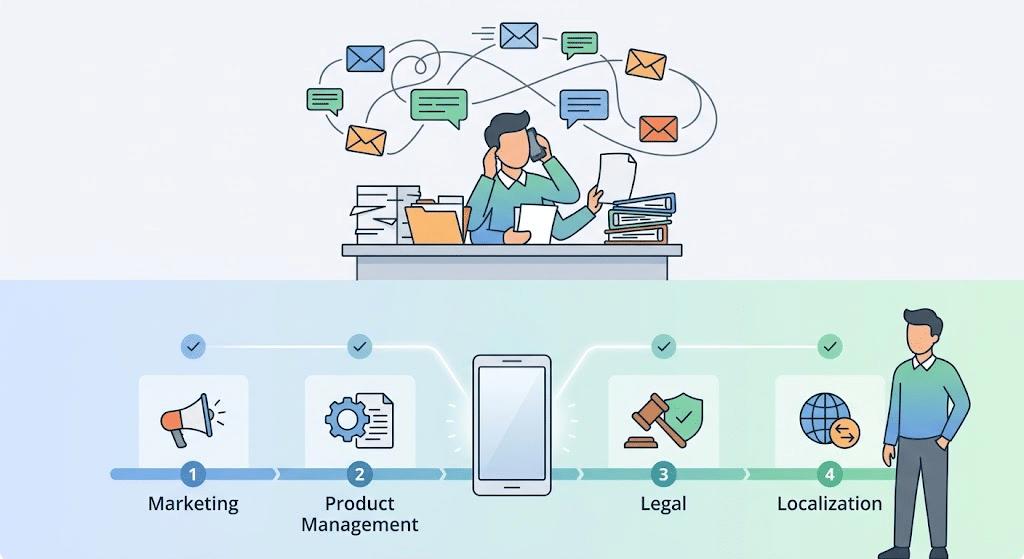
Image created by the author
When the CMS supports structured workflow automation, teams can move content through predefined approval stages while retaining the necessary human reviews. Legal gets notified the moment a draft is ready. The localization team pulls the approved copy straight from the CMS instead of waiting on a forwarded document. The mobile app, the website, and any in-store kiosks all pull from the same content source, so nothing launches out of sync.
If you want a deeper look at how the people side and the technology side of this fit together, Wordable’s guide to content operations breaks down how to build that kind of framework from the ground up.
If you spend your days chasing rankings, managing client sites, or scaling link-building campaigns, a CMS conversation might feel like someone else’s problem. It is not. Search engines evaluate mobile performance directly, and a sluggish content management system quietly undercuts every other tactic in your playbook.
For agencies managing multiple client websites, publishing efficiency directly affects how quickly approved content goes live. A fragmented content workflow can delay delivery through repetitive formatting, image compression, and manual publishing. A well-integrated CMS reduces these steps, allowing teams to spend more time on content planning, optimization, and performance analysis.
There is a revenue angle too. T-Mobile’s website performance improvements resulted in a 34% reduction in slow-loading complaints and a 60% increase in the conversion rate of visits with shopping intent.
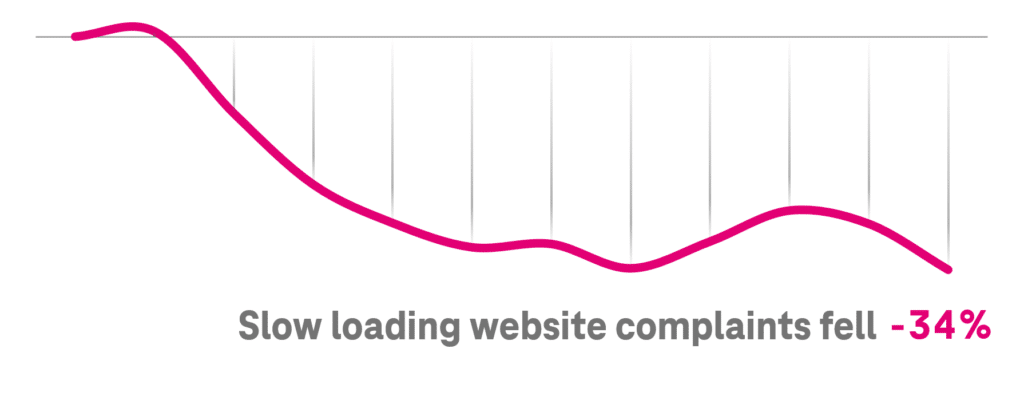
For SEO and marketing teams, T-Mobile’s results demonstrate how improved website performance can support the business case for technical upgrades. However, conversion improvements depend on the website, its audience, and the changes implemented.
Website owners who are growing their own content feel this pressure too. With each new landing page, blog post, or product update, the same hours are at stake. A mobile content management system built on clean, reusable content and tight publishing workflows lets a small team create more without compromising quality or burning out.
Here is the quick math worth bringing to a budget meeting:
None of this requires a full rebuild overnight. Even small upgrades, like fixing image handling or tightening your publishing workflow, move the needle fast.
Mobile content platforms do not look the same in every industry, but the underlying win – faster and more consistent publishing – shows up everywhere.
Retail and eCommerce. These businesses depend on fast, flexible content systems to manage digital storefronts across multiple channels. This kind of platform lets retailers update pricing, inventory status, and promotions in real time across their app and website.
Healthcare. Hospital systems use this kind of platform to push accurate, compliant information to patient portals and staff apps at the same time. When policy changes, one update reaches every screen instead of getting stuck in a print queue.
Financial services. Banks and insurers rely on this kind of platform to keep rate sheets, disclosures, and account tools current across web and app experiences. Given how tightly regulated this industry is, built-in governance matters as much as design flexibility.
Manufacturing and field services. Technicians in the field pull manuals, safety documentation, and parts catalogs from a mobile device. This kind of platform keeps that content synced, so nobody references an outdated PDF from three years ago.
Higher education. Universities push enrollment updates, course changes, and emergency alerts to students who check their phones first. A slow, old-school CMS simply cannot keep pace with how fast student life moves.
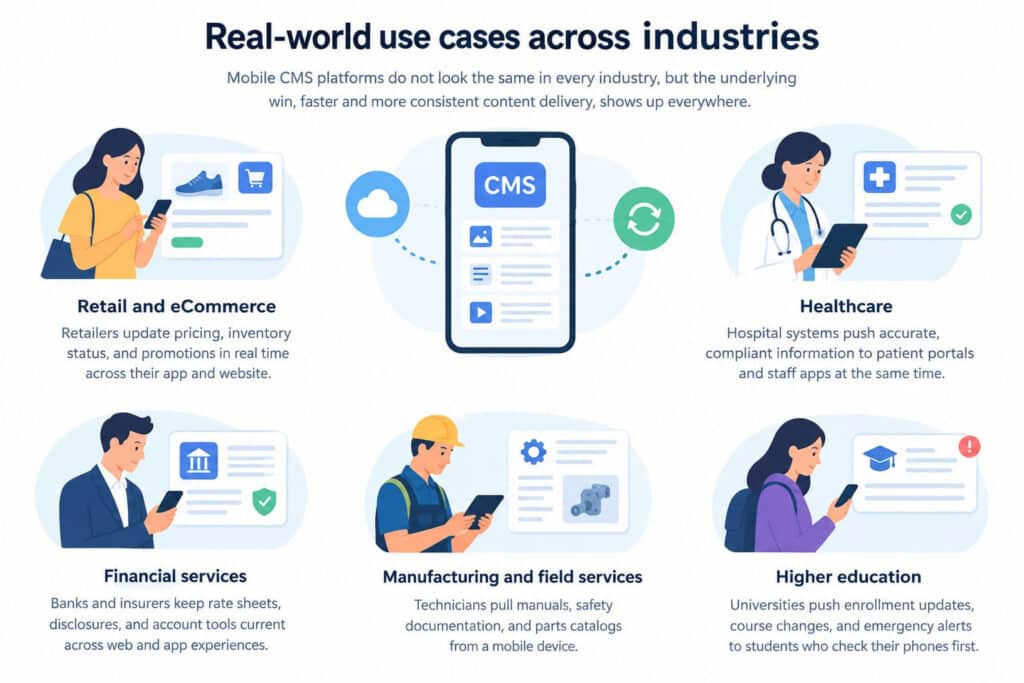
Image created by the author
If your current platform slows down publishing, start with a content audit checklist to identify what needs to change. Here is a practical path forward.
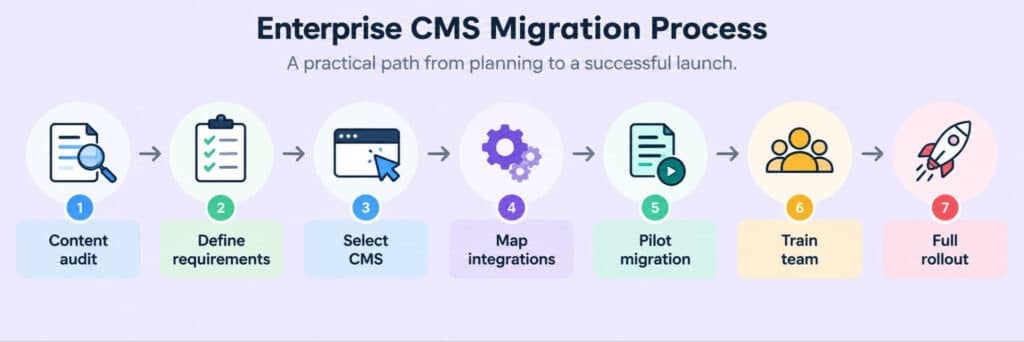
Image created by the author
Enterprise CMS modernization also requires teams to review how approved content moves from drafting tools into the publishing platform. For teams using Google Docs and WordPress, this includes transferring content without rebuilding its formatting, links, or images.
Wordable’s solution to exporting Google Docs to WordPress walks through exactly how to close that gap, so your writers can stay in the tools they already love while your CMS still gets clean, properly formatted content every time. This is also where many content teams quietly waste hours each week, so it is worth fixing early rather than after the mobile CMS rollout is already underway.
Plenty of enterprise CMS migrations stall out or blow past budget. Watch for these traps before they catch you.
Load time deserves special attention during migration because slow-loading pages can increase abandonment and disrupt the user experience. Test mobile performance before launch and address loading issues before moving additional content to the new platform.
Once your new platform goes live, don’t assume it is working. Track it.
Start with these categories:
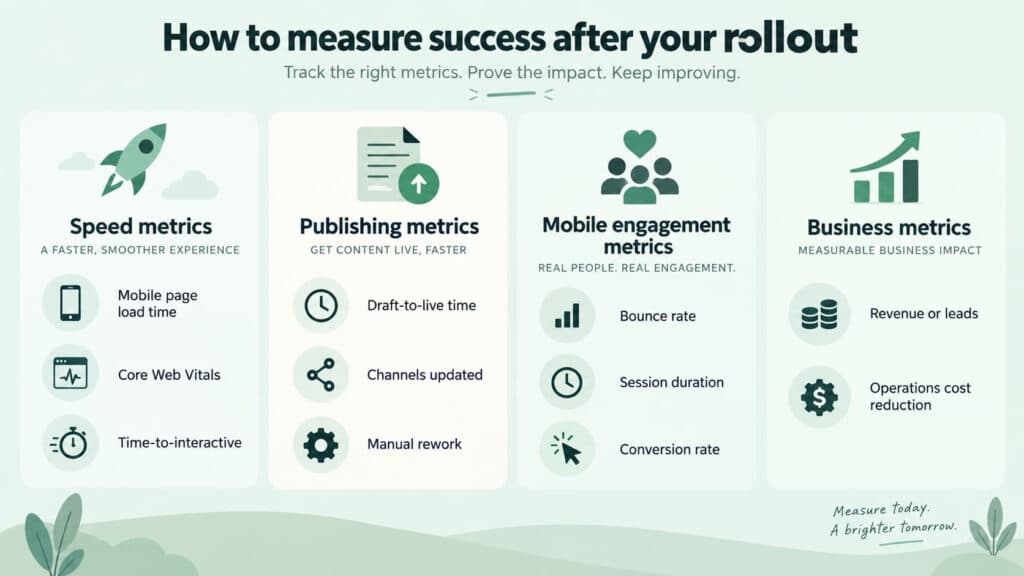
Image created by the author
Give your team a real reporting cadence, not a one-time check-in. Monthly reviews during the first quarter after launch catch problems while they are still easy to fix. After that, quarterly reviews keep everyone honest about whether the new system is actually paying for itself.
Streamlining the process from draft to published page can reduce time spent on repetitive formatting and manual content transfers, leaving more time for content planning and other editorial work.
Publishing Google Docs directly into WordPress is worth a look if you want to see what that time savings looks like in practice. Most teams notice the payoff first in how quickly a finished draft turns into a live, properly formatted page, long before it shows up in any broader performance report.
Enterprises that moved from a monolithic platform to a headless CMS also report real financial upside. Bain Capital Ventures says decoupling the frontend and backend directly drives revenue by enabling faster cross-channel load times, lower storage bandwidth costs, and significantly higher search prominence.
Enterprise digital transformation is no longer a buzzword. It is the difference between a business that adapts quickly and one that rebuilds the same broken workflow every year. A mobile-first content strategy gives your team the foundation to publish faster, personalize smarter, and keep every channel in sync, from your website down to the app in your customer’s pocket.
Start by identifying where your current mobile CMS solutions and publishing workflows slow your team down. If moving approved content from Google Docs into WordPress is one of those bottlenecks, Wordable can help simplify the process while preserving your document formatting.
Explore Wordable’s publishing solution to see how it fits into your existing workflow.
Not exactly, though the two overlap a lot in practice. “Headless” refers to the architecture, where content storage sits apart from content display. A mobile CMS, by contrast, describes a content management system designed to support content delivery and management across mobile devices.
Most enterprise-grade platforms use headless architecture because it makes multi-channel delivery easier, but the terms aren’t strict synonyms. A headless CMS for mobile use cases still needs the right personalization and governance features layered on top of the architecture itself.
It varies widely based on how much content you are moving and how many integrations your business relies on. Smaller teams can do it in a few months.
Larger enterprises with complex compliance needs, multiple brands, or years of legacy content tend to plan for six months to a year. Building in extra time for content cleanup and staff training almost always pays off, since a rushed migration often creates more cleanup work later.
No. A phased migration allows teams to test the new CMS with a smaller content set before expanding the rollout. This reduces the number of systems and workflows affected if problems arise.
It is rarely just the software license. Add up the hours your team spends on manual formatting, the leads lost to slow mobile pages, and the missed campaigns because content could not ship fast enough. Once you tally those hidden costs, an upgrade often pays for itself faster than many finance teams expect.