


Publishing content sounds simple … until multiple people touch the same article.
Now you’re dealing with forgotten internal links, skipped metadata, and publishing delays since (of course) nobody knows which draft version is final.
Now multiply that across dozens of blog posts, freelancers, approvals, campaigns, and deadlines. 🙃
This is where content operations start to break down.
When every article relies on someone remembering what comes next, small gaps in the process quickly turn into missed QA checks, inconsistent formatting, and slower publishing. A content SOP gives the whole team one shared process to follow before those problems start adding up.
Instead of reinventing the process every time, everyone follows the same operational standards.
That’s why, in this guide, I’m sharing how to build a content SOP for your publishing workflow step by step, plus implementation tips.
Keep reading to learn how to standardize publishing as your content operation grows. 👇
Highlights
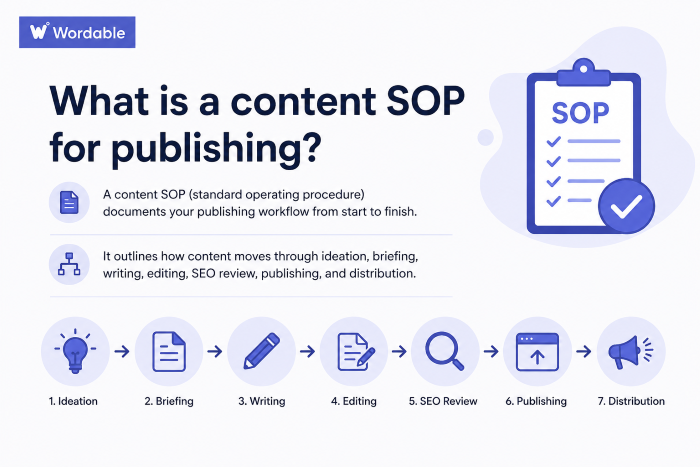
A content SOP, or standard operating procedure, is a document that outlines how content moves through your publishing workflow from start to finish.
It outlines how content moves through ideation, briefing, writing, editing, SEO review, publishing, and distribution.
(Image by Ioana)
Use a content SOP to help your team publish faster, maintain content quality, and scale content production more efficiently.
A content SOP creates clearer ownership and smoother approvals across your publishing process. Everyone knows who is responsible for what and in what order things need to get done.
A content SOP for publishing should document every stage in your content workflow from start to finish.
Your goal is to create a repeatable system that your team can follow consistently as your content production grows.
Content publishing SOPs usually include:
Some teams also include real examples, templates, and screenshots (highly recommended).
A content SOP makes it easier to onboard new people and keep execution consistent across writers, editors, SEO teams, and publishers.
Without a clear publishing process, even strong content teams can run into inconsistent quality and workflow problems that get harder to manage over time.
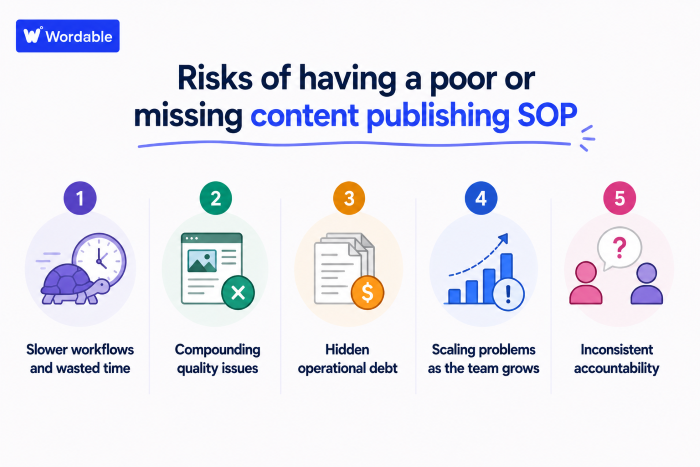
Here are some of the top risks of having a poor or missing content publishing SOP:
(Image by Ioana)
A missing content publishing SOP creates friction across your entire workflow.
Writers submit drafts differently. Editors leave feedback in multiple places. And someone’s bound to publish the wrong article version — or skip a final QA check.
Don’t ask me how I know. 🙈
Now your team’s wasting time fixing avoidable issues instead of moving content forward. A task that should take 15 minutes turns into an hour because nobody follows the same process.
Content quality declines when publishing workflows are inconsistent. Articles may go live with broken links, inconsistent formatting, or outdated information.
None of these issues seems major individually. But together they create a messy publishing operation that becomes harder to manage as your content volume grows. (If you have ambitious SEO goals, you can’t afford quality issues.)
Poor publishing systems create operational debt behind the scenes.
Teams repeat the same mistakes because there’s no documented system to catch them early. For example, the same formatting fixes, missing links, unclear approvals, and last-minute metadata updates may keep showing up across every article. At first, these feel like small cleanup tasks.
Over time, they become a recurring drain on editors, publishers, and content managers, who have to fix the same issues manually.
Poor workflows also make scaling difficult. (E.g., new hires rely heavily on verbal instructions because the process only exists in someone’s head, and publishing timelines may become inconsistent.)
Now your list of publishing issues keeps growing, when a clear SOP could’ve kept your process organized from the start.
Without a clear SOP, ownership is unclear. Team members may assume someone else handled approvals, formatting, uploads, or QA checks. This increases publishing mistakes and creates needless back-and-forth communication across the team.
Now that you’re clear on why you should document your publishing workflow (and the risks of not doing so), let’s create your SOP in 10 steps.
Use the following free SOP template to standardize your content publishing workflow. 👇
Start by documenting how content should move through your team from beginning to end.
Map every stage clearly: idea → content brief → draft → edit → SEO review → publish.
This gives you visibility into production flow, approvals, and review timing. It also helps you uncover where projects slow down, where revision cycles increase, and where team members approach the same stage differently.
For example, one writer may add metadata and internal links during drafting. Another might pass those tasks to SEO later in the workflow, assuming that’s the right procedure.
Documented workflows reduce inconsistencies like these before they turn into publishing delays.
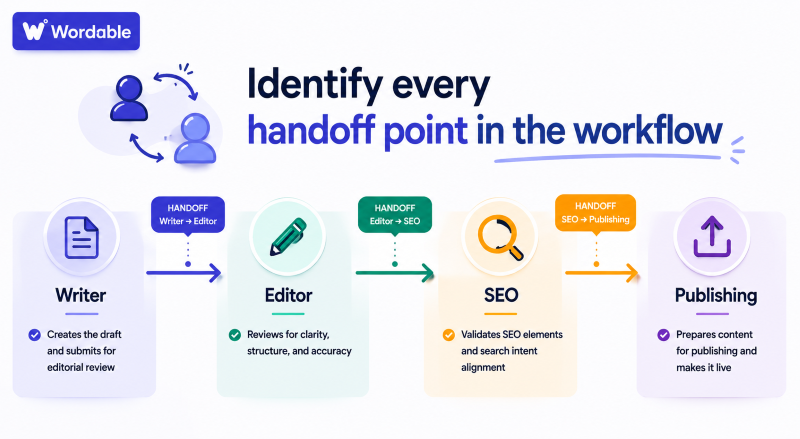
Document every moment the content should change hands. (Whether that’s from a writer to an editor, an editor to SEO, or SEO to publishing.)
Then define what each person needs to complete before the next stage begins.
(Image by Ioana)
For example, writers may need to submit completed metadata, sources, and internal links before editorial review starts.
SEO reviewers may need to verify search intent alignment, heading structure, and entity coverage before approving publication.
More on this in Step 3!
Designate specific people to manage each stage in your content production and publishing process.
(You may have different team members for brief creation, writing, editorial review, SEO validation, publishing, and final QA.)
Include clear completion standards for smoother approvals and more consistent content quality.
Define what qualifies as:
For instance, a draft may require completed headings, approved sources, and original examples before it moves into editing.
Share screenshots and real article examples as reference guides.
(Image by Ioana)
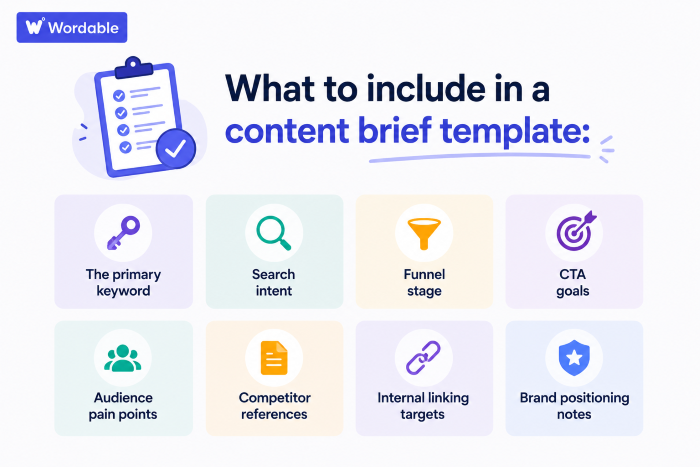
Make a standardized content brief template to help keep your team aligned from the start of each project.
In your template, include:
Spell out your SEO expectations in an SEO checklist.
Include SEO checks for:
This gives every writer, editor, and agency partner a shared optimization standard before content gets published.
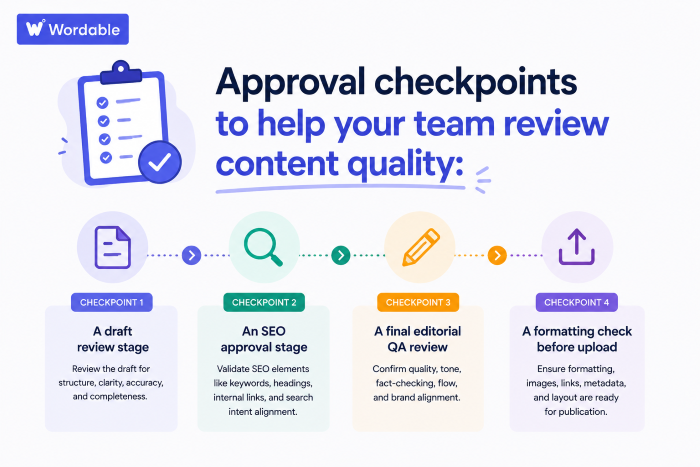
(Image by Ioana)
Include approval checkpoints to help your team review content quality throughout production, rather than waiting until publishing day.
For instance, include QA stages like:
Define your internal linking guidelines.
Include the minimum required internal links per article, plus required links to pillar pages, anchor text standards, and expectations for linking TOFU content toward BOFU pages.
Internal linking works best when every article follows the same structural standards. Over time, this creates stronger topical clusters and better authority distribution across the site.
Document where AI fits into your workflow. (For example, for outlines, summaries, or research support.)
Then outline which stages require human editing, fact-checking, strategic input, and final QA.
This step matters more than most teams realize. According to the Typeface Signal Report, 95% of marketing leaders report rising demand for content, yet 82% remain stuck in the experimentation phase due to compliance, data, and governance challenges.
Note: AI tools should only support content production workflows when you have clear usage and QA standards in place. Never publish generic AI articles.
Make sure final publishing follows the same process every time, regardless of who uploads the content.
Document any specific:
This helps reduce formatting inconsistencies, broken layouts, missed SEO elements, and publishing delays across your team.
You can also standardize the publishing process with Wordable.
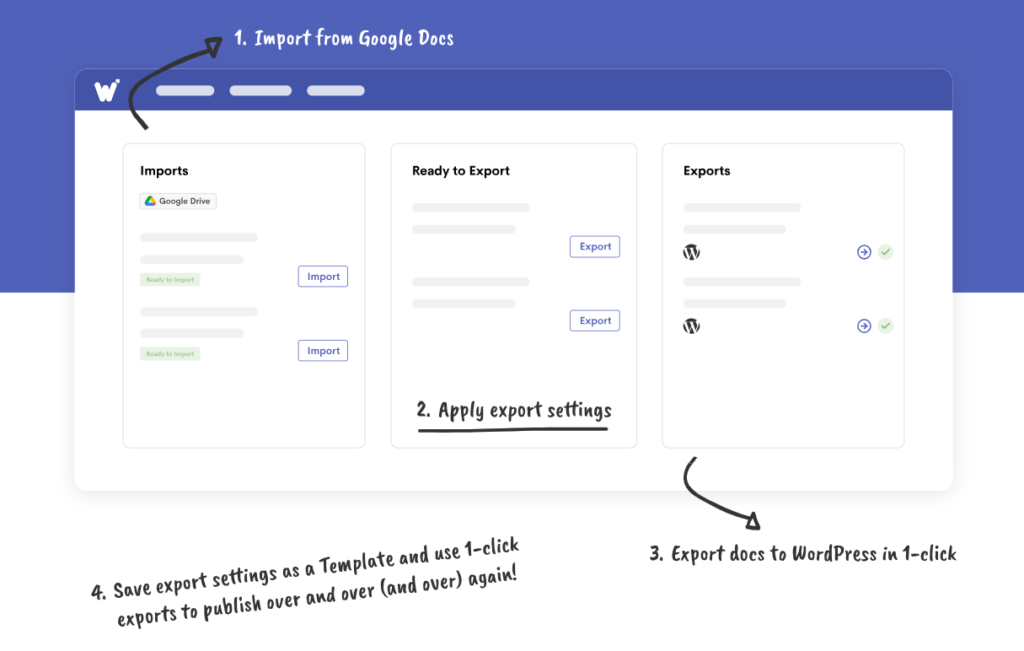
Wordable helps content teams export content from Google Docs directly into their CMS while preserving formatting, images, and structure.
I use it to reduce manual upload work and help my team publish more content faster with fewer formatting issues.
Finally, walk your team through your new workflow step by step.
Explain:
Use real blog posts and publishing scenarios during training so the process feels practical instead of theoretical.
This is also a great time to answer workflow questions, clarify responsibilities, and identify parts in the SOP that still feel confusing or incomplete before scaling it further.
After you’ve made your publishing SOP, I HIGHLY recommend following these tips:
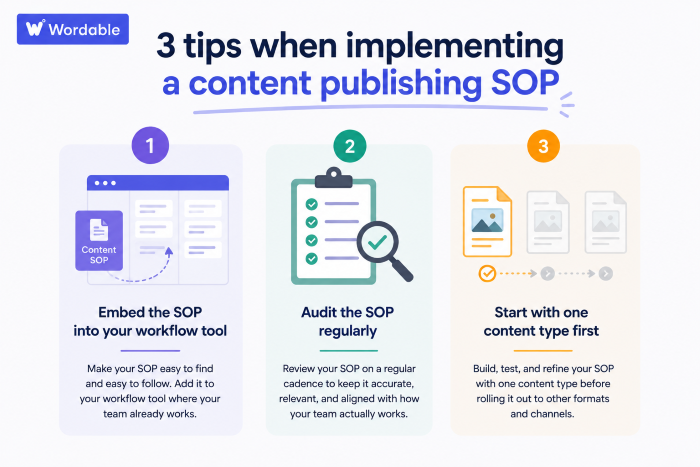
(Image by Ioana)
Workflow adoption is easier when your SOP lives inside the systems your team already uses.
Build the process directly into tools like Asana, ClickUp, or monday.com using checklists, approval gates, assigned owners, and required fields. (Basecamp is also a good one.)
Also, make sure to set up automations for admin tasks when possible to save time. 93% of marketers report using automation for tasks like scheduling, note-taking, and documentation, according to HubSpot research.
Review your SOP monthly or quarterly—track recurring bottlenecks, delayed approvals, workflow confusion, and publishing issues.
Then refine the workflow using real operational feedback from your team.
Test-drive your new SOP before going live.
Systematize one content format before expanding the workflow further.
Blog posts are usually the easiest starting point because they involve recurring SEO, editorial, publishing, and internal linking processes.
Once the workflow is consistent and repeatable, apply the same operational structure across landing pages, comparison pages, case studies, and additional content types.
A documented publishing workflow helps your team create more consistent content, reduce operational friction, and scale production more efficiently over time.
The key is turning your process into something repeatable.
Once your SOP clearly defines approvals, SEO standards, publishing requirements, ownership, and QA expectations, your workflow gets easier to manage as your content operation grows.
Ready to standardize publishing even further?
Use Wordable to streamline formatting, CMS uploads, and content publishing directly from Google Docs to WordPress.
Many teams manage publishing SOPs inside tools like Asana, ClickUp, and Google Docs.
Publishing tools like Wordable can also help standardize your CMS uploads and formatting workflows.
Review and update your SOP quarterly or whenever major changes occur in workflow, SEO, publishing, or team structure. Regular updates help keep your process aligned with how your team operates.
A content calendar tracks publishing timelines and upcoming content.
A content SOP documents how content gets created, reviewed, optimized, approved, published, and distributed.
Yes, a documented SOP helps freelancers understand your editorial standards and publishing workflow much faster.
Your content SOP should be detailed enough that a new team member can follow the workflow without constant clarification.
I recommend including templates, screenshots, checklists, and approval guidelines inside the SOP.
Yes. If your team scales content production with AI, your SOP should document how AI fits into the workflow and which stages require human review and editing.