


How your hybrid team functions on the back-end predicts your organization’s success.
If hybrid work processes feel scattered or confusing, you can expect less productivity and more friction among your team.
If processes feel streamlined and clear, you can expect better productivity and smoother handoffs.
That’s why pristine content workflows are a must.
In this guide, I’ve put together practical steps you can implement to improve content management and team productivity. (PS: I learned these on the job, both as a writer and a content manager, so I know a thing or two about what works!)
Highlights
Build a highly efficient project process for each content and service type you offer. If you already have processes, audit them thoroughly and identify bottlenecks.
Test different sequences, and drop what’s unnecessary.
When you’ve uncovered which processes are most efficient, list each framework simply. Here’s one I’ve found works for most content teams:
Work order ➜ account management ➜ writing ➜ editing ➜ staging ➜ publishing
Then, spell it out. Include how and where each task moves.
For example:
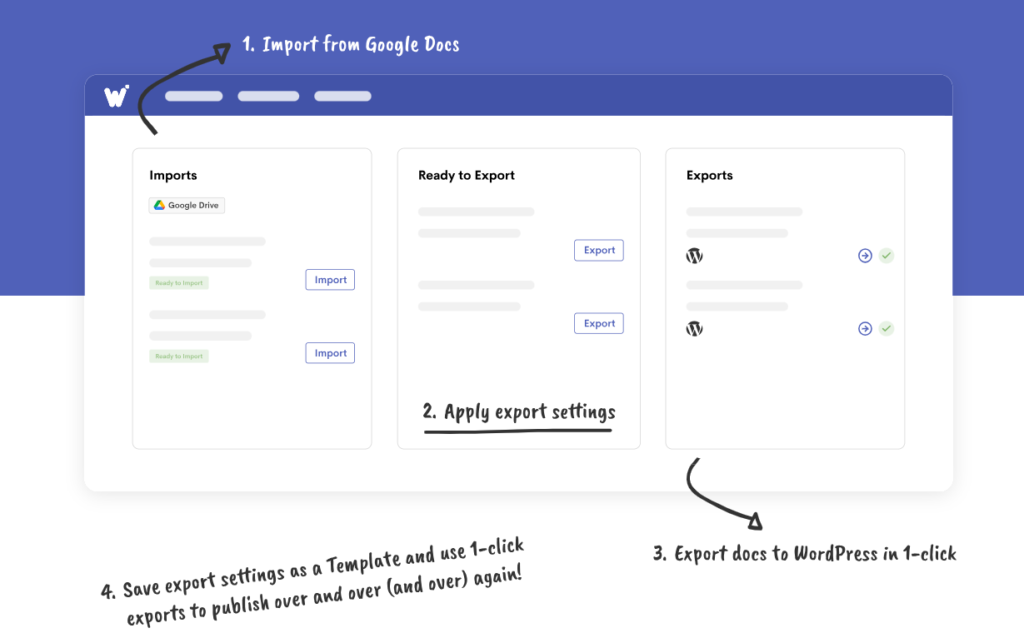
A blog post work order comes in through ProofHub.

The account manager processes the order, creates a project brief, and assigns the blog post to a content writer. Then, once the writer receives the assignment, they write the piece. When finished, the writer assigns the draft to the editor.
The editor edits the piece and assigns it to the staging. The stager uses Wordable to stage and publish the blog post to WordPress.
Do this for all of your content management tasks.
For example, you might have a project management process for:
So, for organic social media campaign,s your framework might be:
Work order ➜ account management ➜ writing ➜ graphic design ➜ content publishing calendar ➜ editing
Again, spell this out so there’s no confusion about how and where tasks move. The simpler your explanation (like the one I wrote above), the better.
Document your processes from above using a Standard Operating Procedures (SOP) tool or process mapping tool.
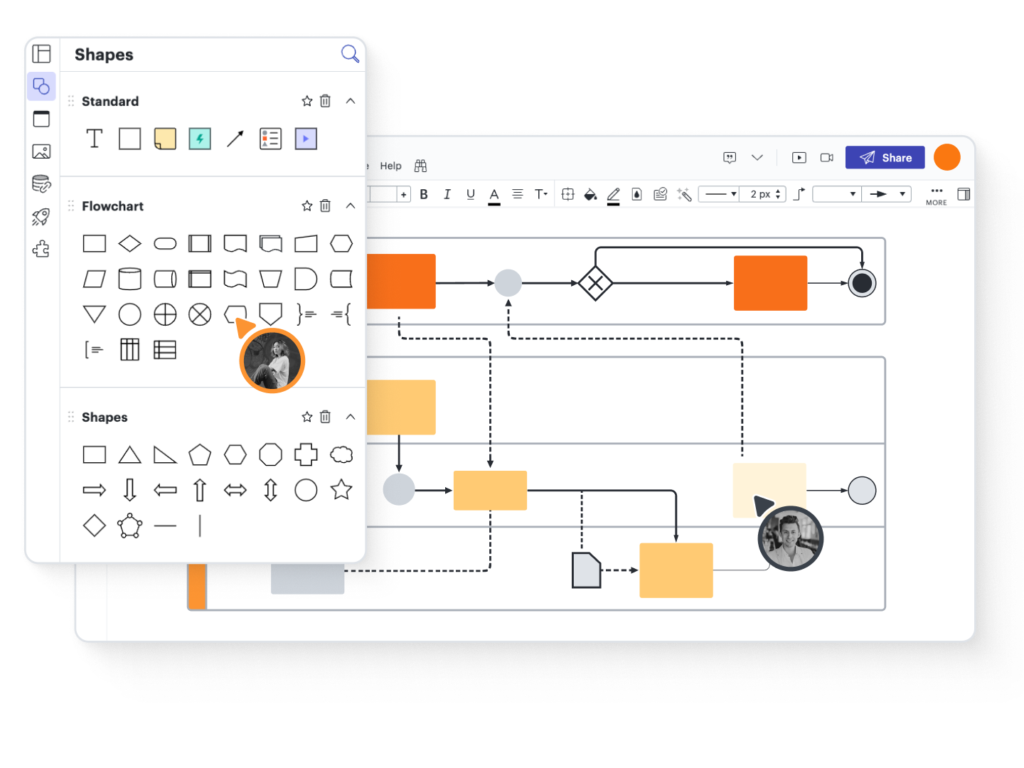
Or just write them in Google Docs and save them to a team folder in Google Drive. You can also upload them to your team productivity tool.
If you have a large team, consider organizing these by role.
So you might make a folder for:
Make sure to also include any other materials they need to succeed in the same folder. (Like SEO checklists or style guides.) If you pay by the hour, use a system to track your team’s time and make sure everyone knows how to use it when they’re working.
After you’ve prepped your SOPs, email them to your team members. Or, if you have a large team, send them instructions on how to access the files. Everything they need to know about their job should be inside of those docs. (Content briefs, etc.)
*Pro-Tip: Attach a Loom video to the email on how your software works so everyone knows how to use it. Show them how to check for new assignments and how to assign the next person, or close out the project, when they’re done. (Or you can paste these videos inside the SOP documents themselves, so everything’s in one spot.)
Include a contact section in each SOP so team members know who and how to ask for help if they need it.
Do NOT try to manage a remote team without SOPs. I’m telling you, it’s a disaster waiting to happen. Without SOPs, remote and hybrid teams run on guesswork. SOPs remove that friction by spelling out what to do and who owns each step.
That’s the key to encouraging better team productivity.
To support your SOPs, use content workflow tools. Again, they should remove friction, shorten handoffs, and make ownership obvious at every stage.
For example …
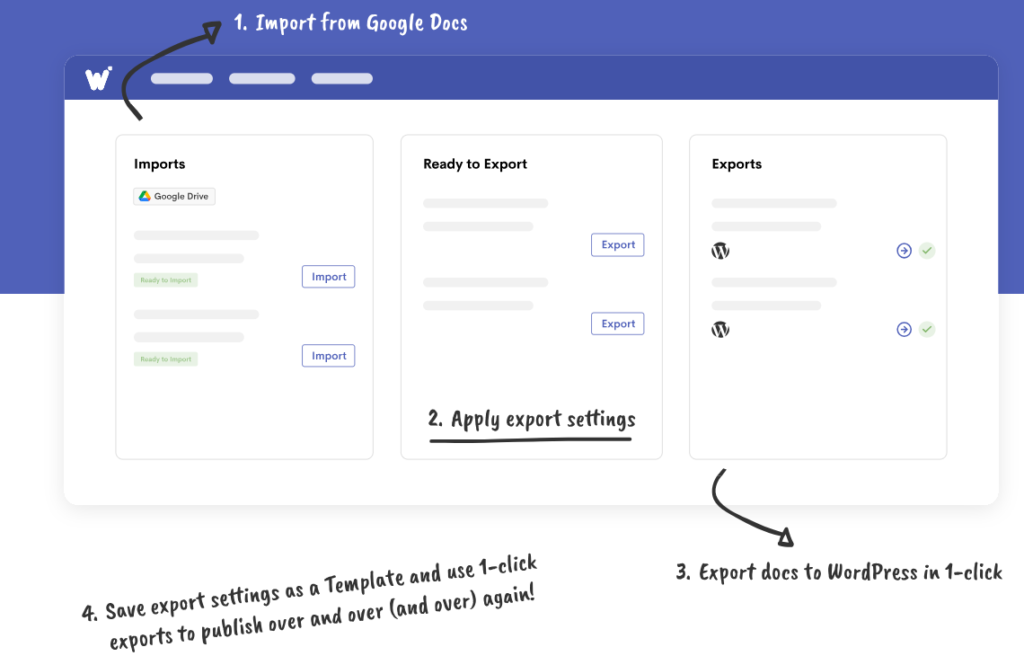
For blog publishing: Use Google Docs for writing and editing. And Writer (dot com) or Grammarly for grammar and plagiarism checks. When the draft is ready, use Wordable to publish the post straight into WordPress with clean formatting intact.
With Wordable, stagers can stop wasting time fixing spacing, links, and headers. Blog publishing will become an easy final step, instead of an annoying rebuild.
For social media campaigns: Use a shared content publishing calendar, like Planable, so your social media team members all see the same pipeline. Writers can add captions. Designers can upload visuals. And editors can leave feedback directly on the post.
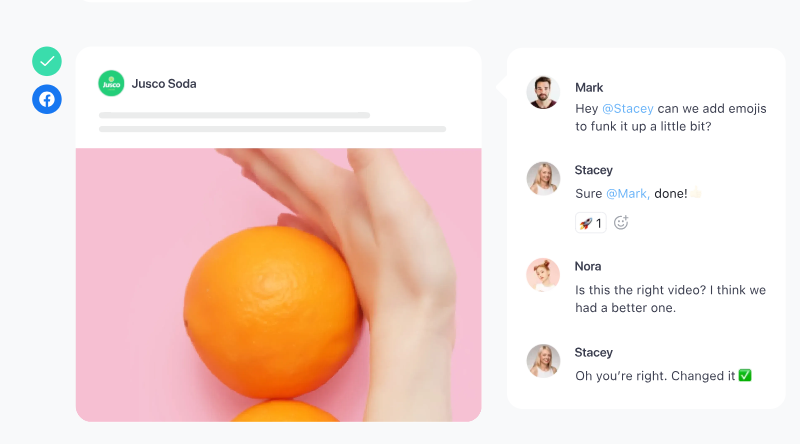
This tool’s great for keeping campaigns moving forward without long approval loops.
To understand how work flows day to day: Use a project tracking tool like TrackingTime. This overviews all of the content projects in your pipeline — from ads to social media to SEO campaigns.
You can use it to:
It’s also a great tool for fixing broken steps in your SOPs. (Audit how your workflows are functioning and check if any assignments get stuck. Then adjust your workflows.)
Want more tool options?
Check out this helpful guide with 20 tools for remote teams, including plans and pricing.
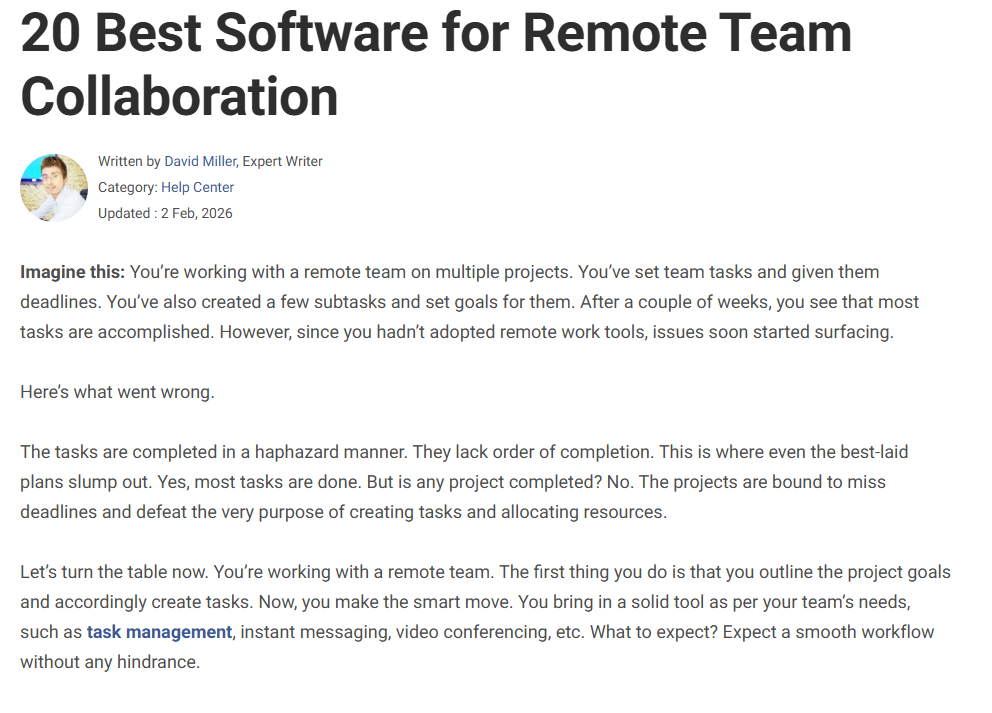
Don’t underestimate how important this is for your team’s productivity. Without the right tech stack, scaling your content operations is next to impossible.
And content strategists confirm this.
“Companies that have not taken the time to develop a robust and scalable content creation framework risk bottlenecks in their process, content that is not aligned to organizational and marketing strategy, and audience-facing brand inconsistencies.
Having a structured, scalable content creation process leads to greater content consistency and quality, more efficient use of resources, and better audience engagement,” says Andi Robinson, Content strategist at Hijinx Marketing.
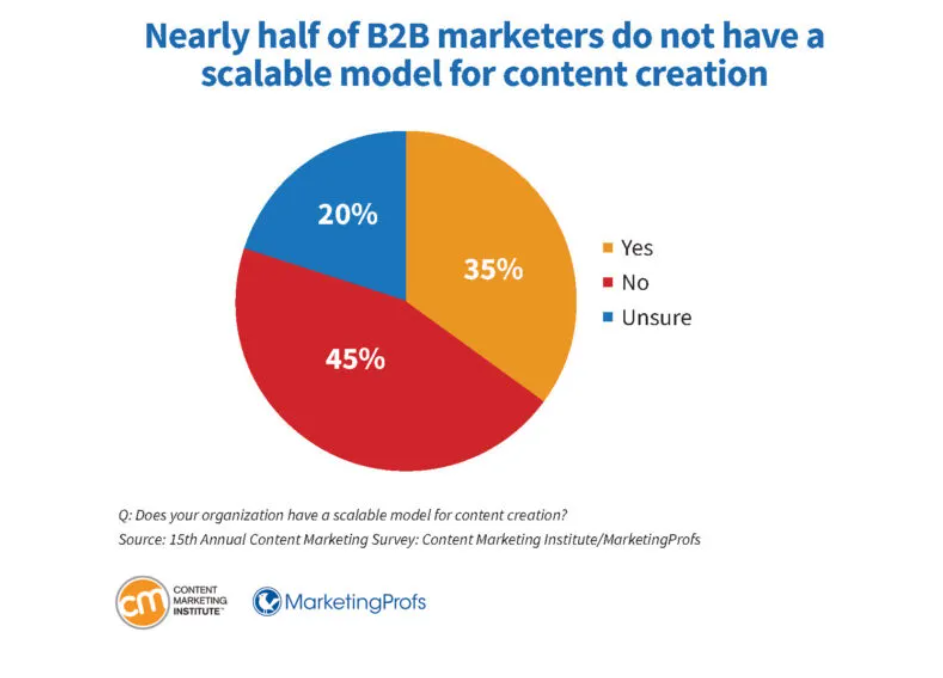
Still, nearly half of B2B marketers don’t have a scalable model for content creation!
Secure your hybrid setup with robust security protocols.
With multiple access points and tools, every login or device is a potential weak point, so clear policies are essential.
➜ Decide who can access what, enforce strong passwords, and turn on multi-factor authentication.
➜ Don’t forget to update permissions whenever team members join, switch roles, or leave.
Get your team involved, too. Show them how to spot phishing attempts, handle sensitive files safely, and use tools securely. Host short, practical video sessions or distribute quick-reference guides to keep everyone on the same page.
You can also try a password manager tool, like LastPass, to give hybrid workers access to your content tools without sharing your sensitive data.
Let automation and AI writing tools handle repetitive workflow steps and free up your team for more creative work. AI-assisted brainstorming, researching, or outlining can shave hours off your weekly workload. (And let your team focus on strategy and subject-matter expert writing instead of busywork.)
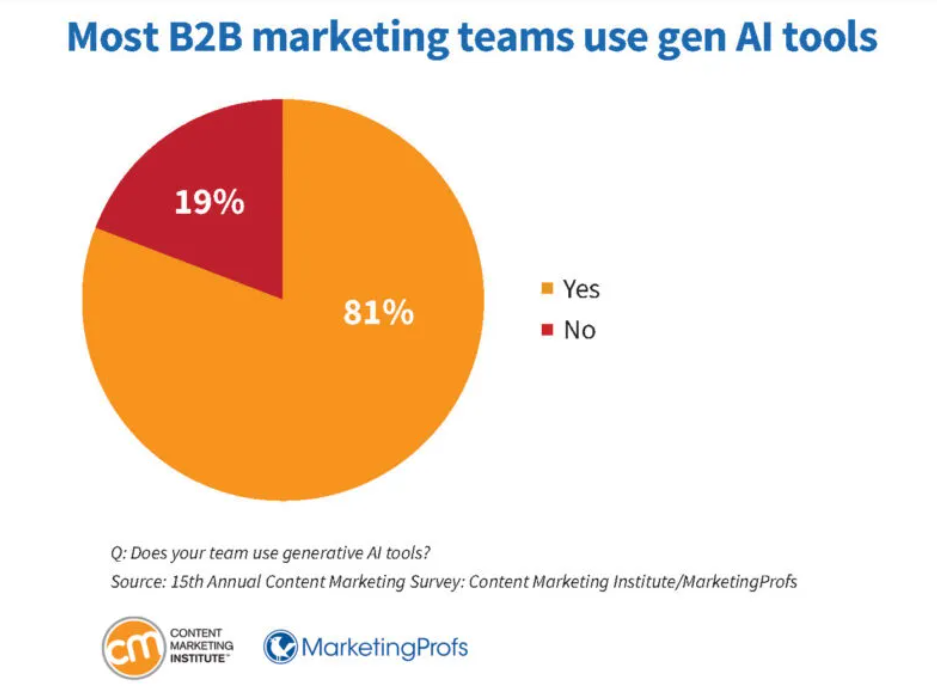
In fact, 81% of B2B marketers are using generative AI tools, according to the Content Marketing Institute.
That said, don’t overdo it.
Encourage open conversations about AI use so everyone knows what’s allowed and where creative input is non-negotiable.
When your team understands the rules, AI becomes a tool that enhances work.
Consider making an SOP for this as well, and include a dos and don’ts section.
Here’s an example of what it might include:
Do: Use AI content writing tools to brainstorm social media caption ideas when marketing client events or ecommerce products.
Don’t: Let AI brainstorm social media caption ideas for LinkedIn posts for our B2B clients. Use the client’s style guide and write authentic thought leadership content instead.
Do: Let AI pull stats and research from industry reports.
Don’t: Automatically use AI’s research without verifying the site’s DA score, information, and publishing date. Research must be recent (no older than three years) and the DA score must be 60+.
Do: Let AI brainstorm outline ideas for blog posts.
Don’t: Use AI outlines straight out. Edit them so they include unique insights and expertise.
You get the idea.
Boost team productivity by offering training and development opportunities.
Teach skills like open communication, how to manage feedback loops, and how to use project management software.
Explain productivity frameworks that work well when managing a remote team:
Make training meetings count by following a structure like:
Track the results from your trainings.
Are remote and hybrid employees implementing what you’ve taught? Is it improving employee engagement and productivity? Have you noticed more effective teamwork?
Use employee engagement software, surveys, or monitor performance metrics to find out.
Continue to offer these and note what’s helping your team work more productively.
Clear content workflows, the right tools, and focused training can turn hybrid work from messy to smooth. When everyone knows what to do, who’s doing what, and how to use the tools, content work gets done faster, handoffs feel effortless, and the team actually enjoys the process.
Pair this with engaging opportunities (such as virtual coffee chats and team challenges) to build meaningful bonds and foster stronger collaboration.
And when you’re ready to make blog post publishing easier, use Wordable. You can publish straight from Google Docs to WordPress in seconds.
What is hybrid work?
Hybrid work is when employees split their time between the office and remote work. Teams enjoy the benefits of both worlds. (Face-to-face collaboration when needed and focused solo work from home for deep work.)
How can hybrid teams stay productive?
Hybrid teams need well-defined workflows, project management tools, and good communication to stay productive.
What tools make hybrid work smoother?
Project tracking tools like Asana or monday.com keep hybrid work smoother and tasks organized. Communication apps like Slack or Teams prevent messages from getting lost. Video conferencing tools such as Zoom and Google Meet are effective for virtual meetings.
How do you stop miscommunication in hybrid teams?
Explain clear communication standards to prevent miscommunication among hybrid team members. Document decisions and share updates in a standardized way.
How often should hybrid teams meet live?
Keep live meetings meaningful and use them only when necessary. For example, use them for complex decisions or in-depth planning — but don’t overdo it. Pair them with async updates so your team isn’t stuck in endless calls and can focus on their work.
What challenges should teams watch out for?
Hybrid setups can lead to tool overload, fragmented communication, and blurred work-life boundaries. Spot these early and address them to keep your team running smoothly.
How can leaders keep hybrid teams productive?
Leaders can keep hybrid teams productive by leading with trust. Communicate transparently, give people autonomy, and create a safe space where they can speak up. Support and recognition go a long way in keeping teams motivated and engaged.
Why is asynchronous communication such a game-changer?
Asynchronous communication enables collaboration across time zones. It reduces meeting fatigue and gives everyone time to think before responding. It also leaves a written decision trail, so nothing slips through the cracks.