


I won’t BS you.
Content gets much harder to manage as your output, people, and channels increase. It’s just the name of the game. Without a framework, content teams can lose alignment and start dropping the ball.
But with a clear content operations framework and the right team in place, scaling becomes much easier.
Let’s take a closer look at what a predictable and productive content operations framework looks like. We’ll also cover who to hire to help you scale your content operations teams.
Highlights
Content operations refers to the system that connects content planning, creation, publishing, and performance tracking. It’s how content work runs day to day.
Content Marketing Institute’s 2025 enterprise research found that 86% of surveyed enterprise marketers have a dedicated content marketing team or staff person. As content teams grow, the challenge shifts from producing individual assets to coordinating the people, processes, and systems behind them.
When you have the budget and focus to scale your content operations with an integrated team, you can:
Without streamlined content operations, you risk: Inconsistent output, unclear ownership, slow production, duplicated work, and weak visibility into performance. Womp womp.
Great content operations work like a production line. I love using the term “content production operations” because it helps you visualize it better.
Here’s a straightforward content production structure you can rely on. Before you apply it, make sure each stage has clear ownership.
This workflow covers the production side of content operations, but the system also needs clear ownership. For each stage, define who is responsible, who approves the work, which tools the team uses, and what triggers the handoff to the next stage. Otherwise, a documented workflow can still break down when responsibilities overlap.
With those responsibilities defined, the production workflow looks like this:
Let me break these down.
At this stage, you’re getting to know your target audience deeply. You might pull sales calls, customer service tickets, and relevant Reddit threads. You can also use social listening tools and read customer reviews to see what your audience is struggling with.
Once you’re clear on their top pain points, conduct keyword research.
Look for long-tail keywords with a low or “easy” competition score and a mid- to high search volume score. (These are faster and easier to rank for.)
With audience and keyword research in hand, you have everything you need to create an SEO strategy.
In stage two, you map out your top-of-funnel, middle-of-funnel, and bottom-of-funnel keywords.
Each set aligns with where your audience sits in the buyer’s journey when they come across your brand. A solid SEO strategy helps you create detailed, effective content briefs in the next stage.
This is where you turn strategy into clear instructions your team can follow. A strong content brief outlines the main keyword, audience’s search intent, and the content’s target angle.
It also defines the audience, funnel stage, the goal, and how the content should move the reader forward.
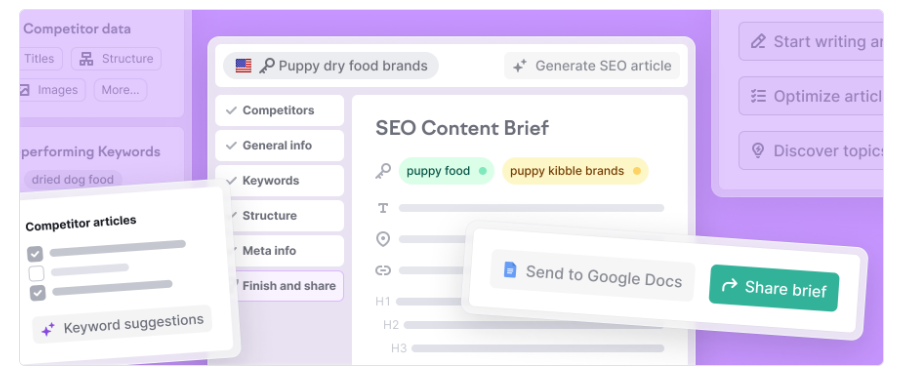
Make sure to add key points to cover, internal links, and top-ranking articles to beat. This gives your writer the context they need to go deeper and create something more useful.
For example, if you’re targeting a MOFU keyword like “best POS system for retail,” guide the writer to compare real use cases, highlight trade-offs, and help the reader choose based on their needs.
Tight briefs lead to better outlines and content that stays aligned with your SEO strategy.
This is where you structure the piece before writing starts.
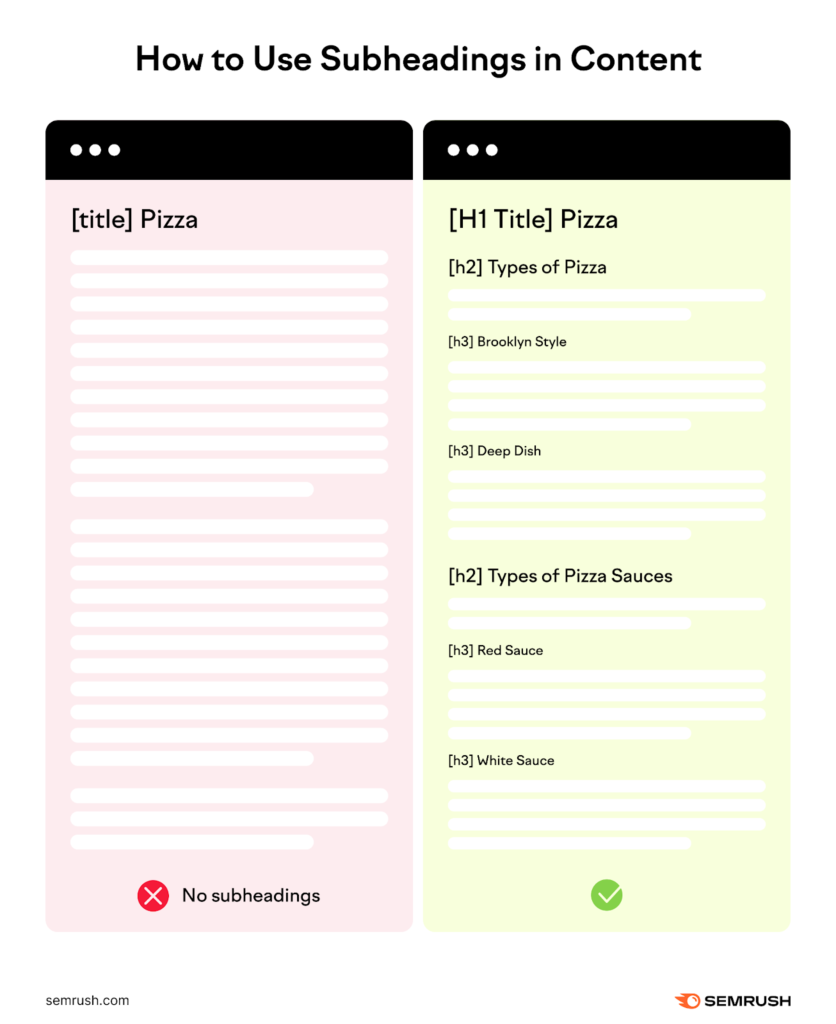
Turn the brief into a clear outline with H2 sections and H3 subheadings. Each section should serve a purpose and move the reader forward.
Map out key points under each heading so the writer knows exactly what to include. For example, instead of a vague section like “features,” break it into “inventory management,” “reporting,” and “ease of use.” This encourages more specific, useful content.
A strong outline speeds up drafting and keeps the final piece tight and on track.
This is where the outline turns into a real content asset. The goal here is to write a complete draft that follows the brief, fills in the outline, and aligns with the search intent.
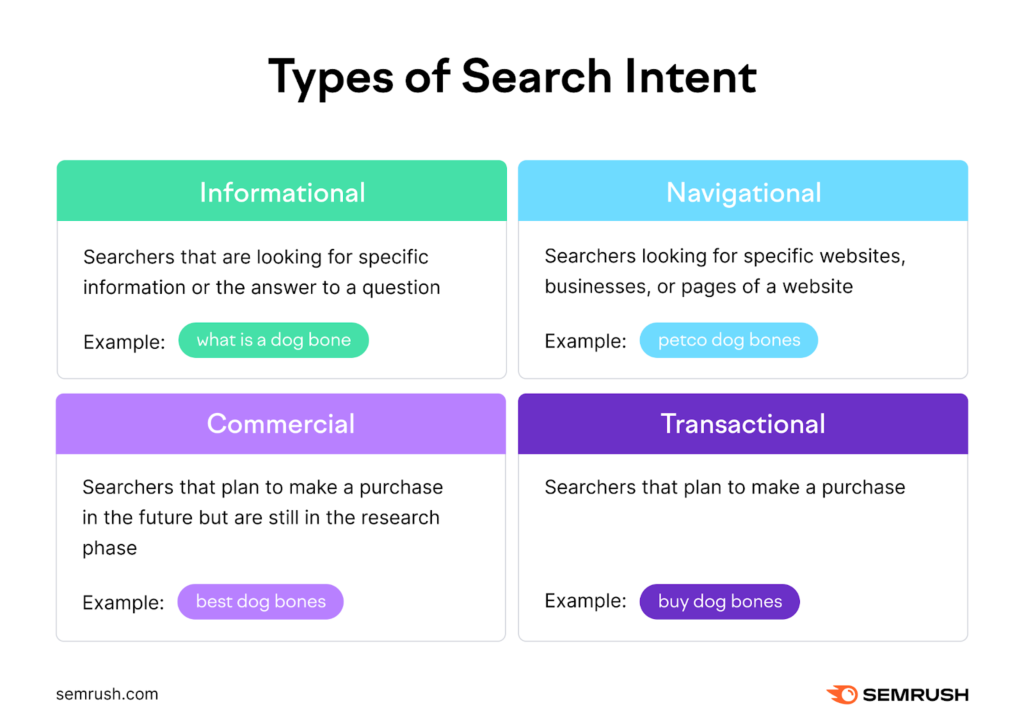
Writers should focus on clarity, structure, and usefulness. The piece should have sections with clear examples and simple explanations.
At this stage, editors clean up the draft and make it publish-ready.
Content editing focuses on clarity, accuracy, and flow. You’re tightening sentences, removing fluff, and (again) making sure the piece delivers on the search intent.
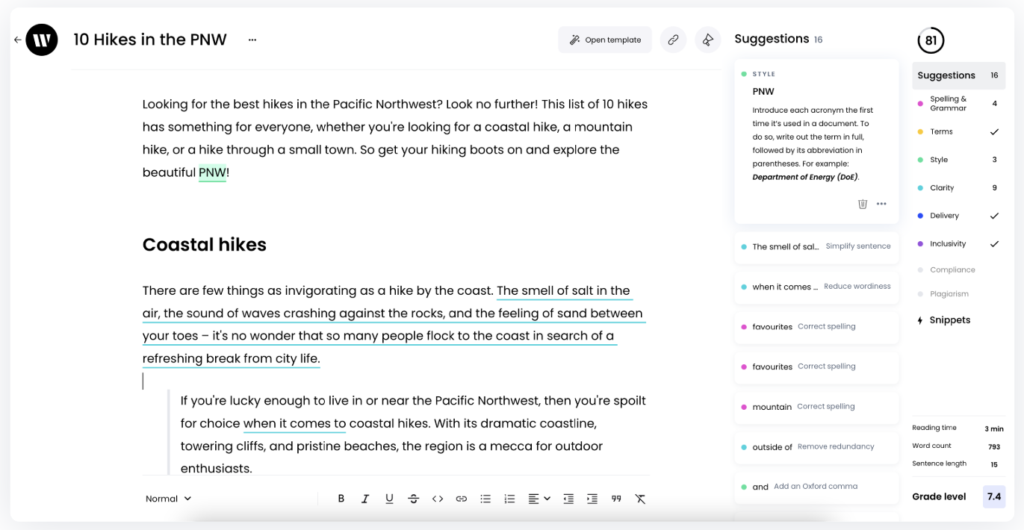
Run a quick QA process here. Check facts, links, formatting, and brand voice. Make sure the structure is easy to scan, and every section adds value. For example, if a section feels repetitive or vague, cut it or rewrite it. If something sounds off-brand, fix it now, not after it’s live.
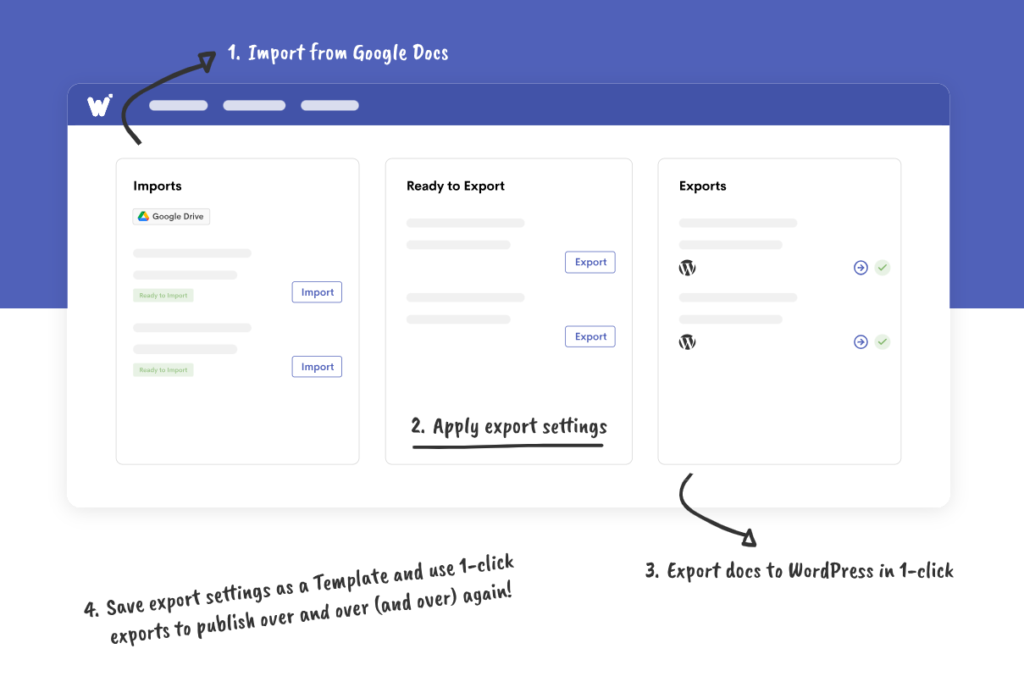
In stage seven, there’s one final QA check before the content gets staged for publishing. Then it’s time to prep the piece to go live. This part can be time-consuming because you have to reformat the piece from Google Docs into WordPress or HubSpot.
My secret trick when batching publishing assets is using Wordable.
I just import my Google Docs, apply my export settings, and export docs to WordPress in literally one click! I can also save my export settings as a template and use one-click exports as often as I need.
Here’s a quick preview so you can see how it works:
Once content gets published, you can start getting it ready for repurposing and distribution.
This is the stage where you amplify your content.
Take each content asset and turn it into multiple assets. Use those outputs as additional content marketing ideas instead of treating every channel as a separate production process. Repurpose it into social posts, email snippets, short-form videos, or even a lead magnet.

Then, distribute it. Share it across the right channels based on where your audience spends time. That might be LinkedIn, newsletters, or niche communities.
This is how you get more ROI without creating everything from scratch.
For example, you can turn a blog post into five LinkedIn posts, four emails, and a quick video walkthrough. (Keep the same core idea. Just vary up the formats so they feel native to each channel you publish them on.)
After you have the original and repurposed snippets published, move on to content analysis.
This is where you figure out what’s working and what’s not.
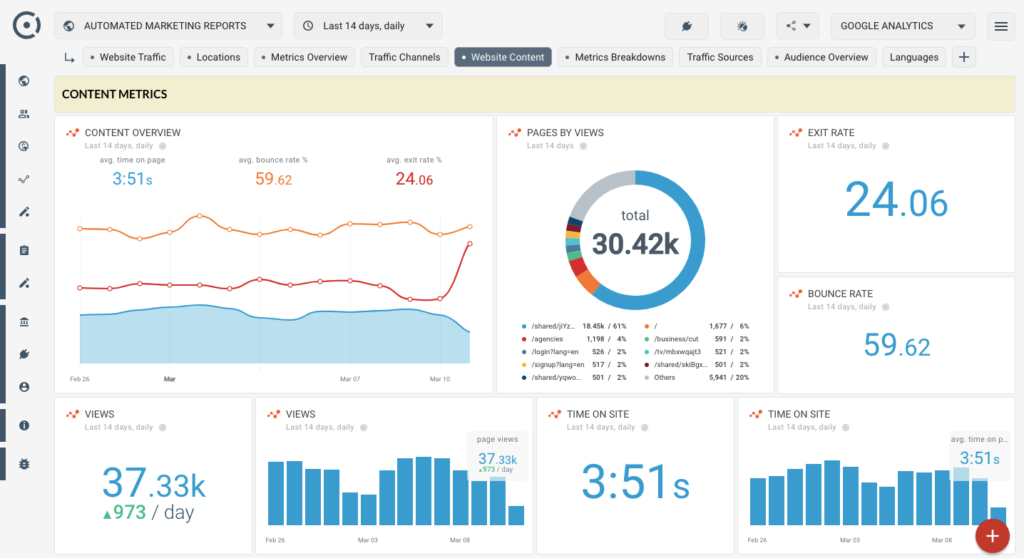
Track key metrics like traffic, rankings, engagement, and conversions. Don’t only look at surface-level data. Connect performance back to the original goal for each piece.
Look for patterns:
For example, if one article brings in traffic but no conversions, something’s off. Either the intent is wrong, or the CTA needs work. Apply these insights to improve your processes.
This is how your content operations consistently improve over time.
In this final stage, you maintain and improve what you’ve already published.
Go back to your existing content and use a structured content optimization process to update it based on performance data. Fix outdated info, improve weak sections, and optimize for new keywords if needed. You can also refresh examples or add internal links to boost relevance.
Your best bet is to focus on high-performing content. (You can increase traction faster this way.)
For example, if a post sits on page two, tightening the intro, updating stats, and improving structure may help push it to page one.
Regular updates also help keep high-performing pages accurate, relevant, and aligned with current search intent.
If you’re looking to compete at an impressive scale, you’ll need more hands on deck. If you’re scaling significantly, automation alone won’t cover every part of the process. You’ll still need people responsible for strategy, production, quality, and delivery.
Here’s who you’ll need to hire and why:
This team focuses on making sure content gets found and performs. It includes SEO specialists and content performance analysts.
They research search demand, optimize structure, and monitor what’s working. They also feed insights back into what to create next.
This is the team that decides what gets made and why it matters. It usually includes a content lead or head of content, sometimes supported by a content strategist.
They set priorities, shape the content plan, and make sure everything connects back to business goals. Without this team, teams tend to produce content that feels busy but disconnected.
This is your execution team. It typically includes writers, social media content creators, and sometimes subject-matter contributors. Their job is to turn briefs and ideas into content, like articles, emails, landing pages, and scripts.
This team exists to make sure content is clear, accurate, and consistent.
It usually includes managing editors and sometimes directors of editorial.
They improve readability, fix inconsistencies, and make sure everything sounds like it belongs to the same brand.
This team keeps everything moving smoothly on the operations side. It usually includes a content operations manager or project manager, sometimes supported by coordinators.
They handle timelines, workflows, approvals, and handovers between teams. Without this team, even strong content teams slow down because work gets stuck between stages.
This team brings content to life visually.
It includes designers and creative specialists.
They create graphics, layouts, and visual assets that support written content and improve engagement. Without them, content can feel flat or harder to consume.
An external team helps with content production when you don’t have enough hands or specialty in-house.
It includes freelance writers, agencies, and specialist partners who fill gaps in capacity or skills. They help scale output, cover niche expertise, or handle workload spikes. They can also be more integrated into your team, which means less internal hiring.
This group sits right at the end of the content process and makes sure everything is ready to go out properly.
It usually includes publishers, content coordinators, or CMS specialists, sometimes supported by an operations or QA-focused role.
Their job is to do the final checks before anything is published. They make sure formatting is correct, links work, visuals are in place, and nothing is missing. Then they handle scheduling or publishing across platforms.
If you’re feeling overwhelmed by the number of content stages and team members you need to create content at scale, it’s time to look for support.
If those gaps become recurring rather than temporary, external support may be more efficient than continually adding work to an already stretched internal team.
I highly recommend leaning on an established content production team like Codeless or uSERP. You’ll get a tailored content strategy, subject-matter expert writers, experienced editors, and stagers and publishers. (Not to mention link builders, content analysis support, and much more.)
If your content team is awesome and you just need help with scaling publishing, you’ll love Wordable. Remember, Wordable lets you move prepared Google Docs into WordPress using a streamlined export workflow.
Scaling content operations well comes down to two things:
With a production process, plus SEOs, writers, editors, and operations support, you can create content that consistently aligns with business goals.
If you want more impact from everything you publish, reach out to Codeless or uSERP for support. If you need help publishing more assets in less time, try Wordable.
If publishing has become a bottleneck, Wordable can reduce the repetitive work involved in moving content from Google Docs to WordPress.
How is content operations different from content strategy?
Content strategy defines what you create and why. Content operations focus on how that content gets produced, managed, and delivered.
What are the biggest problems without content operations?
Teams often deal with inconsistent output, unclear ownership, and slow production. This also leads to duplicated work and poor visibility into performance.
Can small teams use content operations?
Yes, even small teams can benefit from a simple content operations workflow.
Why do content operations matter when scaling?
Content operations matter because they help keep teams aligned. They reduce chaos and help make sure content stays high-quality and consistent. (Even as output increases.)
What roles are needed in content operations?
You typically need SEO specialists, writers, editors, content strategists, and ops managers.