


Choosing the right content and publishing tools can save you time, money, and a lot of stress. Yet many businesses focus only on features. They compare pricing, templates, or integrations. They rarely stop to think about where the software lives and who manages it.
That is where the SaaS vs. On-Premise debate becomes important. For years, this topic was mostly for IT teams.
Today, it matters just as much for marketing agencies, bloggers, publishers, and growing businesses. Your choice affects how your team works together, how quickly you publish content, how secure your data is, and how much time you spend fixing technical problems instead of creating great content.
There is no perfect option for everyone. Some organizations need complete control over their software. Others want flexibility and speed above everything else.
In this guide, you’ll learn what SaaS vs. On-Premise really means for content teams. We’ll compare the two options in simple terms, explain the pros and cons, and help you choose the software solution that best fits your workflow.
Highlights
Let’s start with the basics.
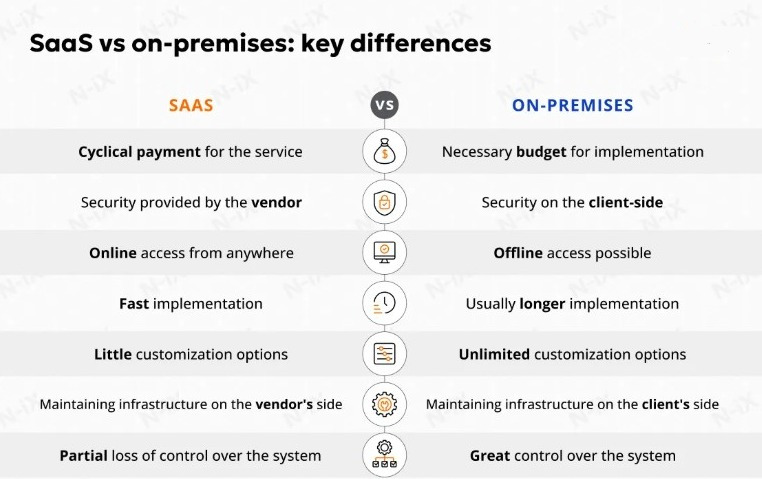
SaaS stands for Software as a Service (SaaS), a cloud-based software delivery model. Instead of installing software on your own servers, you access it through the internet. The SaaS provider hosts everything, handles updates, fixes bugs, and keeps the platform running.
Some popular examples include Google Docs, Notion, Canva, Grammarly, and WordPress.com.
On-Premise software is different. You install it on your own servers or computers. Your business owns the infrastructure, manages updates, maintains security, and handles the deployment and maintenance of the software.
Think of it like renting versus owning a house. With SaaS, you pay a recurring subscription while the provider handles hosting, updates, and maintenance. With On-Premise software, you own and control the system, but your team is responsible for keeping everything running.
With On-Premise software, you own the system, but you also become responsible for everything that comes with it.
The global software market shows just how popular SaaS has become. A September 2025 Gartner forecast projects 21.3% growth in public-cloud services spending in 2026, reflecting continued demand for cloud-based SaaS applications and infrastructure.
For content creators who need website content ideas to scale traffic, the SaaS vs On-Premise decision is less about technology and more about productivity.
Creating content is no longer a one-person job. A single profitable blog post usually involves multiple people:
Every person needs access to the same files and the latest version of every document. That is where software plays a huge role. If your blog tools are slow, difficult to access, or hard to maintain, your publishing schedule suffers.
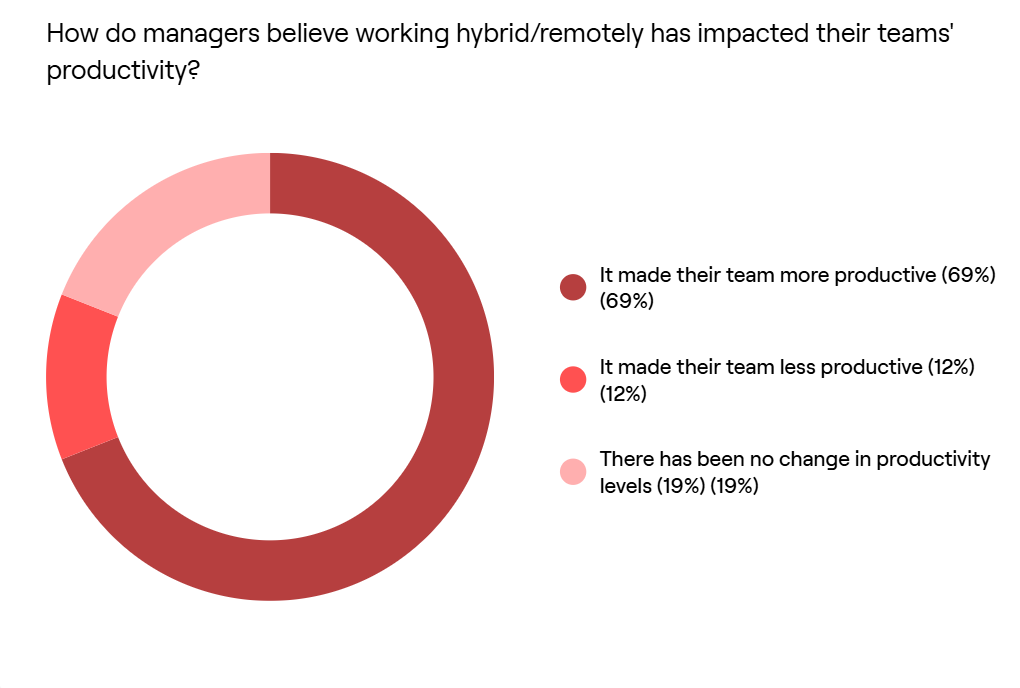
Modern content teams also work from different locations. According to Owl Labs’ 2025 report, over two-thirds of managers (69%) believe that remote and hybrid work improves team productivity.
Imagine your editor lives in London, your designer works from Canada, and your SEO specialist is based in Australia. With SaaS tools, everyone signs in through a web browser and starts working immediately.
With an On-Premise system, remote access often needs additional setup, VPN connections, security rules, and ongoing maintenance.
Neither option is wrong. The right choice depends on how your team works every day.
Many people compare software based only on subscription prices. That can be a costly mistake. The true cost includes much more than the monthly fee.
To compare the two models fairly, calculate the total cost of ownership over the same period. Factor in software fees, implementation, infrastructure, maintenance, security, support, internal staffing, and expected downtime.
With the SaaS model, you usually pay a recurring subscription. That fee often includes hosting, maintenance, security updates, backups, customer support, and new features. Your upfront investment stays low.
Traditional software deployed on-premise works differently. You often pay for software licenses, servers, networking equipment, backups, security tools, IT staff, maintenance, electricity, and hardware replacements. These expenses add up over time.
For a small agency or independent publisher, dedicated IT staffing can significantly increase the total cost of an on-premises system.
However, large enterprises sometimes save money over the long run by running software themselves. This is especially true when they have thousands of users and an existing IT department.
For that reason, compare both models by total cost of ownership rather than subscription or licensing fees alone.
Ask yourself questions like these:
Those answers often matter more than the price listed on the website.
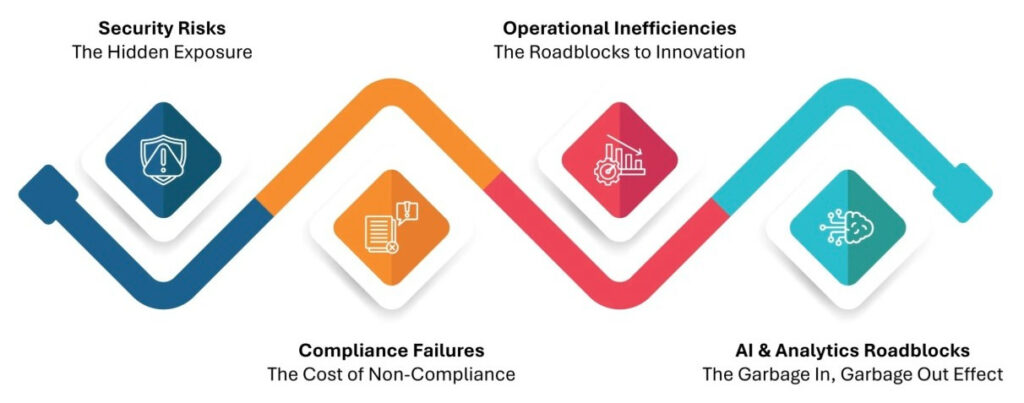
Security is one of the biggest concerns when choosing publishing software. Many people assume On-Premise software is always safer. That is not necessarily true.
Many large SaaS providers maintain dedicated security teams, encryption controls, monitoring systems, security measures, and compliance programs that smaller businesses may struggle to build internally.
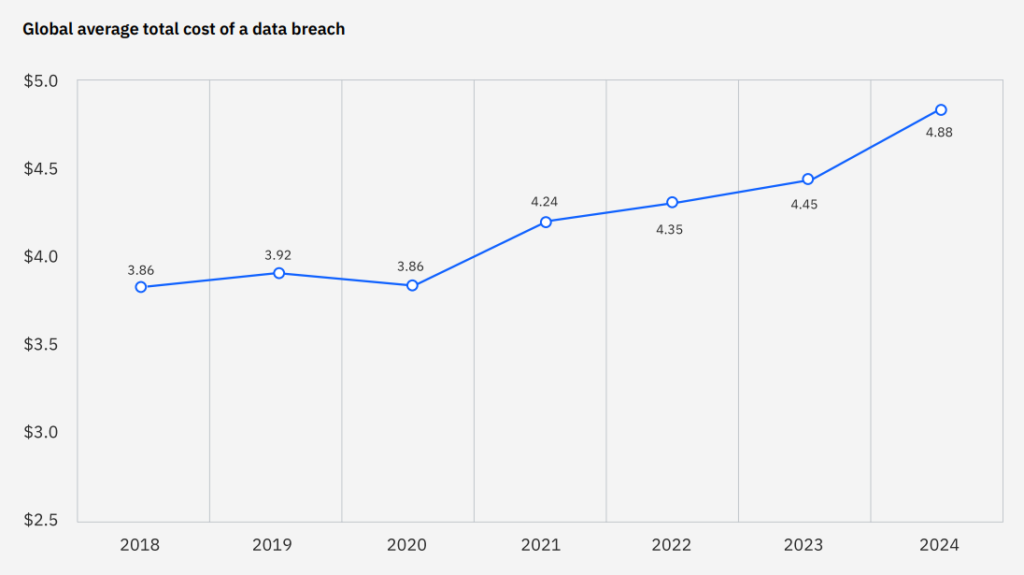
IBM’s 2024 Cost of a Data Breach Report found that the global average breach cost reached USD 4.88 million. That figure underscores the operational and financial importance of strong security.
That said, On-Premise software gives you greater control over data, particularly sensitive data.
Some organizations need this level of control because of legal requirements, government regulations, or industry-specific compliance rules.
Healthcare providers, financial institutions, and government agencies often have strict rules governing where data can be stored.
For many bloggers, agencies, publishers, and website owners, established SaaS providers may offer suitable protection while reducing the internal technical burden. Teams should still review security controls, certifications, backup policies, and data-export options.
Still, before choosing any platform, ask these questions:
Good security is not about choosing between SaaS and On-Premise options. It is about choosing a provider or system that follows proven security practices.
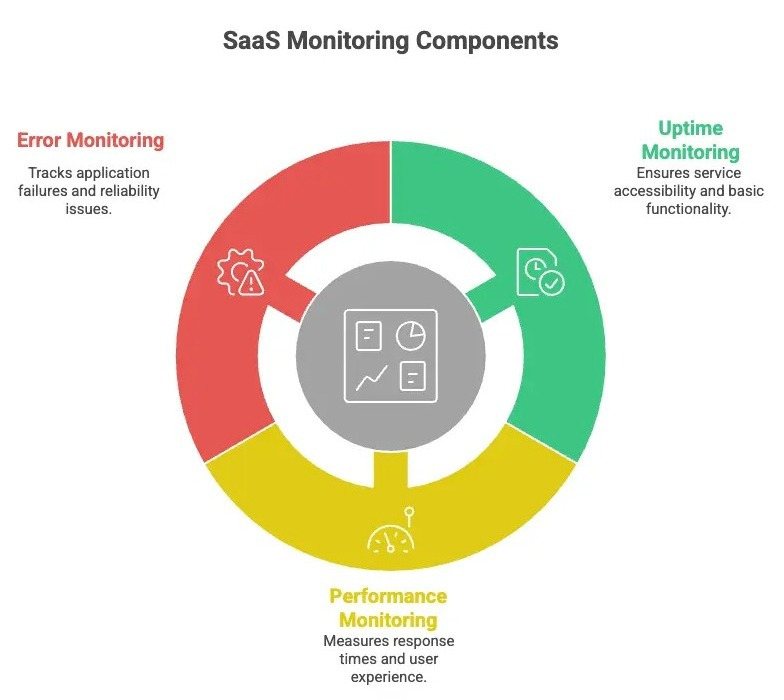
Nothing slows a content team faster than unreliable software. Imagine spending three hours writing an article, only to lose it because the server crashed.
Or picture your entire publishing team waiting for an IT administrator to restart a system before they can upload tomorrow’s blog posts.
With SaaS platforms, the provider is responsible for keeping the service available. Many SaaS providers publish uptime commitments in their service level agreements. Before choosing a platform, it’s worth reviewing the specific uptime target, exclusions, response times, and what happens when something goes wrong. They also use multiple data centers, automatic backups, and disaster recovery plans to reduce downtime.
That convenience also creates dependence on the provider. If the service goes down, changes its pricing, or limits data exports, there’s not much your team can do about it.
On-Premise systems put that responsibility on your business.
This is another area where the SaaS vs On-Premise decision affects far more than just your IT department. It directly impacts publishing schedules, campaign launches, and your team’s ability to meet deadlines.
A simple rule works well here. If your team wants to focus on creating content rather than maintaining servers, SaaS often offers a smoother experience.
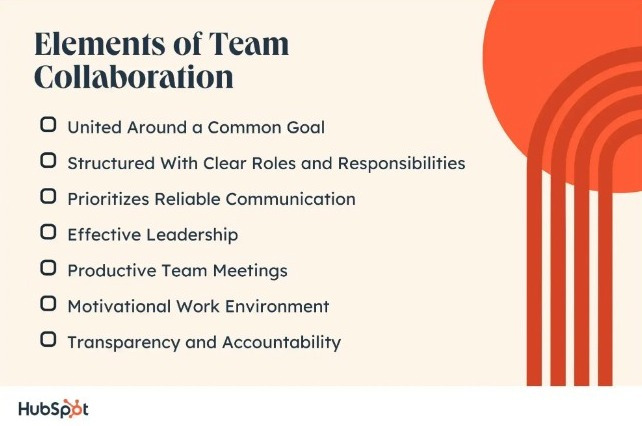
Content creation works best when everyone stays on the same page.
Writers need feedback from editors. Designers need access to the latest copy. SEO specialists need to review keywords before publication. Marketing teams need to schedule and promote finished content.
This is where the SaaS vs On-Premise decision becomes even more important.
Most SaaS solutions are built for collaboration. Team members can work on the same document simultaneously, leave comments, assign tasks, and see changes instantly. They only need an internet connection and the right permissions.
That speed can improve team productivity and help content move from draft to publication much faster.
On-Premise software can also support collaboration, but it often needs additional setup. Your IT team may need to configure user access, remote connections, shared storage, and security settings before everyone can work together smoothly.
For businesses with employees in one office, this may not be a problem.
For remote teams spread across different countries, it can create unnecessary delays.
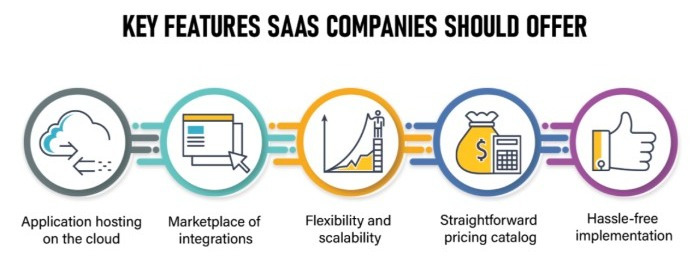
The blog tools that work for a five-person team may not work for fifty people.
Growth changes everything.
You may hire more writers, launch new websites, publish in different languages, or manage several brands at once. Your software should grow with you instead of slowing you down.
SaaS platforms can simplify scalability as your business grows.
Adding a new team member usually takes only a few clicks, making rapid deployment of new users much easier. Need more storage? Upgrade your plan. Need additional features? Most providers offer higher tiers that unlock new capabilities without requiring major changes to your workflow. That flexibility is one reason cloud software continues to grow so quickly.
On-Premise systems can also scale, but the process is usually more involved.
You may need to buy new servers, expand storage, upgrade networking equipment, or invest in additional software licenses. Those changes take time and money, especially if your business grows faster than expected.
Before deciding which option to use, don’t just consider where your business is today. Think about where you want it to be in three or five years.
Still unsure which option fits your business?
Ask yourself these questions before making a decision:
If most of your answers point toward flexibility, collaboration, and simplicity, SaaS will likely be the better choice.
If complete control, customization, custom infrastructure, and strict compliance are your highest priorities, an On-Premise solution may be worth the extra investment.
The SaaS vs. On-Premise debate is no longer just an IT conversation. It is a business decision that affects every stage of your content workflow, from planning and writing to publishing and promotion.
For most agencies, entrepreneurs, bloggers, and website owners, SaaS offers flexibility, collaboration, and a low-maintenance setup that supports remote work productivity. It lets teams spend less time managing technology and more time creating content that attracts readers and grows the business.
That does not mean On-Premise software is outdated. For organizations that need complete control over their infrastructure and data, it remains a strong option.
The best decision comes from understanding your team’s needs, budget, long-term goals, and capacity for technical management.
If a SaaS workflow is the better fit and moving content from Google Docs to WordPress remains a bottleneck, Wordable can reduce manual formatting and speed up exports.
SaaS software is hosted by a third-party provider and accessed through the internet. The provider manages updates, security, backups, and maintenance. On-Premise software is installed on a company’s own servers, giving the business full control but also making it responsible for infrastructure, updates, and security.
For most content teams, SaaS software is the better choice because it improves collaboration, remote work, and publishing speed. Teams can access files from anywhere, edit content together, share feedback, and avoid spending time managing technical issues. On-Premise solutions may be better for organizations that require strict data control.
SaaS usually has lower upfront costs because the provider handles hosting, maintenance, updates, backups, and security. On-Premise software requires investment in servers, licenses, IT staff, and ongoing maintenance. However, large companies with existing IT teams may find On-Premise solutions more cost-effective over time.
Both SaaS and On-Premise software can be secure when managed properly. SaaS providers often have dedicated security teams, encryption, monitoring, and compliance measures. On-Premise software offers more direct control over data storage and security settings, which can be important for businesses with strict regulatory requirements.
Businesses should consider their budget, team size, workflow, security needs, and future growth plans. SaaS is usually better for companies that need flexibility, collaboration, and easy scaling, while On-Premise software is better for organizations that need complete control over their infrastructure and data.